| MC714181 | (Updated) Outlook Mobile: Removing the Sections view in the Feed tab |
|---|
| Classification | planForChange |
|---|---|
| Last Updated | 04/23/2024 18:20:06 |
| Start Time | 02/09/2024 00:46:44 |
| End Time | 06/24/2024 07:00:00 |
| Message Content |
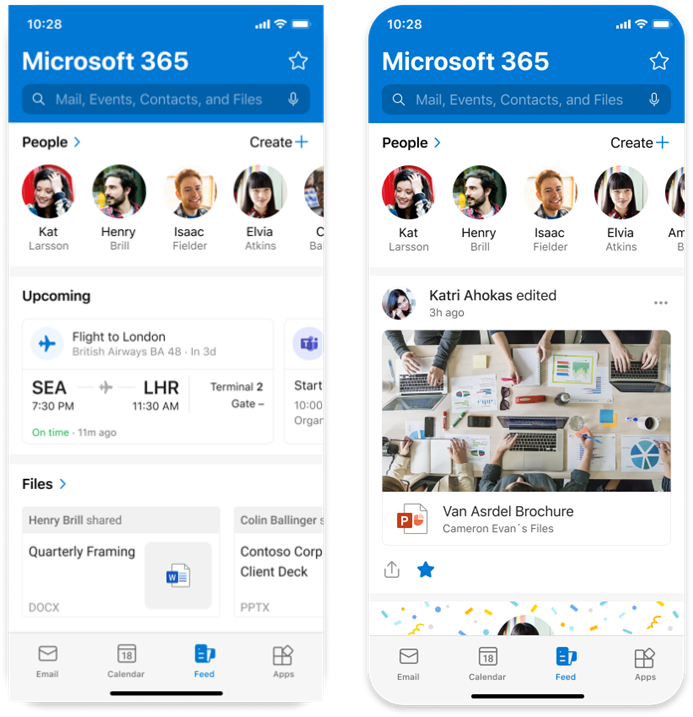
Updated April 23, 2024: We have updated the rollout timeline below. Thank you for your patience. In the Feed tab of Outlook Mobile, we will remove the Sections view in the Feed tab, whose functionality and content can now be found in the vertical feed and elsewhere in the Outlook Mobile app. [When this will happen:] General Availability (Worldwide, GCC and GCC High): We will begin rolling out mid-March 2024 (previously early March) and expect to complete by mid-May 2024 (previously early April). [How this will affect your organization:] For users: The Feed tab in Outlook mobile helps you discover and learn about people and interests relevant at work. The feed shows you a mix of content and activity from across Microsoft 365 to help you stay connected to your colleagues and informed about what’s happening around you. For users who do not have the vertical feed enabled for various reasons, such as users in sovereign clouds (GCC and GCC High) and users in tenants where admins have turned off the feed, we will remove the Feed icon from the Outlook Mobile tab bar at the bottom of the screen. These users will stop seeing the old Sections view but can still find information as follows:
For admins: If admins have turned off the feed using Mobile Device Management (MDM), users will not see the Feed icon in the tab bar of Outlook Mobile. With this release, if admins turn off the feed, they will now turn it off completely and users will no longer see the old Sections view of the feed.
If an admin turns on the feed again, the Feed icon will reappear in the Outlook Mobile tab bar and users will be able to see the Vertical feed. [What you need to do to prepare:] To prepare for this update, we encourage you to learn more at: Deploying Outlook for iOS and Android app configuration settings in Exchange Online | Microsoft Learn on how to turn the feed on and off. Admins may want to notify their users about this change and update their training and documentation accordingly. References For admins: Deploying Outlook for iOS and Android app configuration settings in Exchange Online | Microsoft Learn Blog: Overview of the Microsoft Feed | Microsoft Learn End user Support: Discover and learn with Microsoft Feed – Microsoft Support Screenshot: Section view on the left, vertical feed on the right:
|
| Machine Translation |
2024 年 4 月 23 日更新: 以下のロールアウト タイムラインを更新しました。何卒ご理解のほどよろしくお願いいたします。 Outlook Mobile の [フィード] タブで、[フィード] タブの [セクション] ビューを削除し、その機能とコンテンツが縦方向フィードと Outlook Mobile アプリの他の場所に表示されるようにします。 [これがいつ起こるか:] 一般提供 (ワールドワイド、GCC、GCC High): 2024 年 3 月中旬 (以前は 3 月上旬) にロールアウトを開始し、2024 年 5 月中旬 (以前は 4 月上旬) までに完了する予定です。 [これが組織に及ぼす影響:] ユーザーの場合: Outlook モバイルの [フィード] タブは、職場に関連するユーザーや関心事を見つけて学習するのに役立ちます。フィードには、Microsoft 365 全体のコンテンツとアクティビティが混在して表示されるため、同僚とのつながりを維持し、周囲で何が起こっているかを知ることができます。 ソブリン クラウド (GCC および GCC High) のユーザーや、管理者がフィードをオフにしているテナントのユーザーなど、さまざまな理由で垂直フィードを有効にしていないユーザーについては、画面下部の Outlook Mobile タブ バーからフィード アイコンを削除します。これらのユーザーには、古いセクション ビューは表示されなくなりますが、次の情報を見つけることができます。
管理者向け: 管理者がモバイル デバイス管理 (MDM) を使用してフィードをオフにしている場合、Outlook Mobile のタブ バーにフィード アイコンが表示されません。このリリースでは、管理者がフィードをオフにすると、フィードが完全にオフになり、ユーザーにはフィードの古い セクション ビューが表示されなくなります。
管理者がフィードを再度有効にすると、フィード アイコンが Outlook Mobile のタブ バーに再表示され、ユーザーは縦書きフィードを表示できるようになります。 [準備に必要なこと:] この更新プログラムに備えるには、「 Exchange Online での Outlook for iOS および Android アプリの構成設定の展開 |フィードのオンとオフを切り替える方法について、Microsoft Learn を参照してください。管理者は、この変更についてユーザーに通知し、それに応じてトレーニングとドキュメントを更新することができます。 参照 管理者向け: Outlook for iOS および Android アプリの構成設定を Exchange Online に展開する |Microsoft Learn (英語) ブログ: Microsoft フィードの概要 |Microsoft Learn (英語) エンド ユーザー サポート: Microsoft フィードで検出と学習を行う – Microsoft サポート スクリーンショット: 左が断面図、右が縦書き:
|