| MC748380 | (Updated) Microsoft Teams: Pre-pin meeting apps for users |
|---|
| Classification | stayInformed |
|---|---|
| Last Updated | 04/23/2024 18:14:54 |
| Start Time | 03/20/2024 22:25:07 |
| End Time | 07/29/2024 07:00:00 |
| Message Content |
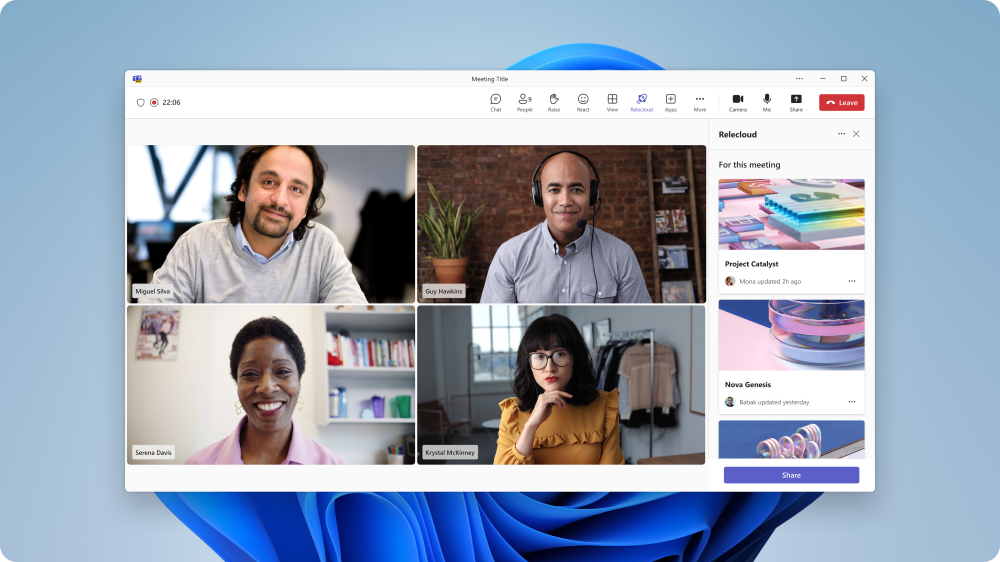
Updated April 23, 2024: We have updated the rollout timeline below. Thank you for your patience. Microsoft Teams is now enhancing app setup policies, allowing admins to pre-pin and pre-install meeting apps for users. Earlier, the pre-pinning and pre-installation were limited to personal apps and message extensions. This update extends the functionality to meeting apps. Admins can set up policies to install and pin meeting apps to provide users quick and easy access to their necessary meeting tools within Microsoft Teams. This message is associated with Microsoft 365 Roadmap ID 131169 [When this will happen:] Worldwide: We will begin rolling out mid-May 2024 (previously late April) and expect to complete by late May 2024 (previously mid-May). GCC, GCC High, DoD: We will begin rolling out late May 2024 (previously mid-May) and expect to complete by late June 2024 (previously mid-June). [How this will affect your organization:] This new feature enhances the customization of Microsoft Teams for users by highlighting the most important meeting apps for them. Admins can choose the meeting apps to pre- pin and pre-install, streamlining the user’s experience, especially during meetings. The pinned apps will appear in the meeting app flyout and the meetings tabs next to chat.
[What you need to do to prepare:] This feature update does not affect any existing policies or permissions. No specific actions are required. You can review the existing app setup policies and consider the meeting apps that could be beneficial to pre-pin and pre-install for your users. You may want to notify your users about this change and update any relevant documentation as appropriate. |
| Machine Translation |
2024 年 4 月 23 日更新: 以下のロールアウト タイムラインを更新しました。何卒ご理解のほどよろしくお願いいたします。 Microsoft Teams では、アプリのセットアップ ポリシーが強化され、管理者がユーザーの会議アプリを事前にピン留めしてプレインストールできるようになりました。以前は、事前ピン留めとプレインストールは個人用アプリとメッセージ拡張機能に限定されていました。この更新により、機能が会議アプリに拡張されます。管理者は、会議アプリをインストールしてピン留めするポリシーを設定して、ユーザーが Microsoft Teams 内の必要な会議ツールにすばやく簡単にアクセスできるようにすることができます。 このメッセージは、Microsoft 365 ロードマップ ID 131169に関連付けられています [これがいつ起こるか:] 全世界: 2024 年 5 月中旬 (以前は 4 月下旬) にロールアウトを開始し、2024 年 5 月下旬 (以前は 5 月中旬) までに完了する予定です。 GCC、GCC High、DoD: 2024 年 5 月下旬 (以前は 5 月中旬) にロールアウトを開始し、2024 年 6 月下旬 (以前は 6 月中旬) までに完了する予定です。 [これが組織に及ぼす影響:] この新機能は、ユーザーにとって最も重要な会議アプリを強調表示することで、ユーザーの Microsoft Teams のカスタマイズを強化します。管理者は、プレピン留めおよびプレインストールする会議アプリを選択できるため、特に会議中のユーザー エクスペリエンスが合理化されます。ピン留めされたアプリは、会議アプリのポップアップと、チャットの横にある会議タブに表示されます。
[準備に必要なこと:] この機能更新プログラムは、既存のポリシーやアクセス許可には影響しません。特別なアクションは必要ありません。既存のアプリ設定ポリシーを確認し、ユーザーの事前ピン留めとプレインストールに有益な会議アプリを検討できます。 この変更についてユーザーに通知し、必要に応じて関連ドキュメントを更新することをお勧めします。 |