| MC786325 | Microsoft Outlook and Microsoft Teams: Respond to meetings with Follow |
|---|
| Classification | stayInformed |
|---|---|
| Last Updated | 04/26/2024 00:13:26 |
| Start Time | 04/26/2024 00:13:00 |
| End Time | 08/30/2024 07:00:00 |
| Message Content |
Coming soon in Microsoft Outlook and Microsoft Teams: We are introducing a new meeting response option called Follow that allows people invited to a meeting to let the organizer know they can’t attend but would like to stay informed. Follow goes beyond the traditional Accept, Tentative, and Decline responses. Follow is for busy individuals with high meeting loads and conflicting meetings. Follow is the ideal meeting response option when you can’t attend a meeting but still want to stay engaged and have access to post-meeting information in Teams. Meeting attendees can respond with Follow in the new Outlook for Windows and Outlook on the Web. Follow is not available on Outlook for Mac or Outlook Mobile at this time. Additional Follow features in Teams for meeting organizers are shown in the screenshots in this message. This message is associated with Microsoft 365 Roadmap ID 154557. [When this will happen:] Targeted Release: We will begin rolling out late April 2024 and expect to complete by late May 2024. General Availability: We will begin rolling out early June 2024 and expect to complete by early July 2024. [How this will affect your organization:] Meeting attendees can respond with Follow to any meeting invitation as long as the meeting has more than two attendees and where the organizer has requested a response. Follow responses will:
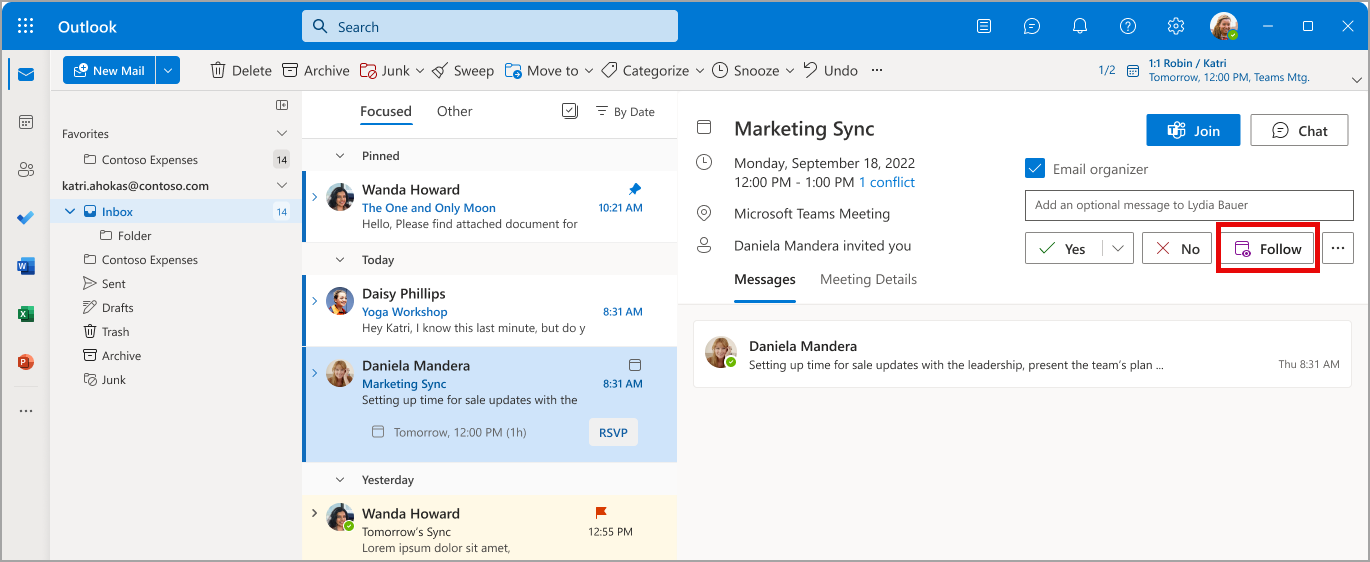
After rollout, invitation response options will be Yes, No, and Follow. Maybe will be accessible through the three-dot menu. Meeting invitation email with new Follow option (Outlook for Windows and Outlook for web):
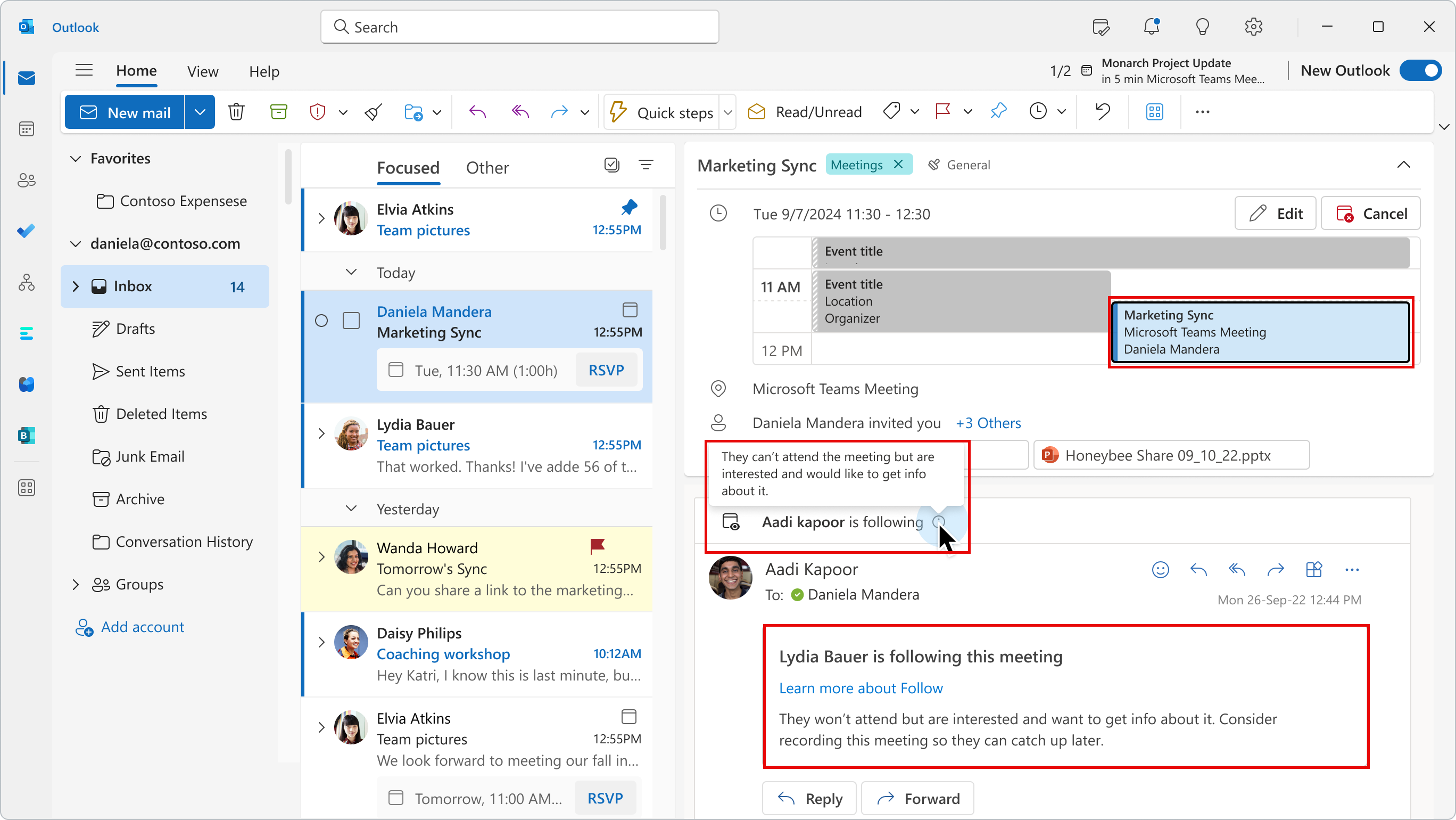
Meeting organizer’s view of invitees who respond with Follow (Outlook for Windows and Outlook for web)
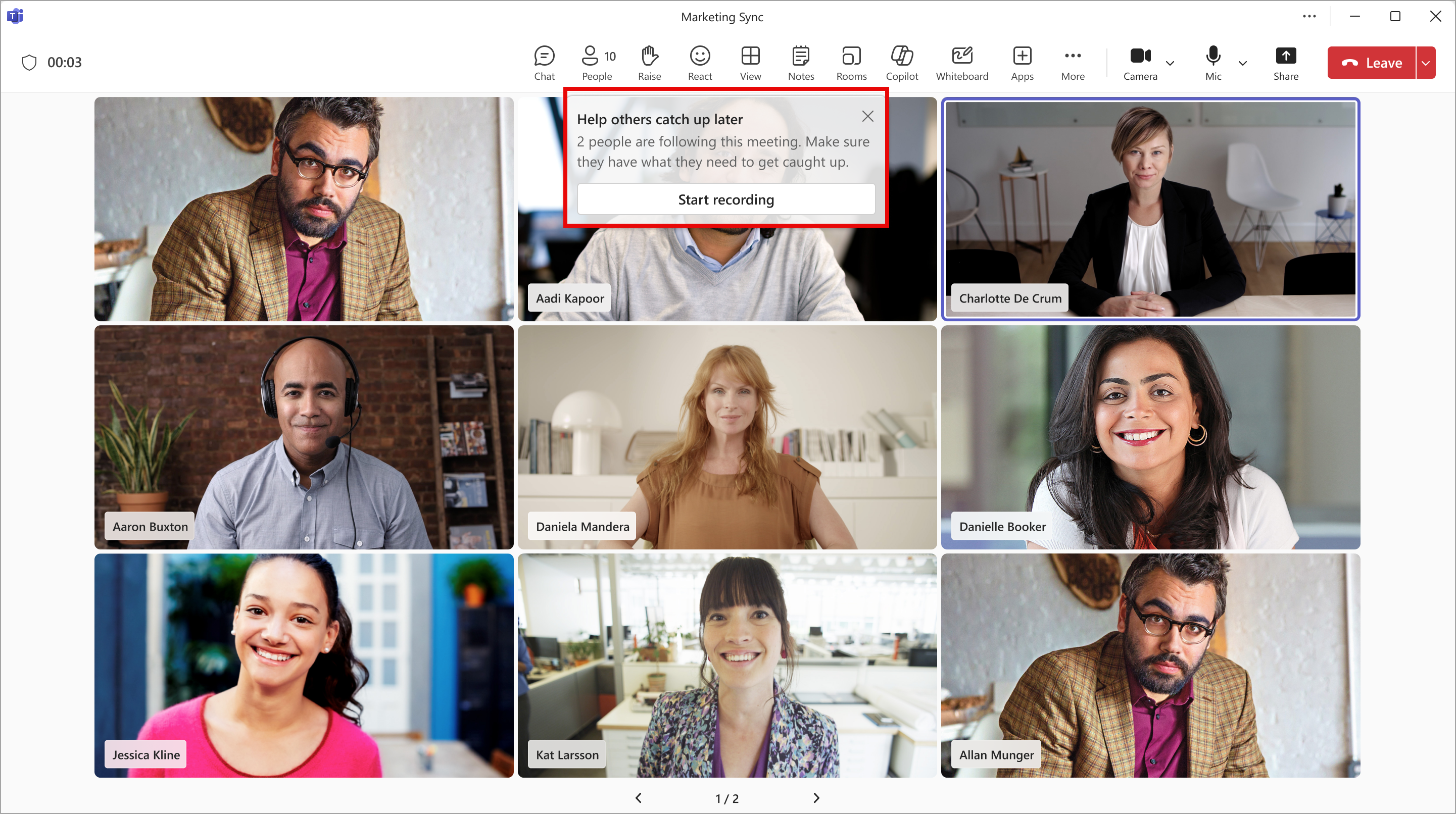
Reminder to the meeting organizer at the start of the meeting about people following the meeting (Outlook for Windows and Outlook for web):
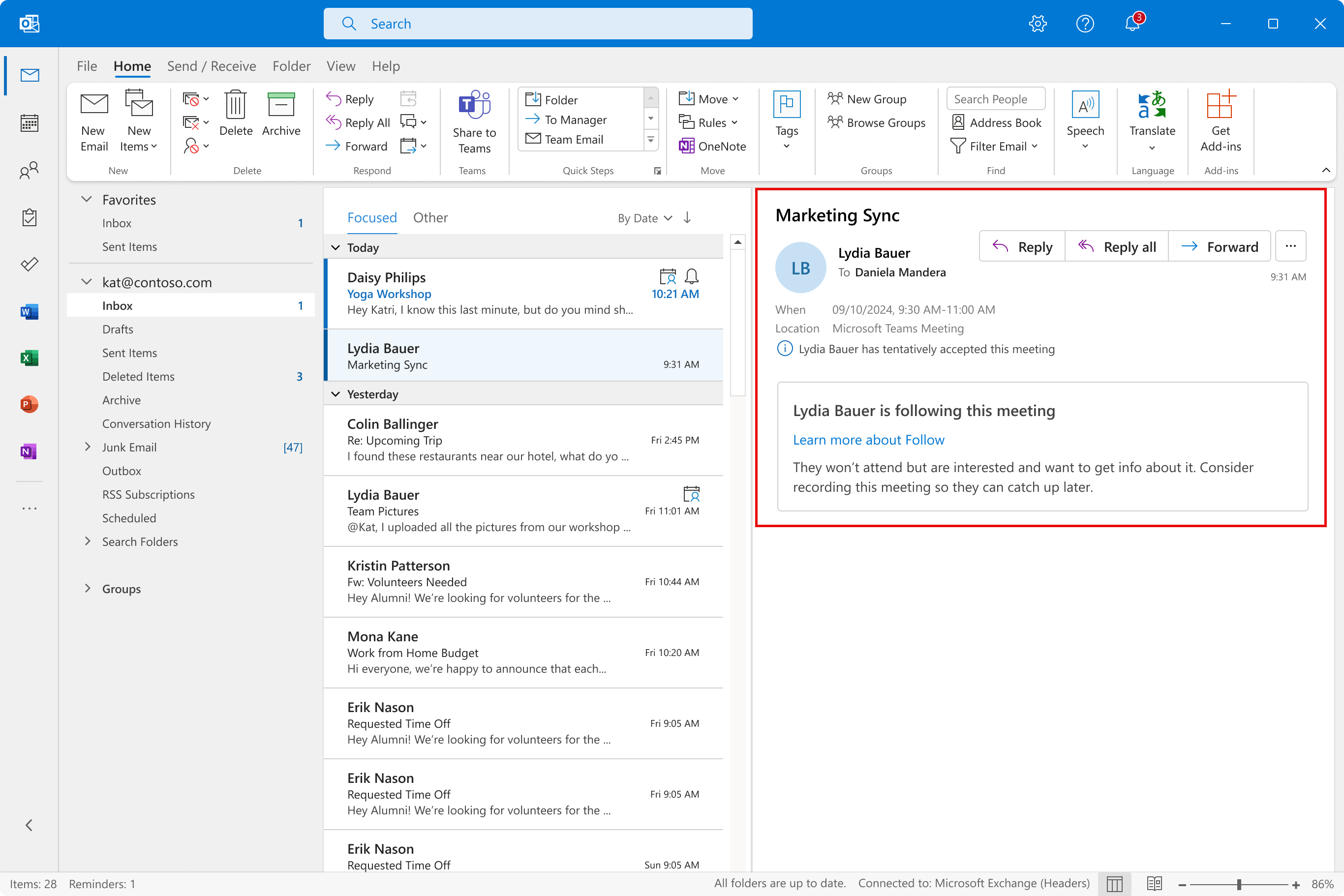
Note: After rollout, Follow responses are only available in new Outlook for Windows and Outlook on the web. If meeting organizers are using either of these Outlook versions, they will see Follow responses. However, if the meeting organizer is using classic Outlook for Windows, Outlook for Mac, or Outlook Mobile, the meeting organizer will see the response as Tentative, with a note that the invitee is following the meeting:
[What you need to do to prepare:] This rollout will happen automatically by the specified date with no admin action required before the rollout. You may want to notify your users about this change and update any relevant documentation as appropriate. Support for users: Follow a meeting in Outlook – Microsoft Support |
| Machine Translation |
Microsoft Outlook と Microsoft Teams で近日公開予定: 会議に招待されたユーザーが、出席できないが最新情報を入手したいことを開催者に知らせることができる、 フォロー と呼ばれる新しい会議応答オプションが導入されます。 フォロー は 、従来の承諾、暫定 、 拒否 の応答を超えています。 フォロー は、会議の負荷が高く、会議の競合が激しい忙しい個人向けです。 フォロー は、会議に出席できないが、引き続き参加し、Teams で会議後の情報にアクセスしたい場合に最適な会議応答オプションです。会議の出席者は、新しい Outlook for Windows と Outlook on the web で [フォロー] で応答できます。現時点では、フォローは Outlook for Mac または Outlook Mobile では使用できません。会議の開催者向けの Teams の追加の フォロー 機能は、このメッセージのスクリーンショットに示されています。 このメッセージは、Microsoft 365 ロードマップ ID 154557に関連付けられ ています。 [これがいつ起こるか:] 対象リリース: 2024 年 4 月下旬にロールアウトを開始し、2024 年 5 月下旬までに完了する予定です。 一般提供: 2024 年 6 月上旬にロールアウトを開始し、2024 年 7 月上旬までに完了する予定です。 [これが組織に及ぼす影響:] 会議の出席者は、会議に 2 人以上の出席者がいて、開催者が応答を要求している限り、任意の会議出席依頼に [フォロー] で応答できます。 フォローの 回答は次のとおりです。
ロールアウト後、招待の応答オプションは [はい]、[いいえ]、および [フォロー] になります。たぶん、3ドットメニューからアクセスできます。 新しい フォロー オプションを含む会議出席依頼メール (Outlook for Windows および Outlook for web):
フォローで応答する招待者に対する会議の開催者のビュー (Outlook for Windows および Outlook for web)
会議の開始時に、会議の開催者に対して、会議をフォローしているユーザーに関するリマインダー (Outlook for Windows および Outlook for web):
注: ロールアウト後、 フォロー の応答は、新しい Outlook for Windows と Outlook on the web でのみ使用できます。会議の開催者がこれらの Outlook バージョンのいずれかを使用している場合は、[返信 をフォローする ] が表示されます。ただし、会議の開催者が従来の Outlook for Windows、Outlook for Mac、または Outlook Mobile を使用している場合、会議の開催者には、招待者が会議をフォローしていることを示すメモとともに、応答が [仮承諾] として表示されます。
[準備に必要なこと:] このロールアウトは、指定された日付までに自動的に行われ、ロールアウト前に管理者のアクションは必要ありません。この変更についてユーザーに通知し、必要に応じて関連ドキュメントを更新することをお勧めします。 ユーザーのサポート: Outlook で会議をフォローする – Microsoft サポート |