| MC789209 | Microsoft SharePoint document libraries: Improved Version history controls | Preview opt-in |
|---|
| Classification | stayInformed |
|---|---|
| Last Updated | 05/01/2024 17:12:08 |
| Start Time | 04/30/2024 16:22:44 |
| End Time | 11/22/2024 08:00:00 |
| Message Content |
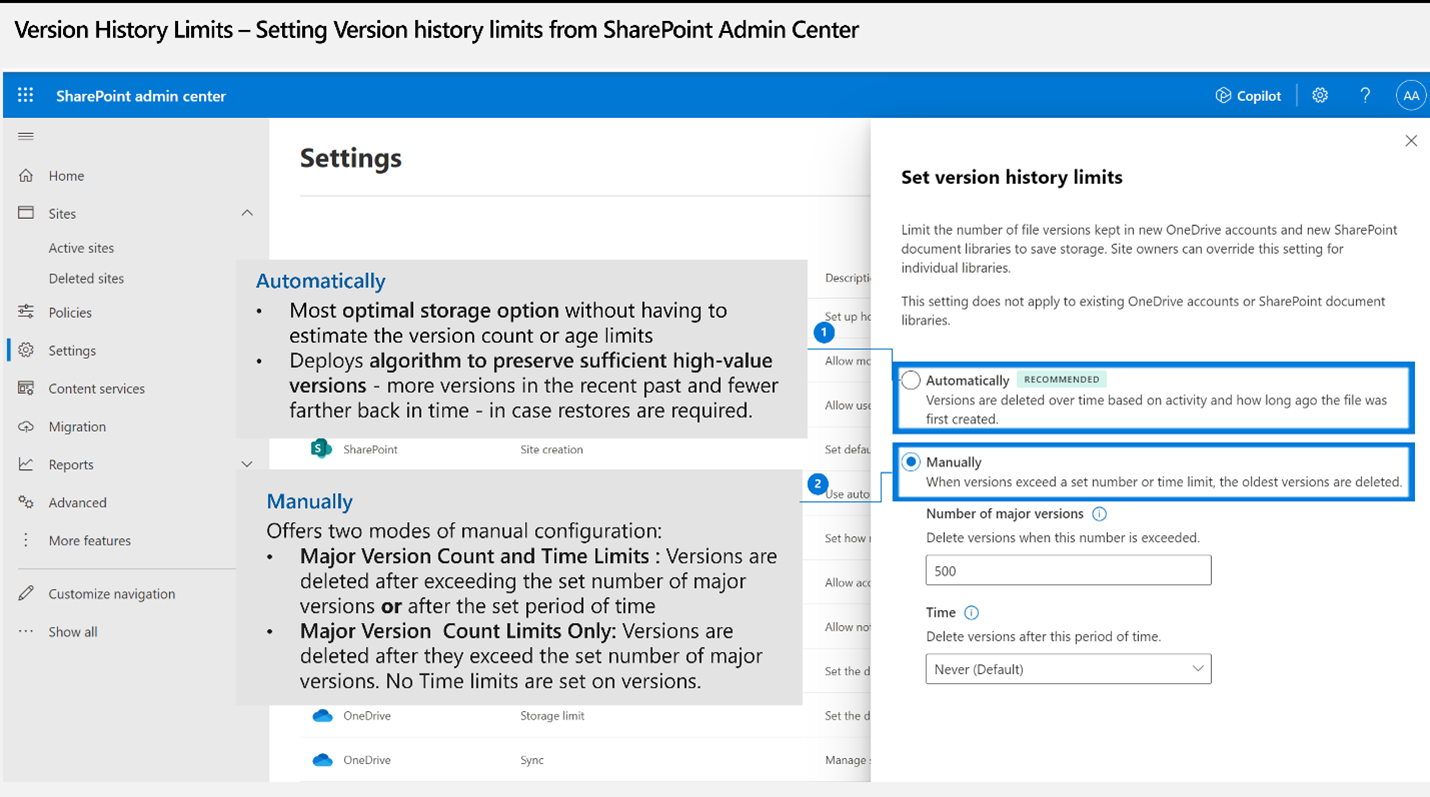
Updated May 1, 2024: Note: If you receive an error “The requested operation is part of an experimental feature that is not supported in the current environment”, this indicates that the feature has not reached your tenant yet. Version history, a critical part of Microsoft SharePoint’s built-in data protection, tells users how a file has evolved over time. Users can easily revert to an older version if business needs change or if files are damaged by user error or malware. Version storage controls allow you as admins to set an appropriate level of recoverability and auditability for your organization. Based on strong customer feedback, we will release enhanced version storage controls so you can meet your needs efficiently and at scale. This message is associated with Microsoft 365 Roadmap ID 145802. [When this will happen:] Public Preview: We will begin rolling out early May 2024 and expect to complete by late June 2024. Admins can opt into the Public Preview by running the SharePoint Online Management PowerShell cmdlet General Availability (Worldwide): We will begin rolling out late August 2024 and expect to complete by mid-October 2024. [How this will affect your organization:] What’s New? We are introducing new version controls that help admins and content owners reduce storage footprint driven by low value file versions. Previously, document library owners could set count-based version limits at the library level. With this rollout, we are introducing new automatic version limits that consider important factors such as age and restore probability to offer more intelligent version deleting options. We’re also adding manual settings for version expiration and count limits. Here is a summary of the new capabilities introduced with this rollout:
After this rollout completes, you can expect these changes: 1. New Version history limits settings in SharePoint admin center: Admins can set global defaults for all new libraries created in the organization. By default, the organization-level Version history limit will be set to Manually delete versions. Within the Manual limits, the default Number of major versions is set to 500 and the Time period is set to Never expire.
2. New Version time limit setting for Document libraries: In addition to existing Version count limits, users can set Version time limits to delete versions based on age. Version time limits will be on the library’s Version settings page. No change will be made to existing version limits applied to the library. 3. New Expiring in column on a file’s Version history view: Users will be able to:
[What you need to do to prepare:] Review updated documentation:
To send feedback or questions about this change, select Like or Dislike at the top of this message in the Microsoft 365 message center. |
| Machine Translation |
2024 年 5 月 1 日更新: 注: “要求された操作は、現在の環境でサポートされていない実験的な機能の一部です” というエラーが表示された場合は、機能がまだテナントに到達していないことを示しています。 バージョン履歴は、 Microsoft SharePoint の組み込みデータ保護の重要な部分であり、ファイルが時間の経過とともにどのように進化したかをユーザーに伝えます。ビジネスニーズが変わった場合や、ユーザーエラーやマルウェアによってファイルが破損した場合、ユーザーは簡単に古いバージョンに戻すことができます。バージョン ストレージ制御を使用すると、管理者は組織に適切なレベルの回復可能性と監査可能性を設定できます。お客様からの強いフィードバックに基づいて、強化されたバージョンのストレージ管理をリリースし、ニーズを効率的かつ大規模に満たすことができるようにします。 このメッセージは、Microsoft 365 ロードマップ ID 145802に関連付けられ ています。 [これがいつ起こるか:] パブリック プレビュー: 2024 年 5 月上旬にロールアウトを開始し、2024 年 6 月下旬までに完了する予定です。管理者は、SharePoint Online Management PowerShell コマンドレット 一般提供 (全世界): 2024 年 8 月下旬にロールアウトを開始し、2024 年 10 月中旬までに完了する予定です。 [これが組織に及ぼす影響:] 新着情報 管理者とコンテンツ所有者が、価値の低いファイル バージョンによって推進されるストレージのフットプリントを削減するのに役立つ新しいバージョン管理を導入しています。以前は、ドキュメント ライブラリの所有者は、ライブラリ レベルでカウントベースのバージョン制限を設定できました。このロールアウトでは、よりインテリジェントなバージョン削除オプションを提供するために、経過時間や復元確率などの重要な要素を考慮した新しい自動バージョン制限 を導入しています。また、バージョンの有効期限とカウント制限の手動設定も追加されています。 このロールアウトで導入された新機能の概要は次のとおりです。
このロールアウトが完了すると、次の変更が期待できます。 1. SharePoint 管理センターの新しい バージョン履歴の制限 設定: 管理者は、組織内で作成されたすべての新しいライブラリに対してグローバルな既定値を設定できます。既定では、組織レベルの バージョン履歴 の制限は、バージョンを毎年 削除する M に設定されます。手動の制限内では、既定の メジャー バージョンの数 が 500 に設定され、 期間 が 無期限 に設定されます 。
2. ドキュメント ライブラリの新しい バージョン時間制限 設定: 既存の バージョン数制限に加えて、ユーザーは バージョン時間制限 を設定して、経過時間に基づいてバージョンを削除できます。 バージョンの時間制限 は、ライブラリの [バージョン設定 ] ページに表示されます。ライブラリに適用されている既存のバージョン制限は変更されません。 3. ファイルのバージョン履歴ビューの新しい [有効期限] 列: ユーザーは次のことができるようになります。
[準備に必要なこと:] 更新されたドキュメントを確認します。
この変更に関するフィードバックや質問を送信するには、Microsoft 365 メッセージ センターでこのメッセージの上部にある [ いいね ] または [嫌い ] を選択します。 |