| MC789610 | Microsoft Teams: Adjusting the Record a greeting button to reflect Its intended purpose in voicemail settings |
|---|
| Classification | stayInformed |
|---|---|
| Last Updated | 05/02/2024 04:20:50 |
| Start Time | 05/02/2024 04:19:54 |
| End Time | 08/05/2024 07:00:00 |
| Message Content |
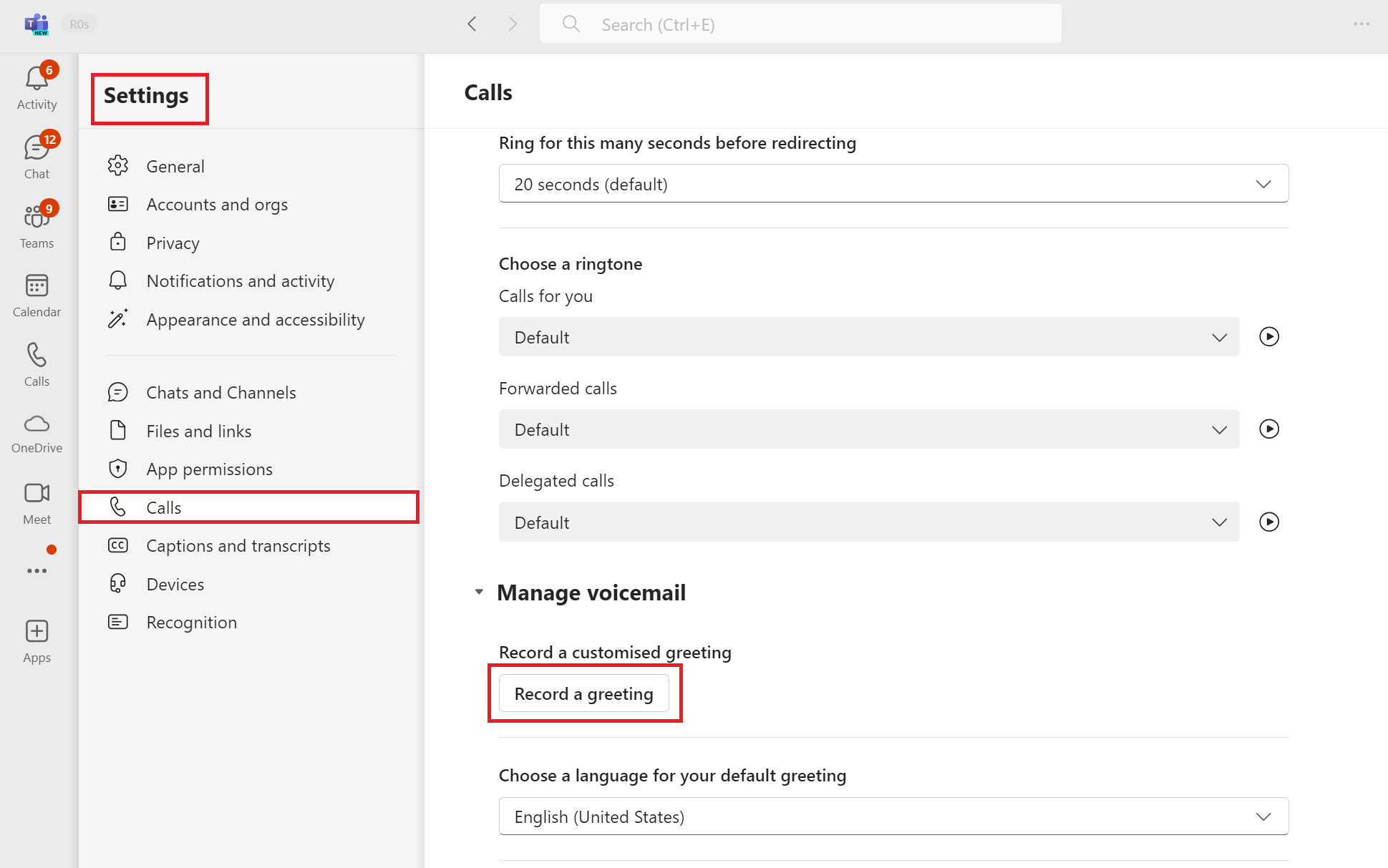
Microsoft Teams: Efforts are underway to improve the functionality of the Record a greeting button under Voicemail settings. Currently, when users press this button, they are redirected to an IVR menu with multiple options. However, only one of these options is related to greeting recording. To address this issue, we will be aligning the button’s functionality with its intended and official purpose, so that under the Record a greeting button, users will only be able to record their greetings. This change is primarily being made to strengthen data protection, but it will also reduce the number of steps required for end-users to record their greetings. To find the Record a greeting button, open MS Teams and navigate to Settings > Calls > Manage Voicemail > Record a greeting button. [When this will happen:] General Availability (Worldwide): We will begin rolling out early May 2024 and expect to complete by late May 2024. General Availability (GCC): We will begin rolling out mid-May 2024 and expect to complete by late June 2024. General Availability (GCC High): We will begin rolling out mid-May 2024 and expect to complete by late June 2024. General Availability (DoD): We will begin rolling out mid-May 2024 and expect to complete by late June 2024.
This change is primarily being made to strengthen data protection, but it will also reduce the number of steps required for end-users to record their greetings. [What you need to do to prepare:] This change will happen automatically, no action is required on tenant’s side. Additional Resources: You can learn more about managing your Teams call settings (including Voicemail settings) under Microsoft learn: |
| Machine Translation |
Microsoft Teams: ボイスメール設定の [挨拶 を録音する] ボタンの機能 を改善するための取り組みが進行中です。現在、ユーザーがこのボタンを押すと、複数のオプションを含むIVRメニューにリダイレクトされます。ただし、これらのオプションのうち、グリーティングの録音に関連するのは 1 つだけです。 この問題に対処するために、ボタンの機能を意図された公式の目的に合わせて調整し、[ 挨拶を録音 する ] ボタンで、ユーザーが挨拶のみを録音できるようにします。この変更は、主にデータ保護を強化するために行われますが、エンドユーザーが挨拶を録音するために必要な手順の数も削減されます。 [挨拶を 録音 する] ボタンを見つけるには、MS Teams を開き、[通話の設定] > [ボイスメールの管理] >> [ 挨拶の録音 ] ボタンに移動します。 [これがいつ起こるか:] 一般提供 (全世界): 2024 年 5 月上旬にロールアウトを開始し、2024 年 5 月下旬までに完了する予定です。 一般提供 (GCC): 2024 年 5 月中旬にロールアウトを開始し、2024 年 6 月下旬までに完了する予定です。 一般提供 (GCC High): 2024 年 5 月中旬にロールアウトを開始し、2024 年 6 月下旬までに完了する予定です。 一般提供 (DoD): 2024 年 5 月中旬にロールアウトを開始し、2024 年 6 月下旬までに完了する予定です。
この変更は、主にデータ保護を強化するために行われますが、エンドユーザーが挨拶を録音するために必要な手順の数も削減されます。 [準備に必要なこと:] この変更は自動的に行われ、テナント側でのアクションは必要ありません。 参考資料: Teams 通話設定 (ボイスメール設定を含む) の管理の詳細については、Microsoft Learn を参照してください。 |