| MC432475 | (Updated) Quick Access Teams and Sharepoint Document Libraries in win32 backstage |
|---|
| Classification | stayInformed |
|---|---|
| Last Updated | 05/24/2024 19:07:46 |
| Start Time | 09/16/2022 21:43:05 |
| End Time | 09/30/2024 08:00:00 |
| Message Content |
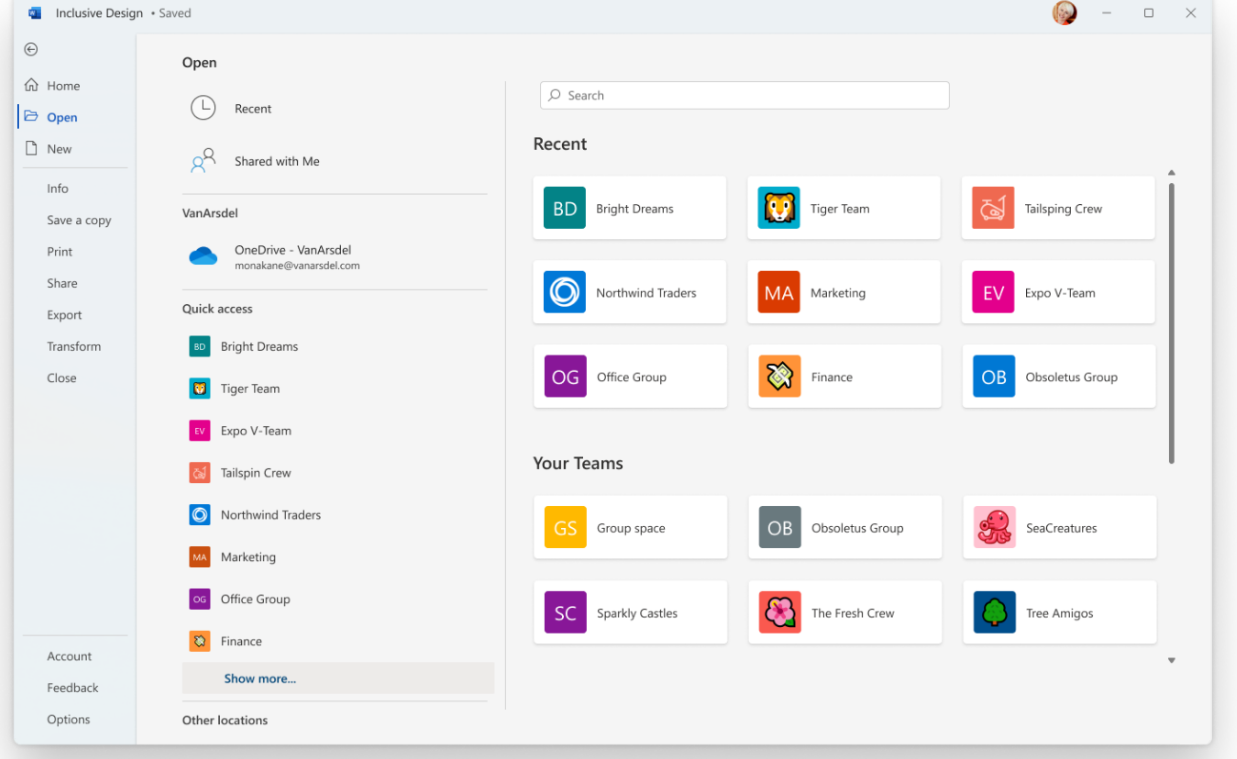
Updated May 24, 2024: We have updated the rollout timeline below. We apologize for the delayed communication. Thank you for your patience. Currently, users experience some frustration when using Office products because of all different routes that they must use to access all their content. The Quick Access feature will allow users to access shared libraries from both their SharePoint and Teams locations. When the user opens files from shared libraries, these libraries will show up in the form of a list which will encourage users to save and open files to these libraries with ease. This helps deliver a more consistent, coherent storage location experience across Microsoft 365 apps. This new backstage experience won’t show up in Teams, SharePoint, or OneDrive but does include storage locations from OneDrive and Teams (sites/channels) which are stored on SharePoint.
[When this will happen:] Targeted Release: We will begin rolling out late January 2024 (previously late October) and expect to complete by late February 2024 (previously late November). Worldwide: We will begin rolling out mid-March 2024 (previously late December) and expect to complete by late August 2024 (previously mid-May). [How this will affect your organization:] This feature will make it easier for employees to get access to more of their storage locations, including Microsoft Teams where they may store more of the content for their projects.
[What you need to do to prepare:]
There is no action needed to prepare for this change. You may want to notify your users about this change and update any relevant documentation as appropriate. This feature will replace the Sites tab in the backstage. |
| Machine Translation |
2024 年 5 月 24 日更新: 以下のロールアウト タイムラインを更新しました。連絡が遅れて申し訳ございません。何卒ご理解のほどよろしくお願いいたします。 現在、ユーザーは、すべてのコンテンツにアクセスするためにさまざまなルートを使用する必要があるため、Office 製品を使用するときにフラストレーションを感じています。クイック アクセス機能を使用すると、ユーザーは SharePoint と Teams の両方の場所から共有ライブラリにアクセスできます。ユーザーが共有ライブラリからファイルを開くと、これらのライブラリがリスト形式で表示され、ユーザーがこれらのライブラリにファイルを簡単に保存して開くことを奨励します。これにより、Microsoft 365 アプリ全体でより一貫性のある一貫性のあるストレージの場所エクスペリエンスを提供できます。この新しいバックステージ エクスペリエンスは、Teams、SharePoint、または OneDrive には表示されませんが、SharePoint に保存されている OneDrive と Teams (サイト/チャネル) のストレージの場所が含まれます。
[これがいつ起こるか:] 対象指定リリース: 2024 年 1 月下旬 (以前は 10 月下旬) にロールアウトを開始し、2024 年 2 月下旬 (以前は 11 月下旬) までに完了する予定です。 全世界: 2024 年 3 月中旬 (以前は 12 月下旬) にロールアウトを開始し、2024 年 8 月下旬 (以前は 5 月中旬) までに完了する予定です。 [これが組織に及ぼす影響:] この機能により、従業員は、プロジェクトのより多くのコンテンツを保存できる Microsoft Teams など、より多くのストレージの場所に簡単にアクセスできるようになります。
[準備に必要なこと:]
この変更に備えるために必要なアクションはありません。この変更についてユーザーに通知し、必要に応じて関連ドキュメントを更新することをお勧めします。この機能は、Backstage の [サイト] タブに置き換わるものです。 |