| MC468492 | (Updated) Authenticator number matching to be enabled for all Microsoft Authenticator users |
|---|
| Classification | planForChange |
|---|---|
| Last Updated | 03/16/2023 18:26:38 |
| Start Time | 11/18/2022 23:56:30 |
| End Time | 07/21/2023 07:00:00 |
| Message Content |
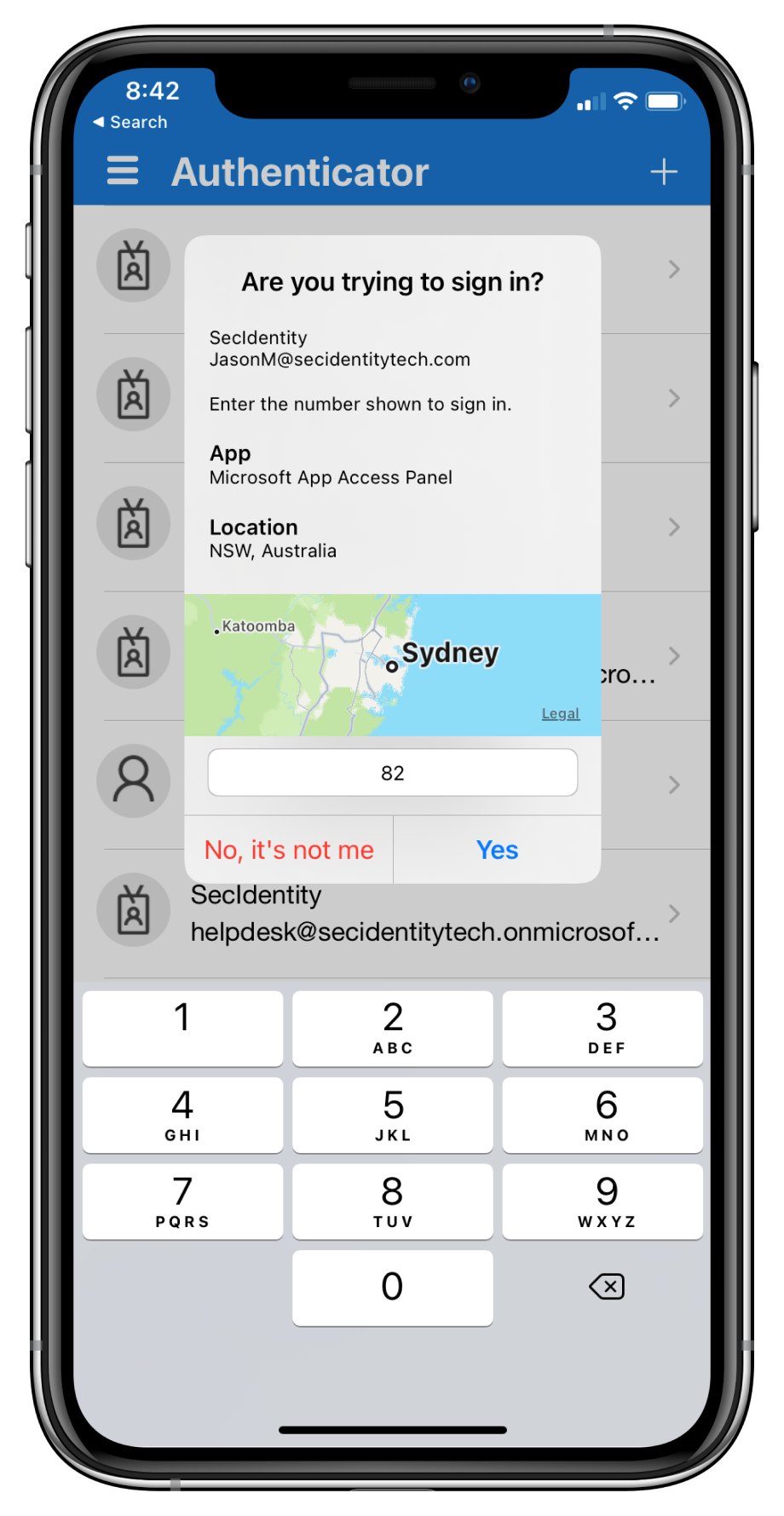
Updated March 16, 2023: We have updated the timing of this change, below. Thank you for your patience. Microsoft Authenticator app’s number matching feature has been Generally Available since Nov 2022! If you have not already leveraged the rollout controls (via Azure Portal Admin UX and MSGraph APIs) to smoothly deploy number matching for users of Microsoft Authenticator push notifications, we highly encourage you to do so. We had previously announced that we will remove the admin controls and enforce the number match experience tenant-wide for all users of Microsoft Authenticator push notifications starting February 27, 2023. After listening to customers, we will extend the availability of the rollout controls for a few more weeks. Organizations can continue to use the existing rollout controls until May 8, 2023, to deploy number matching in their organizations. Microsoft services will start enforcing the number matching experience for all users of Microsoft Authenticator push notifications after May 8th, 2023. We will also remove the rollout controls for number matching after that date. Please note that we have changed the expected behavior for NPS extension to be even more admin friendly. NPS versions 1.2.2216.1+ will be released once Microsoft starts to enable number matching for all Authenticator users. These NPS versions will automatically prefer OTP based sign-ins over traditional push notifications with the Authenticator app. An admin can choose to disable this behavior and fallback to traditional push notifications with Approve/Deny by setting the registry key OVERRIDE_NUMBER_MATCHING_WITH_OTP Value = FALSE. Previous NPS extension versions will not automatically switch Authenticator push notification authentications to OTP based authentications. Please refer to the NPS extension section of the number match documentation for further information. [When this will happen:] Beginning in May 2023. [How this affects your organization:] To prevent accidental approvals, admins can require users to enter a number displayed on the sign-in screen when approving an MFA request in the Microsoft Authenticator app. This feature is critical to protecting against MFA fatigue attacks which are on the rise. Another way to reduce accidental approvals is to show users additional context in Authenticator notifications. Admins can now selectively choose to enable the following:
Number match behavior in different scenarios after May 2023:
[What you can do to prepare:] If customers don’t enable number match for all Microsoft Authenticator push notifications prior to May 8, 2023, users may experience inconsistent sign-ins while the services are rolling out this change. To ensure consistent behavior for all users, we highly recommend you enable number match for Microsoft Authenticator push notifications in advance. Learn more at: |
| Machine Translation |
2023年3月16日更新:わかりやすくするためにコンテンツを更新しました。お待ちいただきありがとうございます。 来の SharePoint 仕鳏扦稀仕鹘Y果にして返されるアイテムにvするカスタム KQL フィルタ`を定xできる仕飨C能がサポ`トされています。このC能は Microsoft Search で裼盲丹欷皮い蓼工SharePoint コンテンツを含むすべてのINで同じ仕飨趣褂盲丹欷毪郡帷C能の柔性と意恧葡蓼丹欷蓼埂 2021 年 11 月、マイクロソフトは、管理者が Microsoft Search のINに KQL を追加するC能をリリ`スしました。垂直成は、来の仕飨QえC能を引き@ぎ、垂直ごとの柔性を高め、この涓 「SharePoint のクラシック仕鳐ē攻讠辚ē螗工去猊昆仕鳐ē攻讠辚ē螗工芜`い」にdされている内容を反映しています。 [これが起こるとき:] この涓 2023 年 4 月中旬にロ`ルアウトされる予定です。 [これがMに与える影:] 2023 年 4 月中旬以降、モダン仕鳐ē攻讠辚ē螗工 KQL Qえにカスタムの既定の仕飨趣蚴褂盲筏皮い毪は、KQL Qえをそれらのソ`スから垂直管理成に移行する必要があります。 【浃扦毪长:】 Mでモダン仕鳐ē攻讠辚ē螗工 KQL Qえにカスタムの既定の仕飨趣蚴褂盲筏皮い龊悉稀KQL Qえを垂直管理成に移婴工氡匾辘蓼埂 手: N格したY果を含むサイトまたはハブ サイトのスコ`プ仕鳏扦违ē ル`ルは、仕飨趣碎vSなく、サイトの最新の仕鳐ē攻讠辚ē螗工N格したY果が返されるため、影を受けません。クエリ ル`ルの幼鳏卧については、「 クエリ ル`ル の管理」を参照してください。来の仕鳐ē攻讠辚ē螗工 SharePoint 仕 API 上にBされたエクスペリエンスは、止の影を受けません。 |