| MC534742 | OneNote to Block Embedded Files that Have Dangerous Extensions |
|---|
| Classification | planForChange |
|---|---|
| Last Updated | 03/29/2023 23:09:38 |
| Start Time | 03/29/2023 23:09:17 |
| End Time | 06/30/2023 07:00:00 |
| Message Content |
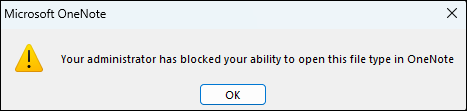
OneNote is making an important change to how it treats embedded files that have dangerous extensions. Previously, OneNote would show users a warning dialog when users tried to open an embedded file with a dangerous extension; users could open the file by choosing OK in the dialog. With this update, OneNote will show users a dialog that will let them know that their administrator has blocked them from opening the embedded file that has a dangerous extension, to also align with the same extensions that Outlook, Word, Excel and PowerPoint currently block. For a list of extensions, please visit Blocked attachments in Outlook. If the user trusts the person that sent the embedded file and they need to open the embedded file, they can save the file to their local device and open the file from there. This post is associated with Microsoft Roadmap ID 122277
[When will this happen:] This change will begin rolling out in Version 2304 in Current Channel (Preview) in late April 2023 and is expected to be complete by late May 2023. For more information about the release schedule, see OneNote will block embedded files that have dangerous extensions. [How this will affect your organization:] This change only affects OneNote for Microsoft 365 on devices running Windows. The change does not affect OneNote on a Mac, OneNote on Android or iOS devices, OneNote on the web, or OneNote for Windows 10.
[What you need to do to prepare:] You should make users and your support organization aware of this upcoming change and update any relevant training documentation. You can also use a Group Policy setting to block additional extensions that you deem to be dangerous. For more information, see OneNote will block embedded files that have dangerous extensions. |
| Machine Translation |
OneNoteは、危険な拡張子を持つファイルを処理する方法に重要な変更を加えています。以前は、OneNoteは、ユーザーが危険な拡張子の付いた埋め込みファイルを開こうとしたときに警告ダイアログを表示していました。ユーザーは、ダイアログで [OK] を選択してファイルを開くことができます。 この更新により、OneNoteは、Outlook、Word、Excel、およびPowerPointが現在ブロックしているのと同じ拡張子に合わせて、管理者が危険な拡張子を持つファイルを開くことをブロックしたことを通知するダイアログをユーザー表示します。拡張機能の一覧については、「 Outlook でブロックされた添付ファイル」を参照してください。 ユーザーが埋め込みファイルの送信者を信頼していて、埋め込みファイルを開く必要がある場合は、ファイルをローカルデバイスに保存し、そこからファイルを開くことができます。 この投稿は、マイクロソフトロードマップID に関連付けられています122277
[これはいつ起こりますか:] この変更は、2023 年 4 月下旬に最新チャネル (プレビュー) のバージョン 2304 でロールアウトを開始し、2023 年 5 月下旬までに完了する予定です。 リリース スケジュールの詳細については、「OneNote は危険な拡張子を持つファイルをブロックする」を参照してください。 [これが組織に与える影響:] この変更は、Windows を実行しているデバイス上の OneNote for Microsoft 365 にのみ影響します。 この変更は、Mac 上の OneNote、Android または iOS デバイスの OneNote、Web 上の OneNote、または Windows 10 用の OneNote には影響しません。
[準備するために必要なこと:] ユーザーとサポート組織にこの今後の変更を認識し、関連するトレーニング ドキュメントを更新する必要があります。 グループ ポリシー設定を使用して、危険と見なされる追加の拡張機能をブロックすることもできます。詳細については、「 OneNote は危険な拡張子を持つファイルをブロックする」を参照してください。 |