| MC535700 | IT Admin Policy Change for the New Webinars experience on Teams |
|---|
| Classification | planForChange |
|---|---|
| Last Updated | 04/01/2023 02:04:08 |
| Start Time | 04/01/2023 02:01:52 |
| End Time | 06/30/2023 07:00:00 |
| Action Required By Date | 2023-05-02T07:00:00Z |
| Message Content |
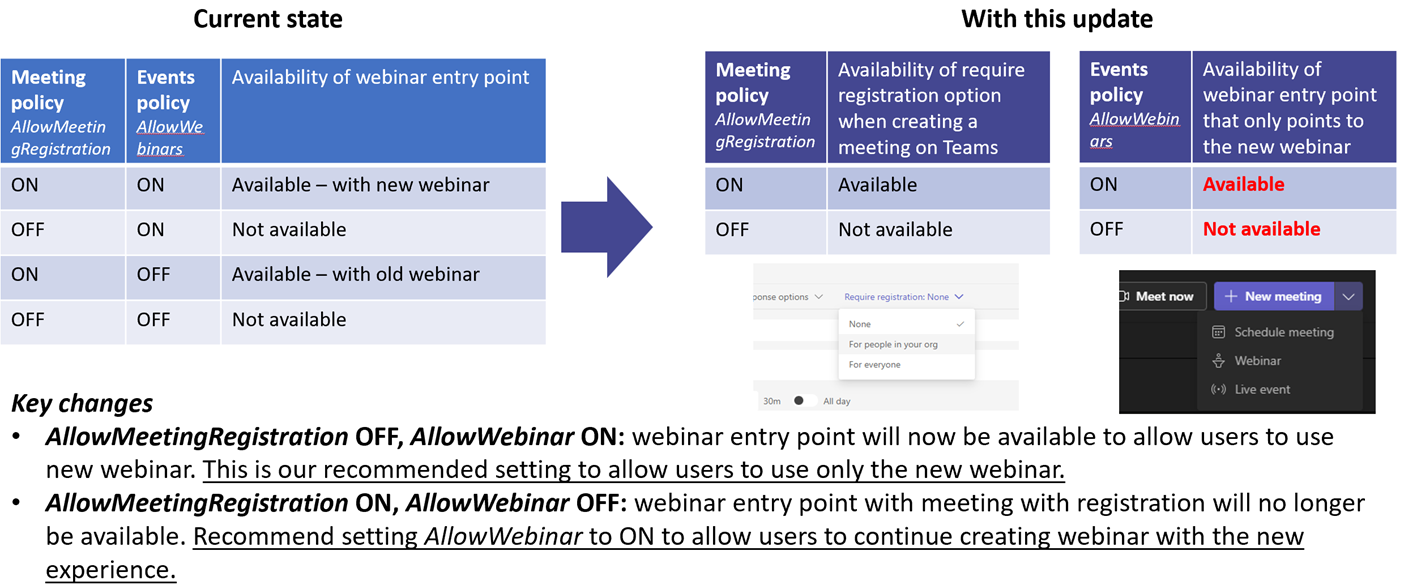
With the launch of the new webinar experience, we introduced a new events policy. In order to ensure smooth transition to the new webinar experience, we temporarily continued the old webinar policy setting of [When this will happen:] This change will take effect on May 3, 2023. [How this will affect your organization:] The current state of enforcement with coupling of By decoupling:
You can configure the new events policy using Powershell cmdlets: New-CsTeamsEventsPolicy, Set-CsTeamsEventsPolicy, Grant-CsTeamsEventsPolicy, Get-CsTeamsEventsPolicy, Remove-CsTeamsEventsPolicy. [What you need to do to prepare:] If you want your users to still have a webinar entry point to create webinar, ensure If you want your users to only use meeting with registration and not the new webinar, you need to set For more information on getting started with Teams webinar, please visit this page.
|
| Machine Translation |
新しい ウェビナー体験の開始に伴い、新しいイベントポリシーを導入しました。 新しいウェビナー エクスペリエンスにスムーズに移行するために、新しいウェビナーの可用性を制御するという [これが起こるとき:] この変更は、2023 年 5 月 3 日に有効になります。 [これが組織に与える影響:] Teams 予定表の [新しい会議] ドロップダウンのウェビナー エントリ ポイントの動作の結合 デカップリングによって:
Powershell コマンドレットを使用して、新しいイベント ポリシーを構成できます: New-CsTeamsEventsPolicy、Set-CsTeamsEventsPolicy、Grant-CsTeamsEventsPolicy、Get-CsTeamsEventsPolicy、Remove-CsTeamsEventsPolicy。 [準備するために必要なこと:] ウェビナーを作成するためのウェビナー エントリ ポイントをユーザーに保持する場合は、[オン] に設定されていることを確認します ユーザーが新しいウェビナーではなく登録済みの会議のみを使用するようにする場合は、オフに設定して Teams ウェビナーの使用を開始する方法の詳細については、こちらのページを参照してください。
|