| MC516906 | (Updated) Take Action on Meeting Category Insights in the Viva Insights app in Teams and on the web |
|---|
| Classification | stayInformed |
|---|---|
| Last Updated | 04/06/2023 19:25:27 |
| Start Time | 02/17/2023 01:20:18 |
| End Time | 05/22/2023 07:00:00 |
| Message Content |
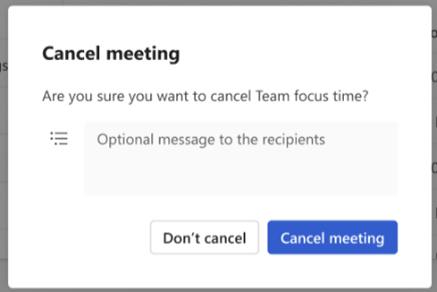
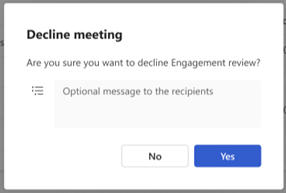
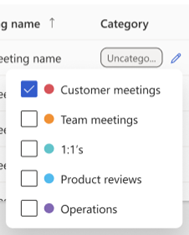
Updated April 6, 2023: We have updated the rollout timeline below. Thank you for your patience. Categories in Outlook and Teams allow users to easily tag and label calendar events. Users can get insights on the time they spend per meeting category in the Viva Insights app in Teams. Using meeting category insights, they can see how their meeting time is distributed (percentage breakdown), how that has changed (meeting trends), and details about each of their meetings contributing to their categories (meeting details). An upcoming update to this feature will allow users to take actions on these meetings to align their time spent in meetings with their goals. These actions include viewing/editing meeting invites, cancelling, declining, and categorizing/recategorizing. This message is associated with Microsoft 365 Roadmap ID 117374 [When will this happen:] We will begin rolling out in early March and expect to complete rollout by mid-April (previously late March). [How will this affect your organization:] Users with a Viva Insights subscription are eligible for meeting category insights, including the upcoming release of actions. Users who have not categorized any meetings between the last 3 months and next 4 weeks will not be able to view meeting category insights in the Viva Insights app but will have access to them once they categorize any meetings in this time period. Users without a Viva Insights subscription will not be able to view meeting category insights.
Users will be able to:
[What do you need to do to prepare:] Viva Insights documentation will be updated in sync with this release: Effective meetings in Viva Insights | Microsoft Learn. Review and assess impact for your organization. Consider updating documentation as appropriate. To categorize meetings in Outlook to access these insights, see the following: Assign a color category to a calendar appointment, meeting, or event |
| Machine Translation |
2023 年 4 月 6 日更新: 以下のロ`ルアウトのタイムラインを更新しました。お待ちいただきありがとうございます。 Outlook と Teams のカテゴリを使用すると、ユ`ザ`は予定表イベントにgにタグを付けてラベルを付けることができます。ユ`ザ`は、Teams のViva インサイト アプリで会hカテゴリごとにMやしたrgにvする分析情螭蛉〉盲扦蓼埂;嶙hカテゴリの分析情螭蚴褂盲筏啤⒒嶙hrgがどのように配分されているか (割合の内U)、それがどのように浠筏郡 (会hのA向)、およびカテゴリに献している各会hの (会hの) を_Jできます。このC能の今後の更新により、ユ`ザ`はこれらの会hにしてアクションをg行して、会hにMやしたrgを目摔撕悉铯护毪长趣扦蓼埂¥长欷椁违伐绁螭摔稀⒒嶙h出席依mの表示/悭螗互搿⒋峭恕⒎诸/再分が含まれます。 このメッセ`ジは、Microsoft 365 ロ`ドマップ ID にvB付けられています117374 [これはいつ起こりますか:] ロ`ルアウトは 3 月上旬に_始され、4 月中旬 (以前は 3 月下旬) までにロ`ルアウトを完了する予定です。 [これはMにどのように影しますか:] Viva インサイト サブスクリプション を持つユ`ザ`は、今後のアクションのリリ`スを含む、会hカテゴリの分析情螭象となります。^去 3 か月から今後 4 Lgのgに会hを分していないユ`ザ`は、Viva インサイトアプリで会hカテゴリの分析情螭虮硎兢扦蓼护螭长纹陂gに会hを分すると、それらにアクセスできるようになります。Viva インサイトサブスクリプションのないユ`ザ`は、会hカテゴリの分析情螭虮硎兢扦蓼护蟆
ユ`ザ`は次のことができるようになります。
[浃工毪郡幛撕韦颏工氡匾辘蓼工:] Viva インサイトのドキュメントは、このリリ`スと同期して更新されます: Viva インサイトでの抗膜驶嶙h |マイクロソフトは学ぶ。Mへの影を_Jおよびu筏蓼埂1匾じてドキュメントを更新することを视してください。 Outlook で会hを分してこれらの分析情螭衰互工工毪摔稀⒁韵陇虿握栅筏皮坤丹ぁ 予定表の予定、会h、またはイベントに色分目を割り当てる |