| MC544391 | Enabling Azure Application Admin role for App Management across Microsoft 365 suite products |
|---|
| Classification | stayInformed |
|---|---|
| Last Updated | 04/20/2023 23:50:54 |
| Start Time | 04/20/2023 23:49:51 |
| End Time | 06/21/2023 07:00:00 |
| Message Content |
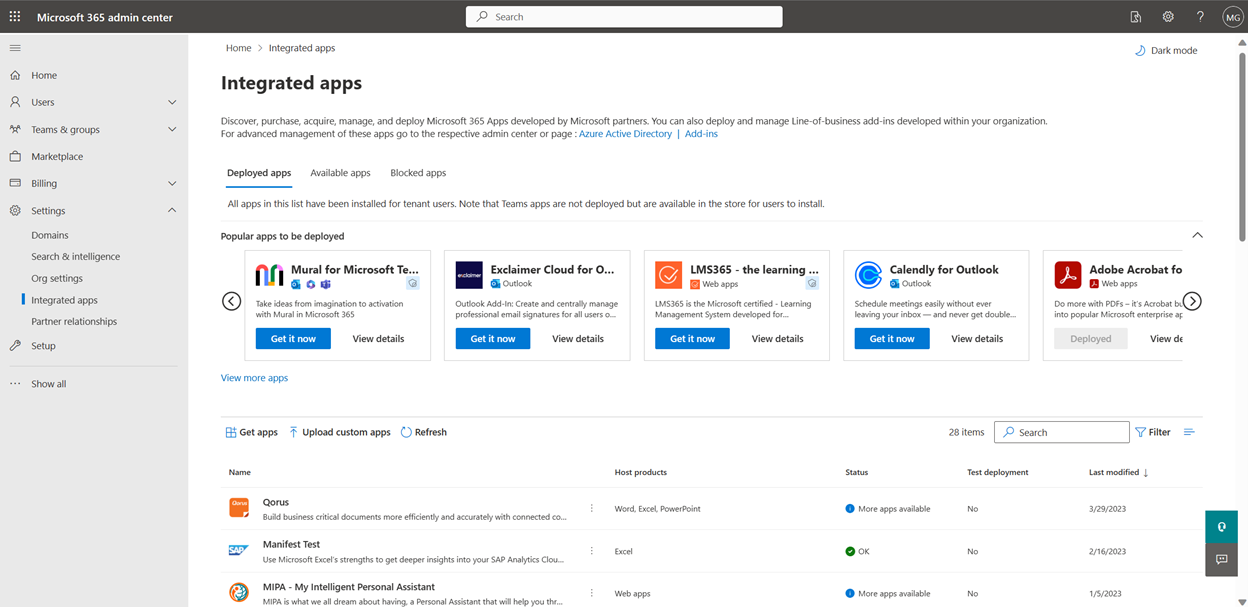
Microsoft allows admins to manage third party store apps and Line of Business apps across various M365 suite products from Integrated Apps blade in M365 Admin Center. Currently Integrated Apps access is limited to Global Admins, Global Reader Admins and Exchange Admins. Now, we are also allowing Azure Application Administrators to access Integrated Apps page and manage apps for their organization. This message is associated with Microsoft 365 Roadmap ID 88942 [When this will happen:] We will begin rolling out in early May and expect to complete rollout by mid-May. [How this will affect your organization:] With this release, all existing Azure Application Administrators in your tenant would be able to access Integrated Apps blade in M365 Admin Center. Azure Application Admins would only be able to manage Excel, Outlook, PowerPoint, and Word add-ins, Teams Apps that work across Outlook and Microsoft 365 app, and SaaS Apps. They would also be able to perform following actions in the Integrated Apps page:
[What you need to do to prepare:] Please review and update the Azure Application Administrator role assignment to the correct set of users who should have access for application management capabilities. Educate future Azure Application Administrators regarding app management from Integrated Apps page. |
| Machine Translation |
Microsoft では、管理者が M365 管理センターの [統合アプリ] ブレードから、さまざまな M365 スイート製品にわたってサード パーティのストア アプリと基幹業務アプリを管理できます。現在、統合アプリへのアクセスは、グローバル管理者、グローバル閲覧者管理者、および Exchange 管理者に制限されています。現在、 Azure アプリケーション管理者は、統合 アプリ ページにアクセスして、組織のアプリを管理することも許可されています。 このメッセージは、Microsoft 365 ロードマップ ID 88942 に関連付けられています。 [これが起こるとき:] ロールアウトは 5 月上旬に開始され、5 月中旬までに完了する予定です。 [これが組織に与える影響:] このリリースでは、テナント内のすべての既存の Azure アプリケーション管理者は、M365 管理センターの [統合アプリ] ブレードにアクセスできるようになります。Azure アプリケーション管理者は、Excel、Outlook、PowerPoint、Word のアドイン、 Outlook と Microsoft 365 アプリで動作する Teams アプリ、SaaS アプリのみを管理できます。また、[統合アプリ] ページで次のアクションを実行することもできます。
[準備するために必要なこと:] Azure アプリケーション管理者ロールの割り当てを確認し、アプリケーション管理機能にアクセスする必要がある正しいユーザー セットに更新してください。 統合アプリ ページから、アプリの管理に関して将来の Azure アプリケーション管理者を教育します。 |