| MC548106 | (Updated) Microsoft Teams: Install apps based on user activity with Auto install approved apps (AAA) |
|---|
| Classification | stayInformed |
|---|---|
| Last Updated | 06/13/2023 20:28:14 |
| Start Time | 04/28/2023 21:50:25 |
| End Time | 07/31/2023 07:00:00 |
| Message Content |
Updated June 13, 2023: We have updated the rollout timeline below. Thank you for your patience. We are expanding the audience for this Message center post as we are getting ready to roll this change to the audience who saw the post originally, and after that to the rest of our customers per the schedule below. The product name has also changed from Zero-touch app install to Auto install approved apps. Microsoft Teams Auto install approved apps (AAA) uses activity from your users to install and surface apps that admins have already allowed for the tenant. An admin can enable AAA to help users naturally discover and use apps that are highly relevant to their needs within Microsoft Teams. Specifically, when a user signs into specific SaaS apps using Azure AD (e.g. in web browser), the app will be installed for that user on Teams.
This message is associated with Microsoft 365 Roadmap ID 100385 AAA provides the right apps to the right users at the right time. Admins and users benefit from:
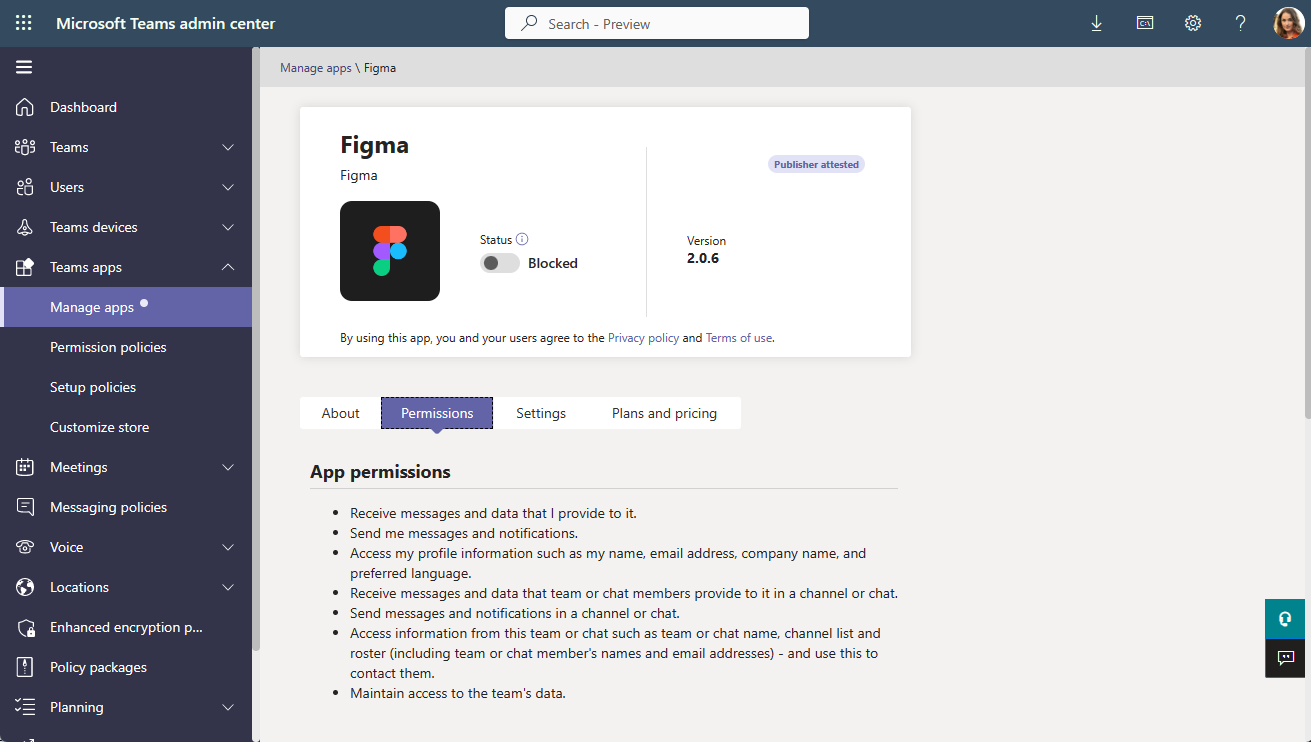
In the Teams admin center, there is also a new App permissions section in every app’s detail page that lists the app permissions. This is the same app permissions shown in the Teams client app store for every app today, now available for admins to conveniently view. This may assist you as you review the apps supported by AAA. [When this will happen:] Customers who previously received this Message center post will begin receiving this feature early May 2023 and we expect to complete by mid-May 2023. New customers who are receiving this Message center post will begin receiving this feature mid-May 2023 and we expect to complete by late June (previously early June). [How this will affect your organization:]
AAA respects all app governance in the Teams Admin Center.
[What you need to do to prepare:] For admins, turn on AAA when it becomes available in your tenant.
Some Teams apps require Graph app permissions during use. Ensure users can smoothly use apps after installation by confirming Graph app permissions have been or can be consented. Complete one or both of the following:
Note: Any user can uninstall an app installed through AAA. The user will not have the app automatically installed again, but they can reinstall it manually.
Limitations:
|
| Machine Translation |
2023 年 6 月 13 日更新: 以下のロールアウトのタイムラインを更新しました。お待ちいただきありがとうございます。 このメッセージ センターの投稿のオーディエンスを拡大しているのは、この変更を最初に投稿を見たオーディエンスにロールし、その後、以下のスケジュールに従って残りのお客様にロールする準備をしているためです。製品名もゼロタッチ アプリ インストールから [承認済みアプリの自動インストール] に変更されました。 Microsoft Teams 承認済みアプリの自動インストール (AAA) は、ユーザーからのアクティビティを使用して、管理者がテナントに対して既に許可しているアプリをインストールして表示します。管理者は、AAA を有効にして、ユーザーが Microsoft Teams 内のニーズに非常に関連性の高いアプリを自然に見つけて使用できるようにすることができます。具体的には、ユーザーが Azure AD を使用して (Web ブラウザーなどで) 特定の SaaS アプリにサインインすると、そのユーザーに対してアプリが Teams にインストールされます。
このメッセージは、Microsoft 365 ロードマップ ID に関連付けられています100385 AAA は、適切なアプリを適切なユーザーに適切なタイミングで提供します。管理者とユーザーには次の利点があります。
Teams 管理センターでは、すべてのアプリの詳細ページに、アプリのアクセス許可を一覧表示する新しいアプリのアクセス許可セクションもあります。これは、現在すべてのアプリの Teams クライアント アプリ ストアに表示されているのと同じアプリのアクセス許可であり、管理者が便利に表示できるようになりました。これは、AAA でサポートされているアプリを確認する際に役立つ場合があります。 [これが起こるとき:] 以前にこのメッセージ センターの投稿を受け取ったお客様は、2023 年 5 月初旬にこの機能の受信を開始し、2023 年 5 月中旬までに完了する予定です。 このメッセージ センターの投稿を受け取っている新規のお客様は、2023 年 5 月中旬にこの機能を受け取り始め、6 月下旬 (以前は 6 月上旬) までに完了する予定です。 [これが組織に与える影響:]
AAA は、Teams 管理センターのすべてのアプリ ガバナンスを尊重します。
[準備するために必要なこと:] 管理者の場合は、テナントで AAA が使用可能になったら有効にします。
一部の Teams アプリでは、使用中にグラフ アプリのアクセス許可が必要です。Graph アプリのアクセス許可が同意されているか、同意できることを確認して、インストール後にユーザーがアプリをスムーズに使用できるようにします。次のいずれかまたは両方を実行します。
手記: すべてのユーザが AAA 経由でインストールされたアプリをアンインストールできます。ユーザーはアプリを自動的に再インストールしませんが、手動で再インストールできます。
制限:
|