| MC567478 | (Updated) Microsoft Defender for Office empowers end users to report suspicious messages in Microsoft Teams |
|---|
| Classification | stayInformed |
|---|---|
| Last Updated | 06/20/2023 19:24:12 |
| Start Time | 06/02/2023 21:41:44 |
| End Time | 09/30/2023 07:00:00 |
| Message Content |
Updated June 20, 2023: We have updated the content below for clarity. Thank you for your patience. Soon the ability for Microsoft Teams users to report messages within Teams as security risk will be turned on by default. Security risk messages could include ones that contain phishing or spam or malicious content, such as phishing URL or malware file, spam content. To learn how end users can report, see User reported message settings in Microsoft Teams. NOTE: This only applies to Microsoft for Defender Plan 2 customers or Microsoft E5/ Office E5 customers.
This message is associated with Microsoft 365 Roadmap ID 100160
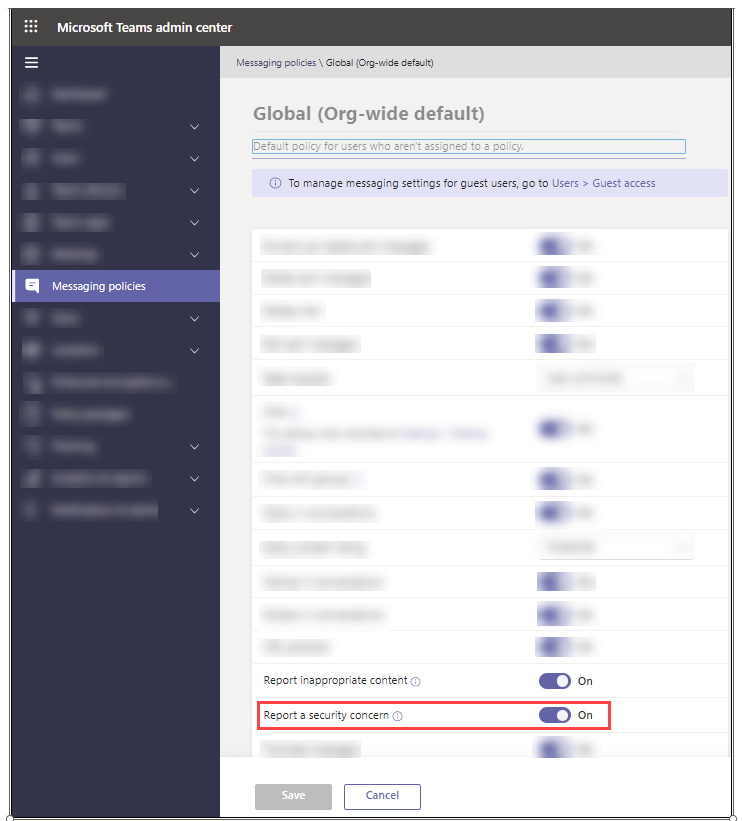
[When this will happen:] Starting in early June Teams admins will be able to control if users can report security messages within Teams Admin Center. We expect this to be completed for all tenants by mid-June 2023. [How this will affect your organization:] The toggle setting in Teams admin center will have no effect within the Teams clients, i.e., end users will not be able to report messages for security concern, unless the tenant has also opted into the Teams Security preview. The toggle is being provided so that Teams admins can opt out of the automatic on by default configuration or define other policies around end users reporting security concerns. The opt out period will be provided for a minimum of 30 days, after which the team client will provide end users with the ability to report messages as a security concern based on the toggle’s setting.
NOTE: When a user reports a Teams chat message as a security concern, the message is acted as per your organization’s user reported settings. If end user reports are sent to Microsoft, everything associated with the message is copied to include in the continual algorithm reviews. This copy includes the message content, message headers added by the Microsoft filtering system, any files or URLs, and related data. Microsoft treats your feedback as your organization’s permission to analyze all the information to fine tune the message hygiene algorithms. Your message is held in secured and audited data centers in the USA. The submission is deleted as soon as it’s no longer required. Microsoft personnel might read your submitted messages and files, which is normally not permitted for Teams messages in Microsoft 365. However, your message is still treated as confidential between you and Microsoft, and your message or file isn’t shared with any other party as part of the review process
[What you need to do to prepare:]
You can opt out of the default “on” option via Teams messaging policies in the Teams admin center by within the opt out period, no earlier than July 10th. The global policy will automatically apply to users in your organization unless you create and assign a custom policy. You can edit the settings in the global policy or create and assign one or more custom policies to turn on or turn off this feature. To learn more, please refer to: Manage messaging policy in teams. If you have any feedback, please provide it from this Message center post using the text box after you do thumbs up or thumbs down as it will directly reach the responsible team. |
| Machine Translation |
2023年6月20日更新:わかりやすくするために、以下のコンテンツを更新しました。お待ちいただきありがとうございます。 まもなく、Microsoft TeamsユーザーがセキュリティリスクとしてTeams内のメッセージを報告する機能がデフォルトでオンになります。セキュリティ リスク メッセージには、フィッシングやスパム、またはフィッシング URL やマルウェア ファイルなどの悪意のあるコンテンツ、スパム コンテンツを含むメッセージが含まれる場合があります。エンド ユーザーが報告する方法については、「 Microsoft Team でのユーザー報告メッセージの設定」を参照してください。 注: これは、マイクロソフト for Defender プラン 2 またはマイクロソフト E5/オフィス E5 のお客様にのみ適用されます。
このメッセージは、Microsoft 365 ロードマップ ID 100160 に関連付けられています。
[これが起こるとき:] 6 月初旬から、Teams 管理者は、ユーザーが Teams 管理センター内でセキュリティ メッセージを報告できるかどうかを制御できるようになります。 これは、2023年6月中旬までにすべてのテナントで完了する予定です。 [これが組織に与える影響:] Teams 管理センターのトグル設定は、Teams クライアント内では効果がなく、テナントが Teams セキュリティ プレビューにもオプトインしていない限り、エンド ユーザーはセキュリティ上の懸念からメッセージを報告できません。 このトグルは、Teams 管理者が既定の構成による自動オンをオプトアウトしたり、セキュリティ上の懸念を報告するエンド ユーザーに関する他のポリシーを定義したりできるように提供されています。オプトアウト期間は最低 30 日間提供され、その後、チーム クライアントは、トグルの設定に基づいてセキュリティ上の懸念事項としてメッセージを報告する機能をエンド ユーザーに提供します。
注: ユーザーがセキュリティ上の懸念事項として Teams チャット メッセージを報告すると、メッセージは組織の ユーザー報告設定に従って処理されます。 エンド ユーザー レポートが Microsoft に送信されると、メッセージに関連付けられているすべてのものがコピーされ、継続的なアルゴリズム レビューに含まれます。このコピーには、メッセージ コンテンツ、Microsoft フィルター システムによって追加されたメッセージ ヘッダー、ファイルまたは URL、および関連データが含まれます。Microsoft は、お客様のフィードバックを、すべての情報を分析してメッセージ検疫アルゴリズムを微調整する組織のアクセス許可として扱います。メッセージは、米国の安全で監査済みのデータセンターに保管されます。提出書類は不要になり次第削除されます。Microsoft の担当者は、送信されたメッセージとファイルを読み取る可能性がありますが、これは通常、Microsoft 365 の Teams メッセージでは許可されていません。ただし、メッセージは引き続きお客様と Microsoft の間で機密情報として扱われ、メッセージまたはファイルがレビュー プロセスの一環として他の当事者と共有されることはありません。
[準備するために必要なこと:]
Teams 管理センターの Teams メッセージング ポリシーを使用して、既定の “オン” オプションをオプトアウトするには、オプトアウト期間内 (7 月 10 日まで) に行うことができます。グローバル ポリシーは、カスタム ポリシーを作成して割り当てない限り、組織内のユーザーに自動的に適用されます。グローバル ポリシーの設定を編集するか、この機能をオンまたはオフにする 1 つ以上のカスタム ポリシーを作成して割り当てることができます。詳細については、「 Teams でメッセージング ポリシーを管理する」を参照してください。 フィードバックがある場合は、担当チームに直接届くため、親指を立てたり下げたりした後、テキストボックスを使用してこのメッセージセンターの投稿から提供してください。 |