| MC545914 | (Updated) Graph Connector Content Results Experience Switches to Results Inline in All Vertical |
|---|
| Classification | stayInformed |
|---|---|
| Last Updated | 06/24/2023 07:41:06 |
| Start Time | 04/24/2023 23:39:57 |
| End Time | 08/31/2023 07:00:00 |
| Message Content |
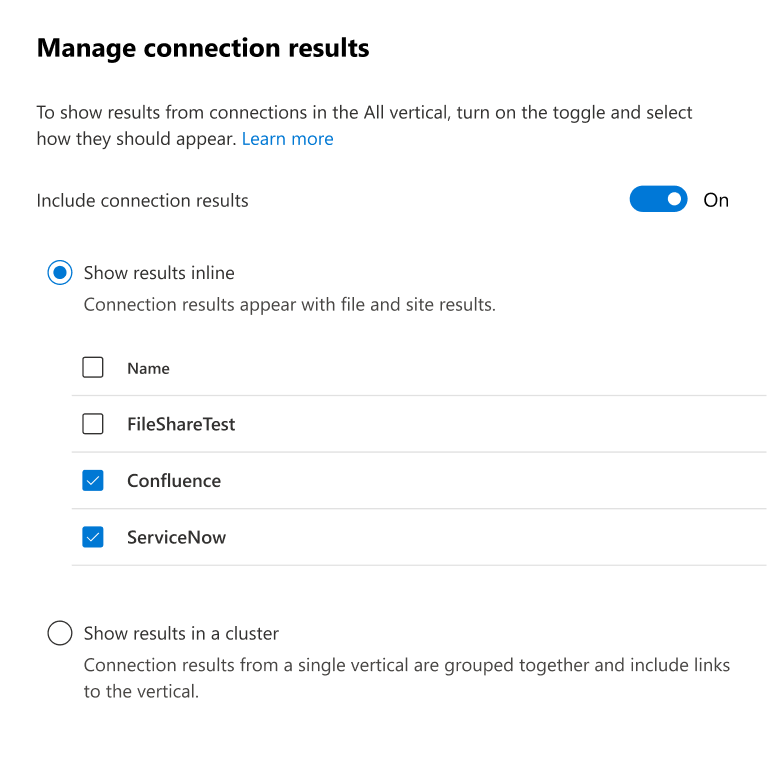
Updated June 24, 2023: We have updated the rollout timeline below. Thank you for your patience. You will soon see Graph Connector results merged inline in the All vertical on SharePoint (organization level) and Office.com. This means that your users will experience Graph Connector results seamlessly integrated with Microsoft content instead of the current result cluster experience which is bound to a fixed place in the middle of the page and has a maximum of two results from a single custom vertical. With inline Connector results, your users can see as many relevant Connector results as retrieved and ranked for each individual query and determined by underlying AI-based search and ranking system. Users can also use the pagination elements at the bottom of the search result page to browse through results that can include connected content or use the Last Modified- and File Type-filters to refine their search for connected content. This message is associated with Microsoft 365 Roadmap ID 115489 [When this will happen:] We will begin rollout in mid-May (previously late April) and expect to complete rollout by late July (previously mid-July). [How this will affect your organization:] Migration: In the admin center, you will see a new panel for managing connection results in the All vertical (Search & Intelligence > Customizations > Verticals > All > Manage connection results).
The Show results inline option will be selected by default, and all connections that are currently linked to an enabled vertical will be checked for All vertical participation. [What you need to do to prepare:]
You can enable other connections too by going to the panel and selecting them from the list shown in the panel. You do not need to create a custom vertical for a connection to make it available it the All vertical. If you are not satisfied with the experience and want to revert back to Result clusters, you can do so in the same Manage connection results panel. Note: If you are using KQL queries on custom verticals, Show results in a cluster will be selected by default upon migration. This is because while result clusters bring content from custom verticals into the All vertical (and thus honor KQL queries), inline merged connector results do not honor vertical-specific KQLs and will show all items that are searchable for the user from the connected data source. If you have any concerns, please reach out to MicrosoftGraphConnectorsFeedback@service.microsoft.com. |
| Machine Translation |
2023 年 6 月 24 日更新: 以下のロールアウトのタイムラインを更新しました。お待ちいただきありがとうございます。 グラフ コネクタの結果は、SharePoint (組織レベル) と Office.com のすべての垂直方向にインラインでマージされます。つまり、ユーザーは、ページ中央の固定された場所にバインドされ、1 つのカスタム垂直から最大 2 つの結果を持つ現在の結果クラスター エクスペリエンスではなく、Microsoft コンテンツとシームレスに統合された Graph コネクタの結果を体験できます。 インライン コネクタの結果を使用すると、ユーザーは、個々のクエリごとに取得およびランク付けされ、基になる AI ベースの検索およびランク付けシステムによって決定される、関連するコネクタの結果の数だけ表示できます。ユーザーは、検索結果ページの下部にある改ページ位置の自動修正要素を使用して、接続されたコンテンツを含む結果を参照したり、[最終更新日時] フィルターと [ファイルの種類] フィルターを使用して、接続されたコンテンツの検索を絞り込んだりすることもできます。 このメッセージは、Microsoft 365 ロードマップ ID に関連付けられています115489 [これが起こるとき:] ロールアウトは 5 月中旬 (以前は 4 月下旬) に開始され、7 月下旬 (以前は 7 月中旬) までにロールアウトを完了する予定です。 [これが組織に与える影響:] 移動: 管理センターでは、接続結果を管理するための新しいパネルが [すべての業種] に表示されます ([検索とインテリジェンス] > [カスタマイズ] > [業種] > [すべて] > [接続結果の管理] )。
[ 結果をインライン で表示] オプションが既定で選択され、有効な垂直に現在リンクされているすべての接続が [すべての垂直参加] でオンになります。 [準備するために必要なこと:]
パネルに移動し、パネルに表示されているリストからそれらを選択することで、他の接続も有効にできます。接続を [すべて] バーティカルで使用できるようにするために、カスタムバーティカルを作成する必要はありません。 エクスペリエンスに満足できず、結果クラスターに戻す場合は、同じ [接続結果の管理] パネルで行うことができます。 手記: カスタム業種で KQL クエリを使用している場合は、移行時に 既定で [クラスター に結果を表示する] が選択されます。これは、結果クラスターがカスタム バーティカルのコンテンツを [すべてのバーティカル] に取り込む (したがって KQL クエリを優先する) のに対し、インライン マージ コネクタの結果はバーティカル固有の KQL を尊重せず、接続されたデータ ソースからユーザーが検索できるすべてのアイテムを表示するためです。 ご不明な点がございましたら、MicrosoftGraphConnectorsFeedback@service.microsoft.com までお問い合わせください。 |