| MC549347 | (Updated) Viva Connections Dashboard Customization |
|---|
| Classification | planForChange |
|---|---|
| Last Updated | 06/27/2023 18:30:53 |
| Start Time | 05/02/2023 16:28:41 |
| End Time | 08/14/2023 07:00:00 |
| Message Content |
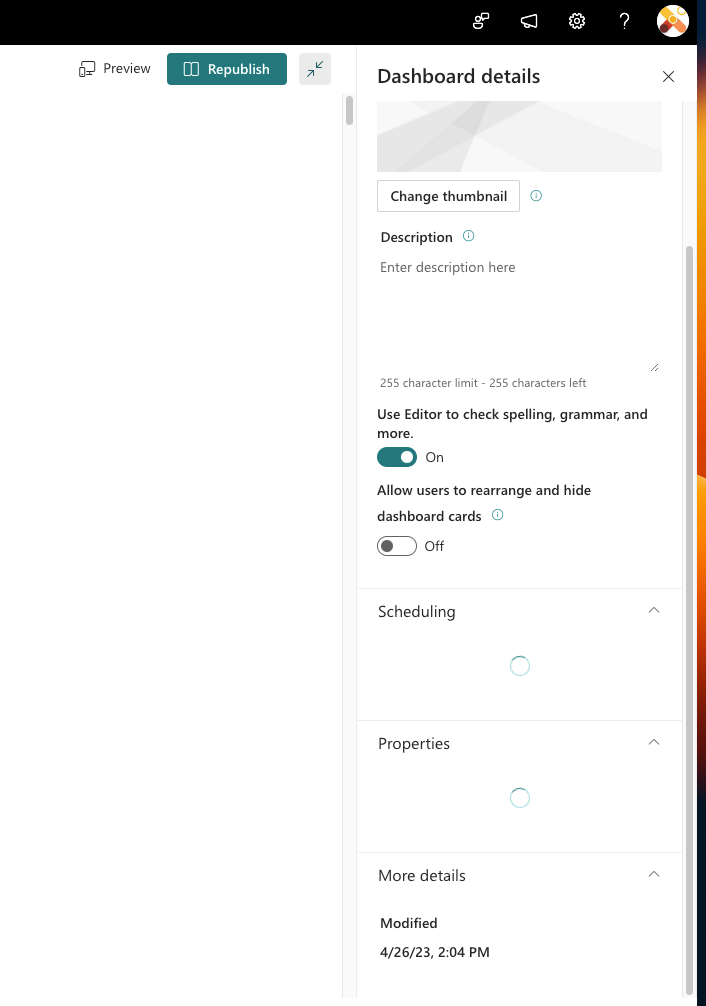
Updated June 27, 2023: We have updated the rollout timeline below. Thank you for your patience. We are excited to announce that dashboard customization is now available on Viva Connections Mobile! This feature allows your employees to personalize their mobile dashboard with the information that is most relevant to their work. We want to inform you that this feature is enabled by default for all your employees. However, we understand that every organization is different, and you may have specific requirements or preferences. Therefore, we want to let you know that as a tenant admin or site operator, you can turn off the feature if necessary. The toggle turn OFF will be available in the dashboard details with the heading “Allow users to rearrange and hide dashboard cards”
This message is associated with Microsoft 365 Roadmap ID 117428
[When this will happen:] Standard Release: We will begin rolling out the admin settings to turn OFF the feature by early May and it will be available for all tenants by early July (previously late June). For end users, we will enable this feature only when the settings get rolled out to all the tenants. [How this will affect your organization:] End user can reorder or hide the cards on their Viva Connections dashboard as per their preference.
[What you need to do to prepare:]
The settings will be enabled by default. In case you don’t want the end users to customize their Viva Connections dashboard, you need to disable it in settings. |
| Machine Translation |
2023 年 6 月 27 日更新: 以下のロールアウトのタイムラインを更新しました。お待ちいただきありがとうございます。 ダッシュボードのカスタマイズがViva コネクション モバイルで利用できるようになったことをお知らせします。この機能により、従業員は自分の仕事に最も関連性の高い情報でモバイルダッシュボードをパーソナライズできます。 この機能は、すべての従業員に対してデフォルトで有効になっていることをお知らせします。ただし、組織はそれぞれ異なり、特定の要件や好みがあることを理解しています。そのため、テナント管理者またはサイト運営者は、必要に応じてこの機能をオフにできることをお知らせします。トグルオフは、ダッシュボードの詳細で「ユーザーがダッシュボードカードを再配置および非表示にできるようにする」という見出しとともに使用できます。
このメッセージは、Microsoft 365 ロードマップ ID に関連付けられています117428
[これが起こるとき:] 標準リリース: 5 月上旬までにこの機能をオフにするための管理設定のロールアウトを開始し、7 月上旬 (以前は 6 月下旬) までにすべてのテナントで利用できるようになります。 エンド ユーザーの場合、この機能は、設定がすべてのテナントにロールアウトされる場合にのみ有効になります。 [これが組織に与える影響:] エンド ユーザーは、好みに応じて、Viva コネクション ダッシュボードでカードを並べ替えたり非表示にしたりできます。
[準備するために必要なこと:]
この設定はデフォルトで有効になっています。エンド ユーザーがViva コネクション ダッシュボードをカスタマイズしないようにするには、設定で無効にする必要があります。 |