| MC611684 | Microsoft Teams: EHR Connector Virtual Appointment usage report for user access |
|---|
| Classification | stayInformed |
|---|---|
| Last Updated | 06/27/2023 23:10:47 |
| Start Time | 06/27/2023 23:10:43 |
| End Time | 08/31/2023 07:00:00 |
| Message Content |
Organizations which have enabled Microsoft Teams EHR Connector can view the usage information of EHR scheduled appointments through EHR Connector Virtual Appointment usage report. Tenant with EHR connector enabled users who are not designated as admins, now have access to the EHR Connector Virtual Appointment usage report through the Virtual Appointments App in Microsoft Teams.
This message is associated with Microsoft 365 Roadmap ID 138229 [When this will happen:] We will begin rolling out mid-July and expect to complete by late July. [How this will affect your organization:] Users (non IT admins) from an organization (tenants enabled with Microsoft EHR connector) who are assigned the Virtual Visit administrator role can install Virtual Appointments app and will be able to view the EHR report for their tenant in the app. [What you need to do to prepare:]
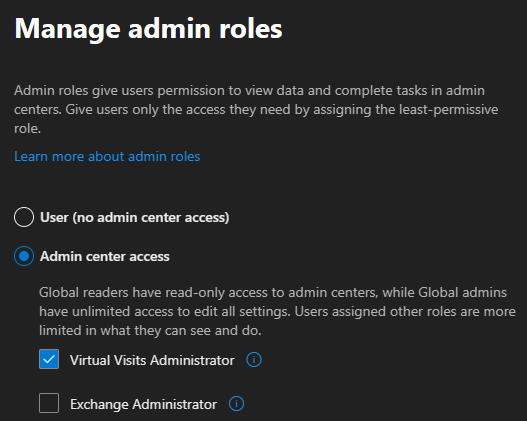
This feature will be available for all users whom IT admins have assigned a ‘Virtual Visit Administrator’ role from Microsoft 365 admin center. An IT admin can visit Microsoft 365 admin center and click on details of the user > Manage admin roles > apply the Virtual Visit Administrator role to that user.
|
| Machine Translation |
EHR コネクタを有効にMicrosoft Teams組織は、EHR コネクタ仮想予定の使用状況レポートを使用して、EHR スケジュールされた予定の使用状況情報を表示できます。管理者として指定されていない EHR コネクタが有効になっているテナントのユーザーは、Microsoft Teams の仮想予定アプリから EHR コネクタ仮想予定の使用状況レポートにアクセスできるようになりました。
このメッセージは、Microsoft 365 ロードマップ ID に関連付けられています138229 [これが起こるとき:] 7月中旬に展開を開始し、7月下旬までに完了する予定です。 [これが組織に与える影響:] 仮想訪問管理者ロールが割り当てられている組織 (Microsoft EHR コネクタで有効なテナント) のユーザー (IT 管理者以外) は、仮想予定アプリをインストールでき、アプリでテナントの EHR レポートを表示できます。 [準備するために必要なこと:]
この機能は、IT 管理者が Microsoft 365 管理センターから “仮想訪問管理者” ロールを割り当てたすべてのユーザーが利用できます。IT 管理者は、Microsoft 365 管理センターにアクセスし、[管理者ロールの管理] >ユーザーの詳細をクリックして>そのユーザーに仮想訪問管理者ロールを適用 できます。
|