| MC669739 | Microsoft Purview compliance portal: Data Loss Prevention – Matched items in audit logs |
|---|
| Classification | stayInformed |
|---|---|
| Last Updated | 08/22/2023 22:58:36 |
| Start Time | 08/22/2023 22:57:59 |
| End Time | 09/22/2023 07:00:00 |
| Message Content |
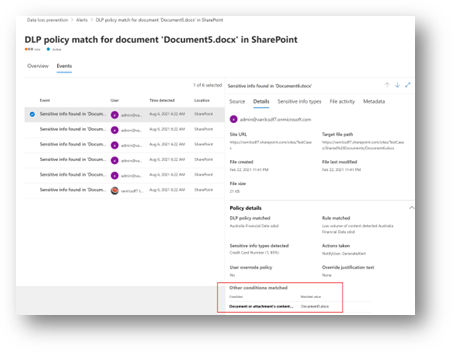
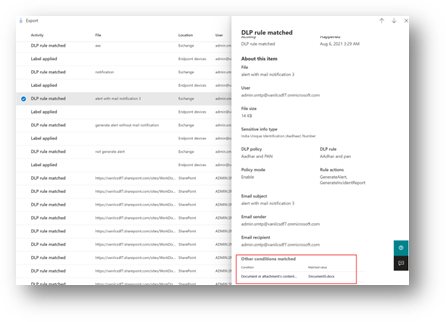
Coming soon to general availability is Microsoft Purview Data Loss Prevention (DLP) capability that will show you the exact cause of a flagged DLP policy violation. We’ve extended our support to show matched conditions across workloads (Exchange, Teams, SharePoint, OneDrive, Endpoint), rules, and conditions.
This message is associated with Microsoft 365 Roadmap ID 117488 [When this will happen:] Standard Release: Rollout will begin in mid-August and is expected to be complete by late August. [How this will affect your organization:] When a DLP rule match occurs, the configured action for that rule (e.g., Block, Audit) is enforced.
[What you need to do to prepare:]
Verify that auditing is enabled for your tenant and turn on advanced classification for Endpoint DLP. Refer to advanced classification scanning and protection. |
| Machine Translation |
間もなく一般提供が開始されるのは、フラグが設定された DLP ポリシー違反の正確な原因を示す Microsoft Purview データ損失防止 (DLP) 機能です。サポートを拡張して、ワークロード (Exchange、Teams、SharePoint、OneDrive、エンドポイント)、ルール、条件全体で一致した条件を表示できるようになりました。
このメッセージは、Microsoft 365 ロードマップ ID に関連付けられています117488 [これが起こるとき:] 標準リリース: ロールアウトは 8 月中旬に開始され、8 月下旬までに完了する予定です。 [これが組織に与える影響:] DLP ルールの一致が発生すると、そのルールに対して構成されたアクション (ブロック、監査など) が適用されます。
[準備するために必要なこと:]
テナントに対して監査が有効になっていることを確認し、エンドポイント DLP の高度な分類を有効にします。 高度な分類スキャンと保護を参照してください。 |