| MC400569 | (Updated) Graph API for Teams Meetings Transcripts |
|---|
| Classification | stayInformed |
|---|---|
| Last Updated | 09/06/2023 22:47:26 |
| Start Time | 07/14/2022 23:23:41 |
| End Time | 11/27/2023 08:00:00 |
| Message Content |
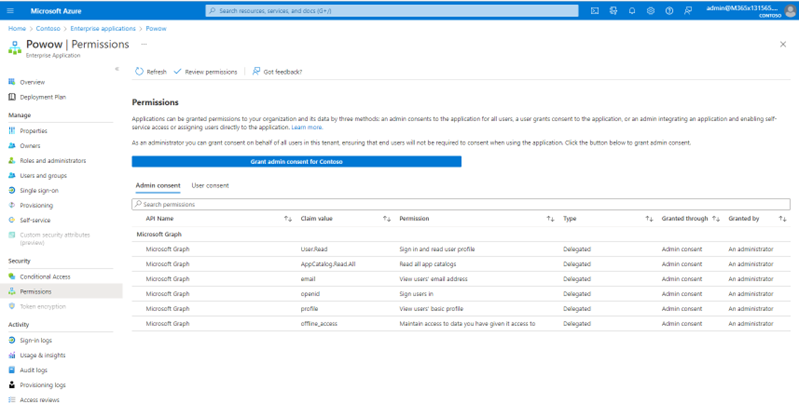
Updated September 6, 2023: We have updated the rollout timeline below. Thank you for your patience. New org-wide application permissions and RSC application permissions have been introduced to make sure that apps can access meeting transcripts for a specific meeting. Resource specific consent (RSC) permissions, specifically enables admins to authorize users to provide consent to apps, so they get specific access to a Teams meeting’s transcripts to which it is installed to, rather than providing them access across the entire tenant. This message is specifically associated with post-meeting transcripts access for apps – Microsoft 365 Roadmap ID: 95788 that allows authorized apps to access Teams Meetings transcripts once the meeting is over. [When will this happen?] We will begin rolling this out in early October 2023 (previously mid-August) and expect to complete late October 2023 (previously early September). [How will this affect your organization?] As a tenant admin, you now have separate org-wide application permissions to access meeting transcripts across the organization. You can now switch to a more restrictive permission for apps to access only transcripts. Alternatively, you could opt for a self-serve model wherein meeting organizers/presenters can authorize individual apps to access the transcripts for specific meetings. This is possible via the feature Resource-Specific Consent. To enable the new meeting transcripts-related org-wide application permissions: You can review and accept org-wide application permissions for apps that require access to Teams meeting transcripts in your organization through the Azure portal (Azure Active Directory > Enterprise applications > <App Name > Permissions) To enable the new meeting transcripts-related meeting specific RSC application permissions: As a tenant admin, you will have the ability to turn on/off resource-specific consent for apps in chats/meeting using a master switch. Once enabled, authorized users can now authorize a Teams app in a meeting, to access for that specific meeting using these permissions. More details can be found here. [What do you need to do to prepare?] Org-wide Application permissions: Review and accept permissions for apps that require access to Teams Meetings transcripts in your organization (both app and delegated context) through the AAD portal through Enterprise Applications > App Name > Permissions.
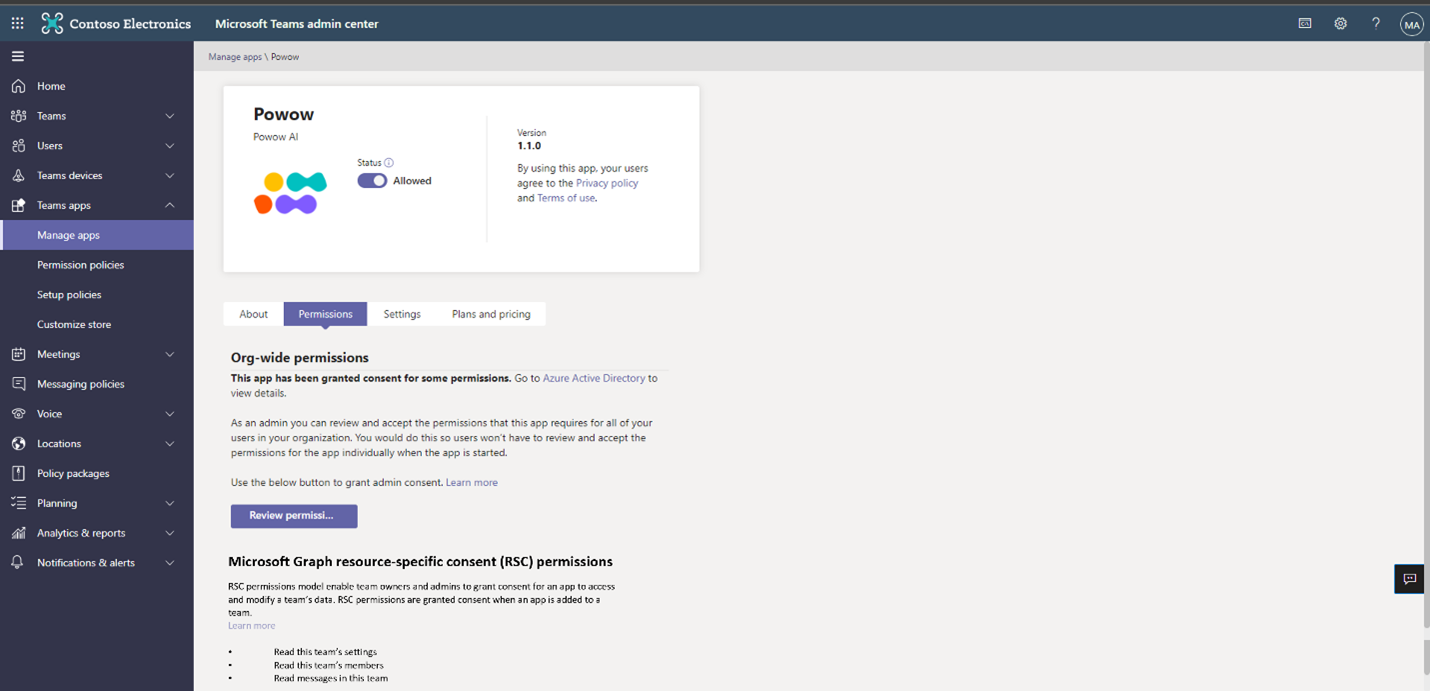
Meeting specific RSC Application Permissions: • Read this to understand how you can control whether you want to allow resource owners to grant RSC permission for apps in meetings directly. • You can also view the list of RSC permissions for a Teams app in the Teams Admin Center (Team Apps ->Manage apps-> <App Name> -> Permissions tab).
• Take into consideration whether to notify your users about this new capability and update your training and documentation as appropriate. |
| Machine Translation |
2023 年 9 月 6 日更新: 以下のロールアウト タイムラインを更新しました。お待ちいただきありがとうございます。 新しい組織全体のアプリケーション権限と RSC アプリケーション権限が導入され、アプリが特定の会議の議事録にアクセスできるようになりました。リソース固有の同意 (RSC) アクセス許可を使用すると、管理者は特に、ユーザーがアプリに同意することを承認できるため、テナント全体でアクセスを提供するのではなく、インストールされている Teams 会議のトランスクリプトへの特定のアクセス権を取得できます。 このメッセージは、特にアプリの会議後のトランスクリプト アクセスに関連付けられています – Microsoft 365 ロードマップ ID: 95788 これにより、承認されたアプリは、会議が終了すると Teams 会議のトランスクリプトにアクセスできます。 [これはいつ起こりますか? これは 2023 年 10 月初旬 (以前は 8 月中旬) に展開を開始し、2023 年 10 月下旬 (以前は 9 月上旬) に完了する予定です。 [これは組織にどのように影響しますか? テナント管理者は、組織全体の会議の議事録にアクセスするための 個別の組織全体のアプリケーションのアクセス許可 を持つようになりました。アプリがトランスクリプトのみにアクセスするためのより制限の厳しいアクセス許可に切り替えることができるようになりました。または、会議の主催者/プレゼンターが個々のアプリが特定の会議のトランスクリプトにアクセスすることを承認できるセルフサービスモデルを選択することもできます。これは、リソース固有の同意機能を介して可能です。 新しい会議の議事録に関連する組織全体のアプリケーション権限を有効にするには: Azure portal を使用して、組織内の Teams 会議の議事録へのアクセスを必要とするアプリに対する組織全体のアプリケーションのアクセス許可を確認して受け入れることができます ( Azure Active Directory >エンタープライズ アプリケーション > <アプリ名>アクセス許可) 新しい会議の議事録関連の会議固有の RSC アプリケーションのアクセス許可を有効にするには: テナント管理者は、マスター スイッチを使用して、チャット/会議のアプリに対するリソース固有の同意をオン/オフにすることができます。有効にすると、承認されたユーザーは、会議で Teams アプリを承認し、これらの アクセス許可を使用してその特定の会議にアクセスできるようになります。詳細については、 こちらをご覧ください。 【準備はどうしたらいいですか? 組織全体のアプリケーションのアクセス許可: エンタープライズ アプリケーション>アプリ名>アクセス許可を使用して、AAD ポータルを介して組織内の Teams 会議トランスクリプト (アプリと委任されたコンテキストの両方) にアクセスする必要があるアプリのアクセス許可を確認して受け入れます。
会議固有の RSC アプリケーションのアクセス許可: . リソース所有者が会議のアプリに対する RSC アクセス許可を直接付与できるようにするかどうかを制御する方法については、 これ を読んでください。 . Teams 管理センター (Teams アプリ ->アプリの管理-> <アプリ名> -> アクセス許可タブ) で、 Teams アプリの RSC アクセス許可の一覧を表示することもできます。
. この新機能についてユーザーに通知し、必要に応じてトレーニングとドキュメントを更新するかどうかを検討します。 |