| MC675959 | Microsoft Information Protection: Microsoft Purview: Exact Data Match to support multi-token corroborative evidence. |
|---|
| Classification | stayInformed |
|---|---|
| Last Updated | 10/26/2023 19:46:23 |
| Start Time | 09/19/2023 23:30:50 |
| End Time | 01/29/2024 08:00:00 |
| Message Content |
Updated October 26, 2023: We have updated the rollout timeline below. Thank you for your patience. Exact Data Match (EDM) will support string match detection of multi-token (i.e., fields with multiple words separated by spaces or punctuation) corroborative evidence without requiring mapping Sensitive Information Types (SITs) to multi-token corroborative evidence fields.
This message is associated with Microsoft 365 Roadmap ID 124847
[When this will happen:] Rollout will begin in mid-November 2023 (previously late October) and is expected to be complete by mid-Devember 2023 (previously mid-November). [How this will affect your organization:] With this release, multi-token corroborative evidence can be detected as a string match, without requiring it to be mapped to a Sensitive Information Type (SIT) that is able to detect that content as a single entity, which may result in more accurate EDM detection. In some cases, it may still make sense to map a SIT to a corroborative evidence field, both to reduce latency by limiting the amount of content that needs to be compared for each match, and to eliminate some potential false positives. For example, if you have indicated multiple characters as ignored delimiters using configurable match, but still want to only detect matches on strings which are formatted with some of the delimiters or where multiple delimiters match each other. In general, if a SIT can be accurately matched to a corroborative evidence column, it is preferred to do so rather than to rely on automatic single-word or multi-token matching.
[What you need to do to prepare:]
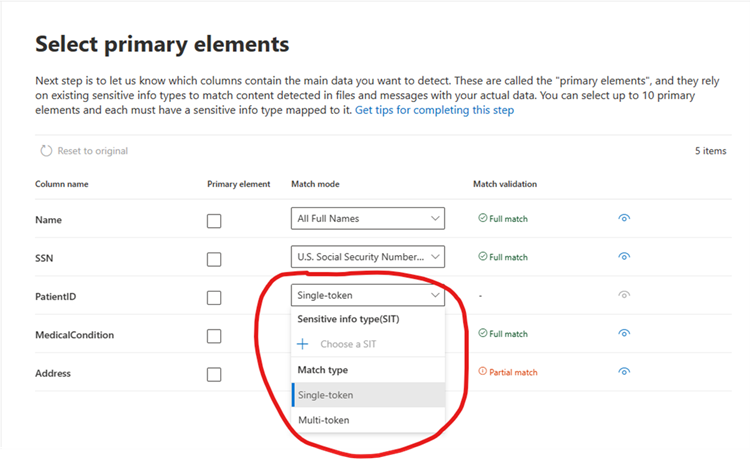
To use this feature, you need to opt-in for multi-token support for each corroborative evidence field that you want enabled. You can do this either through the new EDM UI experience (see screenshot above) or through a schema XML file update. Before doing so, you will need to first uninstall your current version of the EDM Upload Agent and download / install the latest version from: learn.microsoft.com/en-us/purview/sit-get-started-exact-data-match-hash-upload#links-to-edm-upload-agent-by-subscription-type. Once this feature has been released, additional details will be found in our EDM public documentation:
Learn about exact data match based sensitive information types | Microsoft Learn |
| Machine Translation |
2023 年 10 月 26 日更新: 以下のロールアウト タイムラインを更新しました。お待ちいただきありがとうございます。 完全一致データ一致 (EDM) は、機密情報の種類 (SIT) をマルチトークンの補強証拠フィールドにマッピングすることなく、マルチトークン (つまり、スペースまたは句読点で区切られた複数の単語を含むフィールド) の補強証拠の文字列一致検出をサポートします。
このメッセージは、Microsoft 365 ロードマップ ID に関連付けられています 124847
[これが起こるとき:] ロールアウトは 2023 年 11 月中旬 (以前は 10 月下旬) に開始され、2023 年 11 月中旬 (以前は 11 月中旬) までに完了する予定です。 [これが組織に与える影響:] このリリースでは、マルチトークンの補強証拠を文字列の一致として検出でき、そのコンテンツを 1 つのエンティティとして検出できる機密情報の種類 (SIT) にマップする必要がないため、より正確な EDM 検出が可能になります。 場合によっては、SIT を補強証拠フィールドにマップして、一致ごとに比較する必要があるコンテンツの量を制限して待機時間を短縮し、潜在的な誤検知を排除することが理にかなっている場合があります。 たとえば、構成可能な一致を使用して複数の文字を無視された区切り文字として指定したが、一部の区切り記号で書式設定された文字列、または複数の区切り文字が互いに一致する文字列の一致のみを検出する場合などです。 一般に、SITを補強証拠列と正確に一致させることができる場合は、自動シングルワードまたはマルチトークンマッチングに依存するよりも、そうすることが望ましいです。
[準備するために必要なこと:]
この機能を使用するには、有効にする補強証拠フィールドごとにマルチトークンのサポートをオプトインする必要があります。これは、新しい EDM UI エクスペリエンス (上のスクリーンショット参照) またはスキーマ XML ファイルの更新によって行うことができます。その前に、まず現在のバージョンのEDMアップロードエージェントをアンインストールし、https://learn.microsoft.com/en-us/purview/sit-get-started-exact-data-match-hash-upload#links-to-edm-upload-agent-by-subscription-type から最新バージョンをダウンロード/インストールする必要があります。 この機能がリリースされると、EDM のパブリック ドキュメントに追加の詳細が記載されます。
完全一致データ一致に基づく機密情報の種類について学習する | マイクロソフト ラーニング |