| MC684532 | Microsoft Teams: Forward Messages in Teams Chats |
|---|
| Classification | stayInformed |
|---|---|
| Last Updated | 10/26/2023 22:45:34 |
| Start Time | 10/26/2023 22:45:17 |
| End Time | 03/18/2024 07:00:00 |
| Message Content |
With the forward message feature, Microsoft Teams users will soon be able to send chat messages from one chat to another. Messages can be forwarded to 1:1 chats, group chats and meeting chats. This feature will also allow the sender to add additional content to the message in order to provide context and clarity to the recipient. This feature will be rolling out across Microsoft Teams Desktop, Web and Mobile. This message is associated with Microsoft 365 Roadmap ID 90585 [When this will happen:] Rollout will begin in late November 2023 and is expected to be complete by mid-February 2024.
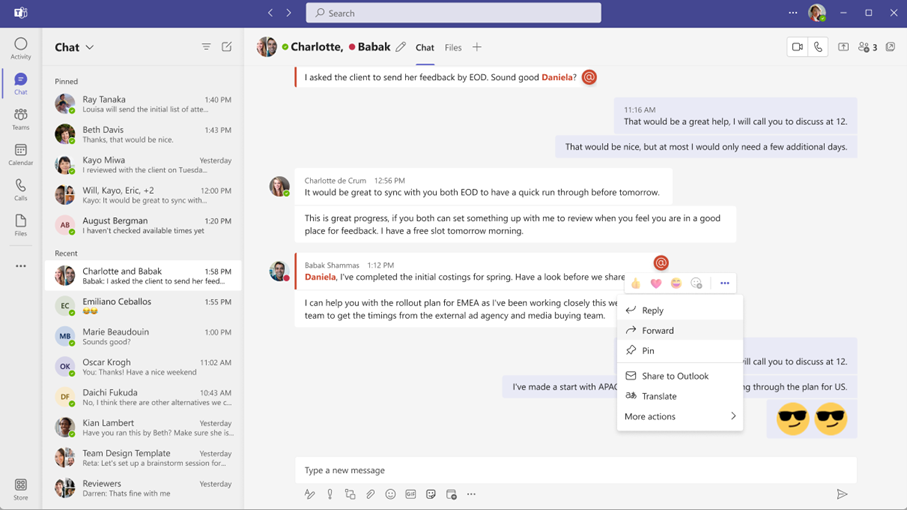
How this will affect your organization:] The entry point for the forward message feature will be in the overflow menu.
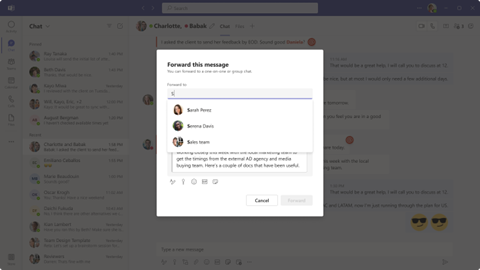
Upon clicking this button, the forward message compose dialog will populate the screen.
In the compose dialog, users will have the option to select from the people picker menu who the message will be forwarded to. A message can be forwarded to an existing named group chat, a new group chat, a meeting chat or a 1:1 chat. Currently, users will only be able to forward one message to one chat at a time.
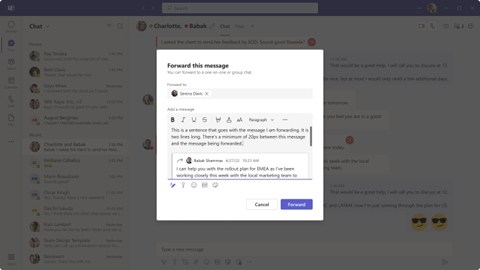
In the compose dialog, the user can also add an additional message to accompany the forwarded message to provide context.
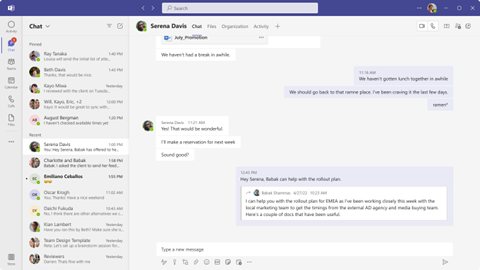
Once the message has been forwarded, the chat will bubble up to the top of the user’s chat list, and the message will appear in the chat in the format shown below.
[What you need to do to prepare:] It is recommended that you notify your users about this new capability to forward messages and update your training and documentation as appropriate. |
| Machine Translation |
メッセージの転送機能を使用すると、Microsoft Teamsユーザーはすぐにあるチャットから別のチャットにチャットメッセージを送信できるようになります。メッセージは、1 対 1 のチャット、グループ チャット、会議チャットに転送できます。この機能により、送信者はメッセージにコンテンツを追加して、受信者にコンテキストと明確さを提供することもできます。 この機能は、デスクトップ、ウェブ、モバイルMicrosoft Teams展開されます。 このメッセージは、Microsoft 365 ロードマップ ID 90585 に関連付けられています [これが起こるとき:] ロールアウトは2023年11月下旬に開始され、2024年2月中旬までに完了する予定です。
これが組織に与える影響:] メッセージ転送機能のエントリ ポイントは、オーバーフロー メニューにあります。
このボタンをクリックすると、転送メッセージ作成ダイアログが画面に表示されます。
作成ダイアログでは、ユーザーはユーザー選択ウィンドウ メニューからメッセージの転送先を選択できます。メッセージは、既存の名前付きグループ チャット、新しいグループ チャット、会議チャット、または 1 対 1 のチャットに転送できます。現在、ユーザーは一度に1つのメッセージのみを1つのチャットに転送できます。
作成ダイアログでは、ユーザーは転送されたメッセージに付随するメッセージを追加して、コンテキストを提供することもできます。
メッセージが転送されると、チャットはユーザーのチャットリストの一番上に表示され、メッセージは以下の形式でチャットに表示されます。
[準備するために必要なこと:] メッセージを転送し、必要に応じてトレーニングとドキュメントを更新するこの新機能についてユーザーに通知することをお勧めします。 |