| MC681892 | (Updated) Move Scheduling assistant settings move to the toolbar |
|---|
| Classification | stayInformed |
|---|---|
| Last Updated | 11/07/2023 20:48:09 |
| Start Time | 10/16/2023 22:06:47 |
| End Time | 01/01/2024 08:00:00 |
| Message Content |
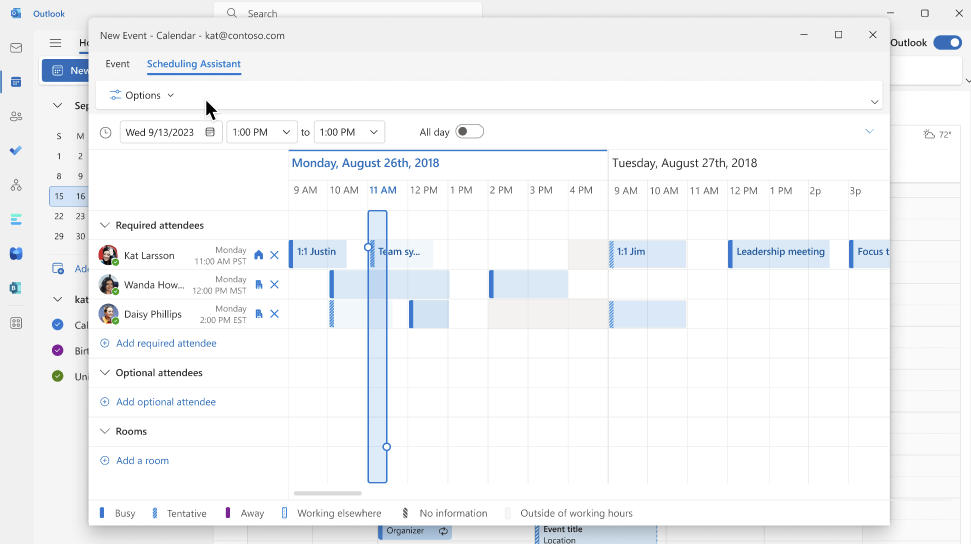
Updated November 7, 2023: We have updated the rollout timeline below. Thank you for your patience. We are moving the settings for the Scheduling assistant to the toolbar to reduce clicks and a more seamless scheduling new experience. This message is associated with Microsoft 365 Roadmap ID 170792 [When this will happen:] Standard Release: We will start rolling out the public preview during in mid-October and we expect the roll out to be complete by late November 2023 (previously late October). [How this will affect your organization:] This update will be available to all the modern clients without any additional action. This change cannot be disabled. Currently the settings are available on the assistant above the attendee column: Moving forward, users can click on options to see more these existing settings to customize their view.
[What you need to do to prepare:] Nothing, no action is required. |
| Machine Translation |
2023 年 11 月 7 日更新: 以下のロールアウト タイムラインを更新しました。何卒ご理解のほどよろしくお願いいたします。 スケジュール アシスタントの設定をツールバーに移動して、クリックを減らし、よりシームレスなスケジュール設定の新しいエクスペリエンスを実現しています。 このメッセージは、Microsoft 365 ロードマップ ID 170792に関連付けられています [これがいつ起こるか:] 標準リリース: 10 月中旬にパブリック プレビューのロールアウトを開始し、2023 年 11 月下旬 (以前は 10 月下旬) までにロールアウトを完了する予定です。 [これが組織に及ぼす影響:] この更新プログラムは、追加のアクションなしで、すべての最新のクライアントで利用できます。この変更を無効にすることはできません。 現在、設定は出席者列の上のアシスタントで使用できます。 今後、ユーザーはオプションをクリックして、これらの既存の設定をさらに表示し、ビューをカスタマイズできます。
[準備に必要なこと:] 何も、何もする必要はありません。 |