| MC561188 | (Updated) Microsoft Teams: Set your Work Hours and Location |
|---|
| Classification | stayInformed |
|---|---|
| Last Updated | 11/27/2023 20:57:02 |
| Start Time | 05/26/2023 00:34:42 |
| End Time | 03/04/2024 07:00:00 |
| Message Content |
Updated November 27, 2023: We have updated the rollout timeline below. Thank you for your patience. Set your work location for the day in Microsoft Teams so your team can learn about your availability for in-office and remote collaboration. This message is associated with Microsoft 365 Roadmap ID 125375 [When this will happen:] Targeted Release and Preview: We have begun rollout and expect to complete rollout by late May. Standard Release: We will begin rolling out in early June 2023 and expect to complete rollout by late January 2024 (previously early November). [How this will affect your organization:] We are highlighting Microsoft 365 features that will bring transparency and focus on where you and your colleagues are working: work hours and location. These features will appear in Outlook on the web and Teams and bring the flexibility of enabling users to share where they are working. You’re already accustomed to managing and sharing your schedule in Outlook and Teams. With these additional features, Microsoft 365 is now location-aware C giving more information to you and colleagues to work better together. Microsoft 365 already helps you manage and share your work schedule and availability. The work hours and location features allow you to specify more details about your work schedule and preferences, like from where you’re working (remotely or in office) and whether you work different hours on different days.
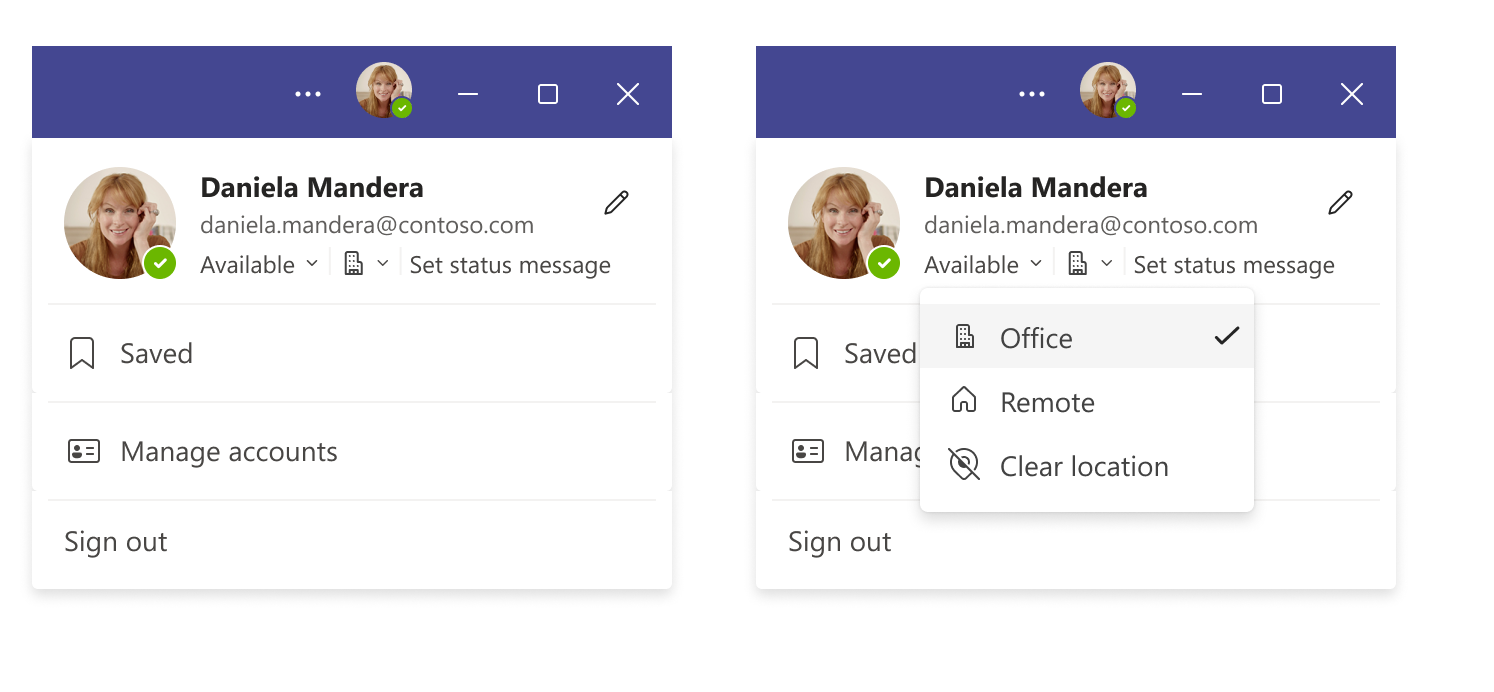
Teams gives you the flexibility to easily change the location for that day, without impacting the rest of your week. For example, after a few hours in the office, you decide to finish up your work from home. To change your location from Teams, simply click on your profile on the top right corner of the Teams window, view your account settings menu and change your work location for that day. You can also update your location from any device with Teams. If you want to quickly look up where someone is working from, you can view their location in their profile card next to their availability. [What you need to do to prepare:] There is no action required from you at this time. You may want to notify your users of this update. |
| Machine Translation |
2023 年 11 月 27 日更新: 以下のロ`ルアウト タイムラインを更新しました。何卒ご理解のほどよろしくおいいたします。 Microsoft Teams でその日の勤鏊蛟O定して、チ`ムがオフィス内およびリモ`ト コラボレ`ションの空きrgについて学できるようにします。 このメッセ`ジは、Microsoft 365 ロ`ドマップ ID 125375にvB付けられています [これがいつ起こるか:] 象指定リリ`スとプレビュ`: ロ`ルアウトを_始しており、5 月下旬までにロ`ルアウトを完了する予定です。 圣辚戛`ス: 2023 年 6 月上旬にロ`ルアウトを_始し、2024 年 1 月下旬 (以前は 11 月上旬) までにロ`ルアウトを完了する予定です。 [これがMに及ぼす影:] Microsoft 365 のC能を{し、透明性をもたらし、あなたとあなたの同僚がPいている鏊 (勤rgと鏊) に焦点を当てます。これらのC能は、Outlook on the webと Teams に表示され、ユ`ザ`が作Iしている鏊蚬灿肖扦肴彳性をもたらします。Outlook と Teams でのスケジュ`ルの管理と共有には既にTれています。これらの追加C能により、Microsoft 365 は鏊蛘JRするようになり、より多くの情螭蜃苑证韧扭颂峁─筏啤⒐餐Iを改善します。 Microsoft 365 は、作Iスケジュ`ルと空きrgの管理と共有に既に役立っています。勤rgと鏊C能を使用すると、勤障 (リモ`トまたはオフィス) や、曜日ごとになるrgに勤栅工毪嗓Δ胜伞⑶榨攻饱弗濠`ルや好みのを指定できます。
Teams では、Lの残りの部分に影を与えることなく、その日の鏊蚝gに涓扦肴彳性があります。たとえば、オフィスで数rg^ごした後、自宅で仕事をKえることにしたとします。Teams から鏊涓工毪摔稀Teams ウィンドウの右上隅にあるプロファイルをクリックし、アカウントO定メニュ`を表示して、その日の勤鏊涓筏蓼埂 また、Teams を使用して任意のデバイスから位置情螭蚋陇工毪长趣猡扦蓼埂%姗`ザ`がどこでPいているかをすばやく{べたい龊悉稀抓恁榨)`ル カ`ドで空きrg情螭魏幛摔鏊虼_Jできます。 [浃吮匾胜长:] Fr点では、お客による操作は必要ありません。この更新プログラムをユ`ザ`に通知することができます。 |