| MC694386 | Data Loss Prevention – File Name and File Path filters for DLP alerts in Microsoft 365 Defender portal |
|---|
| Classification | stayInformed |
|---|---|
| Last Updated | 11/30/2023 00:12:17 |
| Start Time | 11/30/2023 00:11:36 |
| End Time | 02/29/2024 08:00:00 |
| Message Content |
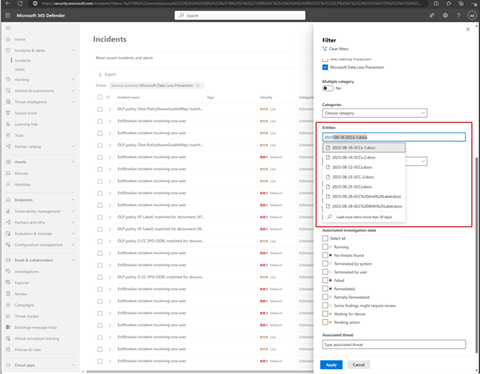
We are announcing a new feature in Public Preview where we are enhancing the filtering experience for DLP alerts in Microsoft 365 Defender portal with the capability to filter the DLP alerts/incidents queues by File Name or File Path.
This message is associated with Microsoft 365 Roadmap ID 180989
[When this will happen:] This is now available in Preview. [How this will affect your organization:]
Below is a screenshot of this new File Name/File Path filter in action.
[What you need to do to prepare:]
There is nothing you need to do prepare, the filter option will be available in the DLP incidents and alerts experience in the Microsoft 365 Defender portal. Investigate data loss alerts with Microsoft 365 Defender | Microsoft Learn |
| Machine Translation |
パブリック プレビューの新機能を発表し、Microsoft 365 Defender ポータルでの DLP アラートのフィルター処理エクスペリエンスを強化し、ファイル名またはファイル パスで DLP アラート/インシデント キューをフィルター処理する機能を追加します。
このメッセージは、Microsoft 365 ロードマップ ID 180989に関連付けられています
[これがいつ起こるか:] これはプレビューで利用できるようになりました。 [これが組織に及ぼす影響:]
以下は、この新しいファイル名/ファイルパスフィルターの動作のスクリーンショットです。
[準備に必要なこと:]
準備する必要はなく、フィルター オプションは、Microsoft 365 Defender ポータルの DLP インシデントとアラート エクスペリエンスで使用できます。 |