| MC578280 | (Updated) Animated Backgrounds in Teams Meetings |
|---|
| Classification | stayInformed |
|---|---|
| Last Updated | 11/30/2023 19:09:28 |
| Start Time | 06/09/2023 05:29:36 |
| End Time | 02/26/2024 08:00:00 |
| Message Content |
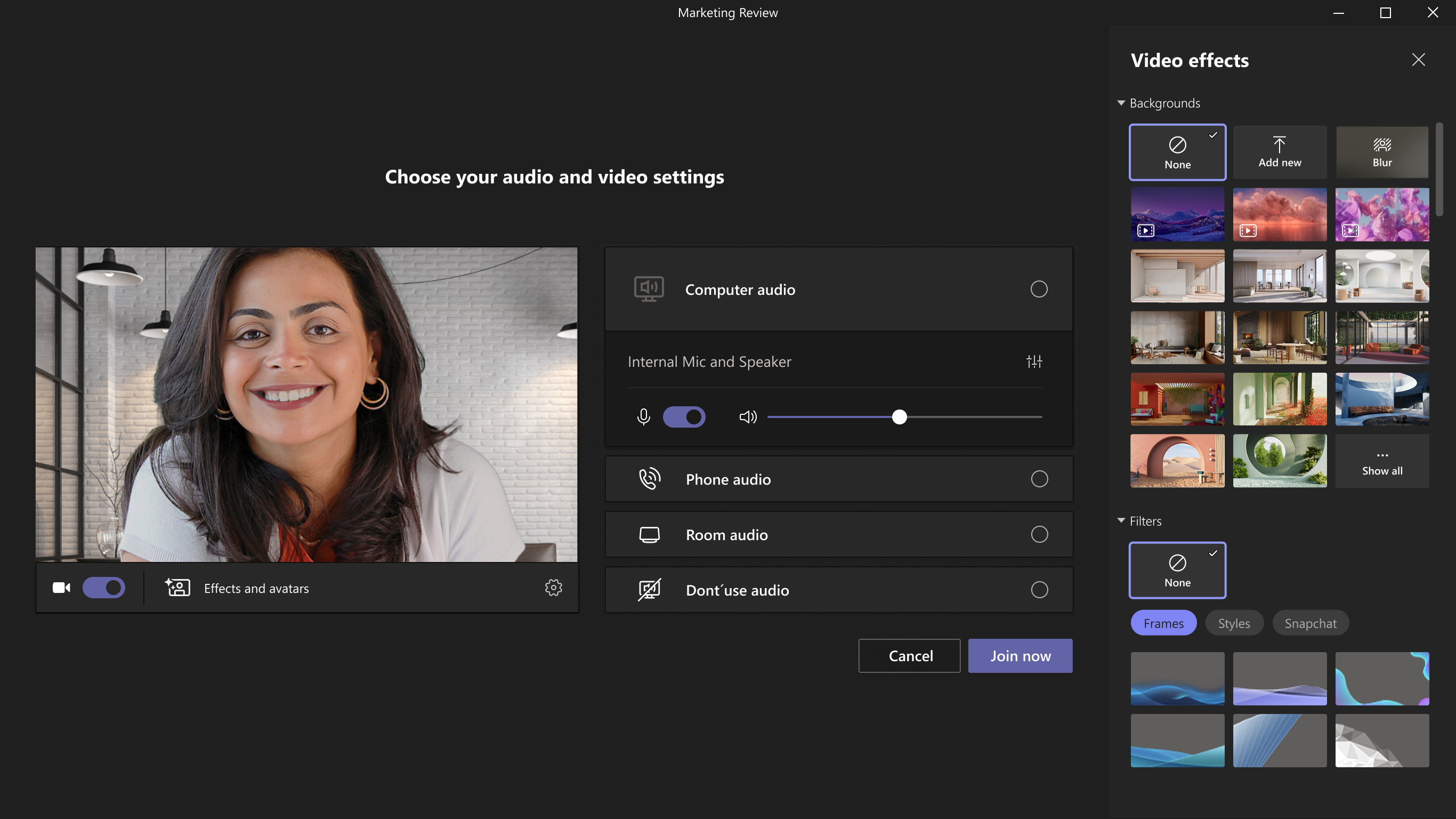
Updated November 30, 2023: We have updated the timeline below. Thank you for your patience. The animated background feature in Teams Meetings allows users to replace their existing background with a dynamic animation for a more immersive virtual environment. It offers various options to enhance meeting experience with creativity and personalization according to users’ preferences. Currently, only pre-defined backgrounds from Microsoft are supported. Animated backgrounds are identified by the small video icon in the bottom-left corner of the preview picture. This message is associated with Microsoft 365 Roadmap ID 122513 [When this will happen:] Targeted Release: We will begin rolling out in mid-June and expect to complete rollout by late June. Public Preview: We will begin rolling out in mid-June and expect to complete rollout by late June. Standard Release and GCC: We will begin rolling out in early July and expect to complete rollout by mid-September 2023 (previously late July). GCC-High and DoD: We will begin rolling out in late September and expect to complete rollout by mid-January 2024 (previously late October). [How this will affect your organization:] Users can go to the pre-join screen before the meeting start > Effects and Avatars > Video effects and select a new animated background. Animated backgrounds can be identified by the little video symbol in the bottom left corner of the preview picture.
Users can also change animated backgrounds when they start a meeting and go to More in meeting toolbar > Effects and Avatars > Select an animated background.
[What you need to do to prepare:] No preparation is needed. You may want to update your training materials indicating that animated backgrounds are now supported Teams meetings. |
| Machine Translation |
2023 年 11 月 30 日更新: 以下のタイムラインを更新しました。何卒ご理解のほどよろしくお願いいたします。 Teams 会議のアニメーション背景機能を使用すると、ユーザーは既存の背景を動的なアニメーションに置き換えて、より没入感のある仮想環境を実現できます。ユーザーの好みに応じて、創造性とパーソナライゼーションで会議体験を向上させるためのさまざまなオプションを提供します。現在、Microsoft の事前定義された背景のみがサポートされています。アニメーション化された背景は、プレビュー画像の左下隅にある小さなビデオアイコンで識別されます。 このメッセージは、Microsoft 365 ロードマップ ID 122513に関連付けられています [これがいつ起こるか:] 対象指定リリース: 6 月中旬にロールアウトを開始し、6 月下旬までにロールアウトを完了する予定です。 パブリック プレビュー: 6 月中旬にロールアウトを開始し、6 月下旬までにロールアウトを完了する予定です。 標準リリースと GCC: 7 月上旬にロールアウトを開始し、2023 年 9 月中旬 (以前は 7 月下旬) までにロールアウトを完了する予定です。 GCC-High と DoD: 9 月下旬にロールアウトを開始し、2024 年 1 月中旬 (以前は 10 月下旬) までにロールアウトを完了する予定です。 [これが組織に及ぼす影響:] ユーザーは、ミーティング開始前に [効果とアバター] > [ビデオ効果] > 参加前画面に移動し、新しいアニメーション背景を選択できます。アニメーション化された背景は、プレビュー画像の左下隅にある小さなビデオ記号で識別できます。
ユーザーは、ミーティングの開始時にアニメーションの背景を変更し、 ミーティング ツールバーの [その他] > [効果とアバター] > [アニメーションの背景を選択] に移動することもできます。
[準備に必要なこと:] 準備は必要ありません。アニメーションの背景が Teams 会議でサポートされるようになったことを示すトレーニング資料を更新することができます。 |