| MC697806 | Viva Insights Feature Admin Controls: Reflection |
|---|
| Classification | stayInformed |
|---|---|
| Last Updated | 12/13/2023 00:31:58 |
| Start Time | 12/13/2023 00:28:12 |
| End Time | 03/29/2024 07:00:00 |
| Message Content |
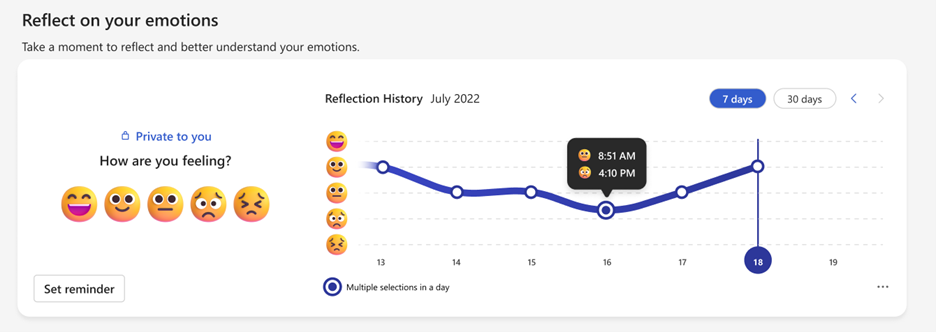
We have added new capabilities for admins in Viva Insights: Admins can disable the Reflection feature for their tenant, individual users, or AAD groups and M365 Groups. [When this will happen:] These changes will start to roll out in December 2023 and will be available worldwide by early February 2024. [How this will affect your organization:] A new capability for admins offers more flexibility to manage user access to specific Insights features: to start with, Insights Admins can configure access to the Reflection feature. They can configure access at the tenant level, group level (using AAD groups or M365 Groups), or at the user level, for maximum flexibility. View our support content to learn more about the Reflection feature.
Admins will now have the ability to configure access to this feature using a Powershell cmdlet. Use the Add-VivaModuleFeaturePolicy cmdlet to add a new access policy for a specific feature in Viva C in this case, Reflection. The attributes of the policy are defined using the various parameters of the cmdlet. Policies are used to restrict or grant access to the specified feature for specific users, groups, or the entire tenant.
For more information about the Powershell cmdlets and detailed instructions on how to set a policy, visit Control access to features in Viva
[What you need to do to prepare:] Review and assess the impact on your organization. Determine if you want to create a policy to configure access to the Reflection feature in Viva Insights. |
| Machine Translation |
Viva インサイトに管理者向けの新C能が追加されました: 管理者は、テナント、々のユ`ザ`、または AAD グル`プと M365 グル`プのリフレクションC能をo郡摔工毪长趣扦蓼埂 [これがいつ起こるか:] これらの涓 2023 年 12 月にロ`ルアウトを_始し、2024 年 2 月上旬までに全世界で利用できるようになります。 [これがMに及ぼす影:] 管理者向けの新C能により、特定のインサイトC能へのユ`ザアクセスをより柔に管理できます: まず、インサイト管理者は Reflection C能へのアクセスを成できます。テナント レベル、グル`プ レベル (AAD グル`プまたは M365 グル`プを使用)、またはユ`ザ` レベルでアクセスを成して、柔性を最大限に高めることができます。 リフレクションC能のについては、 サポ`トコンテンツ をごEください。
管理者は、Powershell コマンドレットを使用してこのC能へのアクセスを成できるようになりました。Add-VivaModuleFeaturePolicy コマンドレットを使用して、Viva の特定のC能 (この龊悉膝辚榨欹伐绁) の新しいアクセス ポリシ`を追加します。ポリシ`の属性は、コマンドレットのさまざまなパラメ`タ`を使用して定xされます。ポリシ`は、特定のユ`ザ`、グル`プ、またはテナント全体にして、指定されたC能へのアクセスを制限またはS可するために使用されます。
Powershell コマンドレットのとポリシ`のO定方法のな手については、「Viva のC能へのアクセスを制御する」を参照してください
[浃吮匾胜长:] Mへの影を_Jおよびu筏蓼埂Viva インサイトのリフレクションC能へのアクセスを成するポリシ`を作成するかどうかをQ定します。 |