| MC708076 | Microsoft Viva Engage: New feature to limit moving of conversations across communities |
|---|
| Classification | stayInformed |
|---|---|
| Last Updated | 01/18/2024 00:58:00 |
| Start Time | 01/18/2024 00:01:00 |
| End Time | 06/28/2024 07:00:00 |
| Message Content |
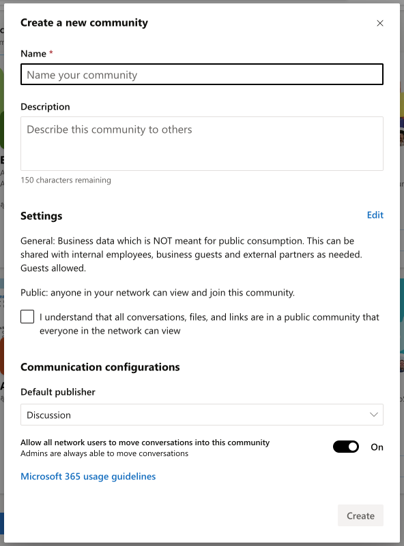
Starting in January 2024, Microsoft Viva Engage customers will see a new setting to prevent users from moving conversations into a community. Community or Engage admins may want to limit the movement of conversations between communities in the network. The new limit move conversation feature helps with that goal. When applied, users cannot move conversations into a community. All users can move conversations out of a community. Regardless of setting status, admins retain the ability to move a conversation anywhere in the network. The limit move conversation feature is a toggle on a community’s Settings page. The toggle is available per community. Community admins can use the toggle for communities they manage. Engage admins can adjust the setting in any community. This feature is only available in the community settings in the Viva Engage web/desktop experience and in Outlook and Teams apps. Mobile apps and the Classic Engage (Yammer) experiences will not see this new setting. [When this will happen:] Networks will begin to see the limit move conversation feature in community settings starting January 2024. Full rollout will complete by the end of March 2024. [How this will affect your organization:] Community and Engage admins will be able to apply the limit move conversation feature from community settings. The toggle appears in the settings of existing communities and via the settings modal during community creation. Note that restricted communities are not affected by this feature. If a community is restricted, users cannot move conversations in or out of a community.
[What you need to do to prepare:] No action is needed to prepare for this change. You may want to notify your users about this change and update any relevant documentation as appropriate. |
| Machine Translation |
2024 年 1 月以降、Microsoft Viva エンゲージのお客様には、ユーザーが会話をコミュニティに移動できないようにする新しい設定が表示されます。 コミュニティ管理者または Engage 管理者は、ネットワーク内のコミュニティ間の会話の移動を制限したい場合があります。新しい 制限移動会話 機能は、その目標に役立ちます。適用すると、ユーザは会話をコミュニティに移動できません。すべてのユーザーが会話をコミュニティから移動できます。設定ステータスに関係なく、管理者はネットワーク内の任意の場所に会話を移動できます。 会話の制限移動機能は、コミュニティの [設定] ページの切り替えです。トグルはコミュニティごとに使用できます。コミュニティ管理者は、管理するコミュニティの切り替えを使用できます。Engage 管理者は、任意のコミュニティで設定を調整できます。 この機能は、Viva エンゲージ Web/デスクトップ エクスペリエンスのコミュニティ設定と、Outlook アプリと Teams アプリでのみ使用できます。モバイル アプリとクラシック エンゲージ (Yammer) エクスペリエンスには、この新しい設定は表示されません。 [これがいつ起こるか:] ネットワークでは、2024 年 1 月からコミュニティ設定で 制限移動 会話機能が表示されるようになります。完全なロールアウトは 2024 年 3 月末までに完了する予定です。 [これが組織に及ぼす影響:] コミュニティ管理者と Engage 管理者は、コミュニティ設定から 会話の制限移動 機能を適用できます。トグルは、既存のコミュニティの設定と、コミュニティ作成時の設定モーダルに表示されます。制限付きコミュニティはこの機能の影響を受けません。コミュニティが制限されている場合、ユーザーはコミュニティ内またはコミュニティ外に会話を移動できません。
[準備に必要なこと:] この変更に備えるためのアクションは必要ありません。この変更についてユーザーに通知し、必要に応じて関連ドキュメントを更新することをお勧めします。 |