| MC709988 | Microsoft Outlook: OneDrive for Business opens in Outlook on the web |
|---|
| Classification | stayInformed |
|---|---|
| Last Updated | 01/25/2024 01:16:22 |
| Start Time | 01/25/2024 01:15:22 |
| End Time | 05/01/2024 07:00:00 |
| Message Content |
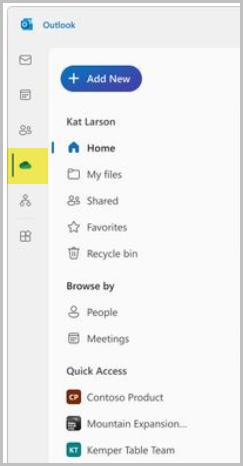
Quickly access your OneDrive for Business files without leaving Microsoft Outlook on the web! Previously, the OneDrive for Business button in Outlook on the web opened a new tab for OneDrive. With this change, you will see OneDrive folders and files inside of Outlook for the web, for a consistent and fast experience This message is associated with Microsoft 365 Roadmap ID 369520.
[When this will happen:] Targeted Release: We will begin rolling out late January 2024 and expect to complete early February 2024. All Environments: We will begin rolling out mid-February 2024 and expect to complete by late March 2024. [How this will affect your organization:] Your organization will be able to access OneDrive for Business directly from Outlook for the web for a faster and streamlined experience.
[What you need to do to prepare:]
No action is needed to prepare for this change. You may want to notify your users about this change and update any relevant documentation as appropriate. For more information and a screenshot of the OneDrive for Business button in Outlook for the web: Unveiling the Next Generation of OneDrive. |
| Machine Translation |
Web 上の Microsoft Outlook を離れることなく、OneDrive for Business ファイルにすばやくアクセスできます。以前は、Outlook on the webの OneDrive for Business ボタンで OneDrive の新しいタブが開きました。この変更により、Outlook for the web内にOneDriveフォルダーとファイルが表示され、一貫性のある高速なエクスペリエンスが実現します このメッセージは、Microsoft 365 ロードマップ ID 369520 に関連付けられています。
[これがいつ起こるか:] 対象リリース: 2024 年 1 月下旬にロールアウトを開始し、2024 年 2 月上旬に完了する予定です。 すべての環境: 2024 年 2 月中旬にロールアウトを開始し、2024 年 3 月下旬までに完了する予定です。 [これが組織に及ぼす影響:] 組織は、Outlook for the webから直接OneDrive for Businessにアクセスして、より高速で合理化されたエクスペリエンスを実現できます。
[準備に必要なこと:]
この変更に備えるためのアクションは必要ありません。この変更についてユーザーに通知し、必要に応じて関連ドキュメントを更新することをお勧めします。 Outlook for the webの [OneDrive for Business] ボタンの詳細とスクリーンショットについては、「 次世代の OneDrive を発表する」を参照してください。 |