| MC710215 | Microsoft SharePoint news for email now supports custom template tab settings and wider posts |
|---|
| Classification | stayInformed |
|---|---|
| Last Updated | 01/26/2024 00:10:59 |
| Start Time | 01/26/2024 00:10:45 |
| End Time | 10/31/2024 07:00:00 |
| Message Content |
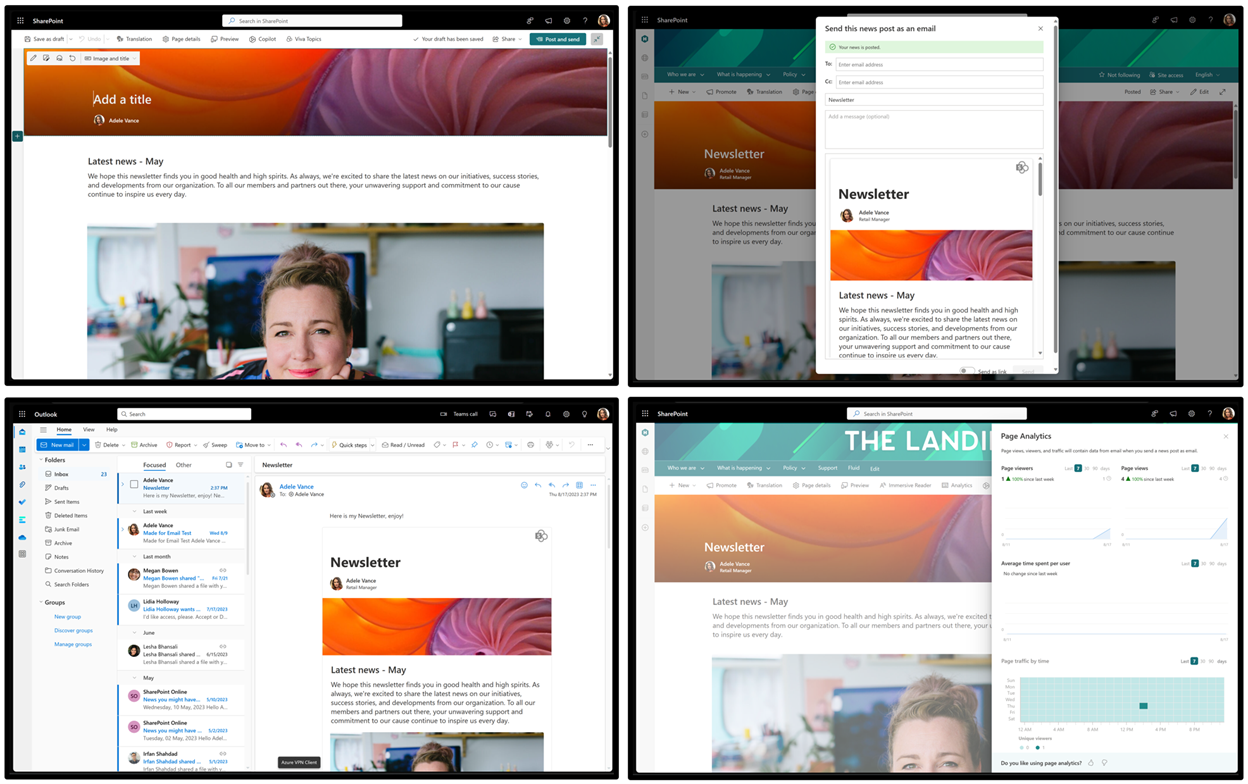
News for email is a new type of News template that authors can use to convert SharePoint News posts into distributions for Microsoft Outlook for Windows email inboxes. You can now engage your audience directly in their Outlook for Windows inbox and track their mail reads.
[When this will happen:] Targeted Release: We will begin rolling out mid-January 2024 and expect to complete by early February 2024. Standard Release, GCC, GCC High, DoD, USSec, and USNat: We will begin rolling out early February 2024 and expect to complete by mid-February 2024.
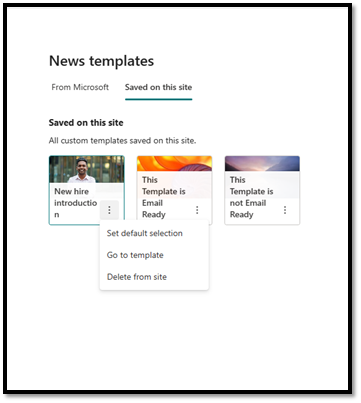
[How this will affect your organization:] SharePoint News posts recipients may see wider widths when they open Made for email news on a wider desktop view in Outlook for Windows. Site admins can now make the Saved on this site template picker tab open first when they set a custom template as the site default. Custom template picker tab settings
When you set a custom template as your site default, the Saved on this site tab will open first in the News template picker, and your templates will appear before the built-in templates from Microsoft. Follow these steps:
To undo this change, set a Microsoft built-in template as your default.
Wider messages on Microsoft Outlook for Windows
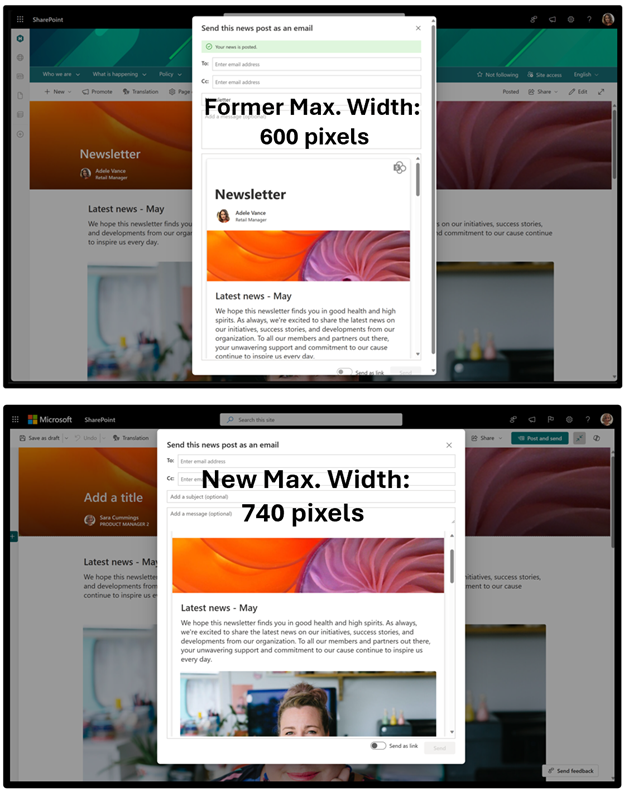
When you open a Made for email news post in your Outlook for Windows inbox, the post will now be wider (up to 740 pixels) when space is available, for a more legible view. The Send time preview will show the 740-pixel view. On mobile devices or when space is not available, posts will revert to 600 pixels wide.
[What you need to do to prepare:] Learn more about this update: Introducing new SharePoint news for email feature and SharePoint News for Email templates. No action is needed to prepare for this change. You may want to notify your users about this change and update any relevant documentation as appropriate. |
| Machine Translation |
電子メールのニュース は、作成者が SharePoint ニュースの投稿を Microsoft Outlook for Windows の電子メール受信トレイの配布に変換するために使用できる新しい種類のニュース テンプレートです。Outlook for Windows の受信トレイで直接対象ユーザーを引き付け、メールの既読を追跡できるようになりました。
[これがいつ起こるか:] 対象リリース: 2024 年 1 月中旬にロールアウト を開始し、2024 年 2 月上旬までに 完了する予定です。 標準リリース、GCC、GCC High、DoD、USSec、USNat: 2024 年 2 月上旬にロールアウトを開始し、2024 年 2 月中旬までに完了する予定です。
[これが組織に及ぼす影響:] SharePoint ニュースの投稿の受信者は、Outlook for Windows の広いデスクトップ ビューで [ メール用に作成された ニュース] を開くと、幅が広く表示される場合があります。サイト管理者は、カスタム テンプレートをサイトの既定として設定するときに、 最初に [このサイト テンプレート ピッカーに保存] タブを開くことができるようになりました。 カスタム テンプレート ピッカー タブの設定
カスタム テンプレートをサイトの既定として設定すると、ニュース テンプレート ピッカーで [ このサイトに保存済み ] タブが最初に開き、テンプレートが Microsoft の組み込みテンプレートの前に表示されます。以下の手順に従います。
この変更を元に戻すには、Microsoft 組み込みテンプレートを既定として設定します。
Microsoft Outlook for Windows のより広範なメッセージ
Outlook for Windows の受信トレイで [ メール用に作成された ] ニュース投稿を開くと、空き領域が空くと投稿の幅が広くなり (最大 740 ピクセル)、見やすくなりました。 送信時刻のプレビュー には、740 ピクセルのビューが表示されます。モバイルデバイスや空き容量がない場合、投稿の幅は600ピクセルに戻ります。
[準備に必要なこと:] この更新プログラムの詳細については、「 電子メール用の新しい SharePoint ニュース機能 と 電子メール用 SharePoint ニュース テンプレートの概要」を参照してください。 この変更に備えるためのアクションは必要ありません。この変更についてユーザーに通知し、必要に応じて関連ドキュメントを更新することをお勧めします。 |