| MC709268 | (Updated) Introducing the ability to duplicate an existing webinar |
|---|
| Classification | stayInformed |
|---|---|
| Last Updated | 02/02/2024 21:22:22 |
| Start Time | 01/23/2024 00:43:02 |
| End Time | 06/03/2024 07:00:00 |
| Message Content |
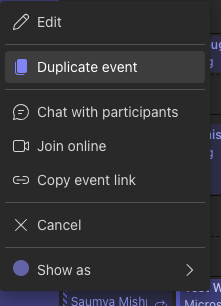
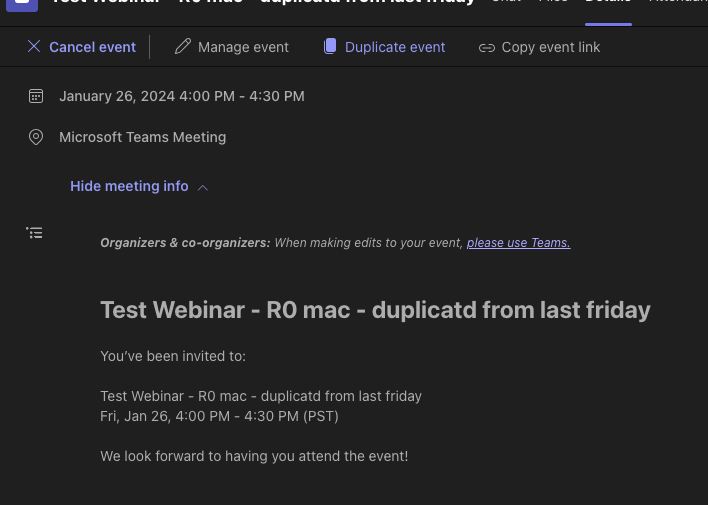
Updated February 2, 2024: We have updated the rollout timeline below. Thank you for your patience. Currently with webinars, you are unable to duplicate a webinar and create a new webinar based off an existing one. This can be time consuming if organizers would like to schedule multiple events that are similar to one another. To simplify event creation Microsoft Teams is introducing the ability to create a new webinar by duplicating the information for an existing scheduled one. Information includes a webinar’s details, presenters, theming, and more. The organizer can also choose to edit and update the information as needed for their new webinar. This message is associated with Microsoft 365 Roadmap ID 375177 [When this will happen:] Targeted Release: We will begin rolling out mid-March 2024 (previously late February) and expect to complete by late March 2024 (previously early March). Standard Release and GCC: We will begin rolling out late March 2024 (previously early March) and expect to complete by late April 2024 (previously late March). [How this will affect your organization:] Webinar organizers in your tenant can now duplicate webinars from existing scheduled webinars. Organizers can do this by right clicking on the webinar object in the Teams Calendar and then clicking on “Duplicate event.” Organizers can also duplicate an event by clicking “Duplicate event” in the details page when a user double clicks on the webinar in the calendar.
[What you need to do to prepare:] You do not need to do anything to prepare; however, we do recommend updating your existing internal documentation on webinars to include this new update. |
| Machine Translation |
2024 年 2 月 2 日更新: 以下のロールアウト タイムラインを更新しました。何卒ご理解のほどよろしくお願いいたします。 現在、ウェビナーでは、ウェビナーを複製して、既存のウェビナーに基づいて新しいウェビナーを作成することはできません。これは、主催者が互いに類似した複数のイベントをスケジュールする場合に時間がかかることがあります。イベントの作成を簡素化するために、Microsoft Teams では、既存のスケジュールされたウェビナーの情報を複製して新しいウェビナーを作成する機能が導入されています。情報には、ウェビナーの詳細、プレゼンター、テーマなどが含まれます。開催者は、新しいウェビナーの必要に応じて情報を編集および更新することもできます。 このメッセージは、Microsoft 365 ロードマップ ID 375177に関連付けられています [これがいつ起こるか:] 対象リリース: 2024 年 3 月中旬 (以前は 2 月下旬) にロールアウトを開始し、2024 年 3 月下旬 (以前は 3 月上旬) までに完了する予定です。 標準リリースと GCC: 2024 年 3 月下旬 (以前は 3 月上旬) にロールアウトを開始し、2024 年 4 月下旬 (以前は 3 月下旬) までに完了する予定です。 [これが組織に及ぼす影響:] テナントのウェビナー開催者は、既存のスケジュールされたウェビナーからウェビナーを複製できるようになりました。開催者は、Teams カレンダーのウェビナー オブジェクトを右クリックし、[イベントの複製] をクリックすることでこれを行うことができます。主催者は、ユーザーがカレンダーでウェビナーをダブルクリックしたときに詳細ページの [イベントの複製] をクリックして、イベントを複製することもできます。
[準備に必要なこと:] 準備のために何もする必要はありません。ただし、ウェビナーに関する既存の内部ドキュメントを更新して、この新しい更新を含めることをお勧めします。 |