| MC716386 | Microsoft Viva Connections: Scoped search in New Teams |
|---|
| Classification | stayInformed |
|---|---|
| Last Updated | 02/16/2024 02:05:23 |
| Start Time | 02/16/2024 02:04:12 |
| End Time | 08/06/2024 07:00:00 |
| Message Content |
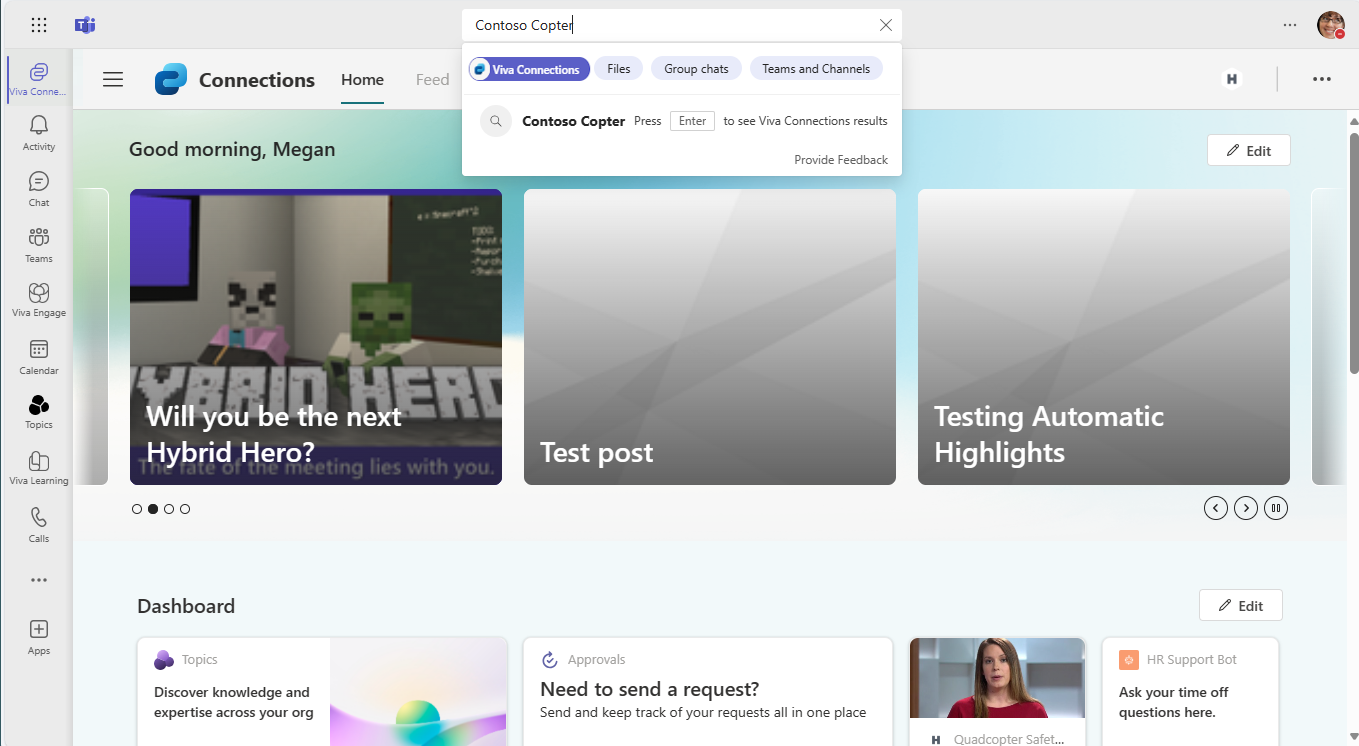
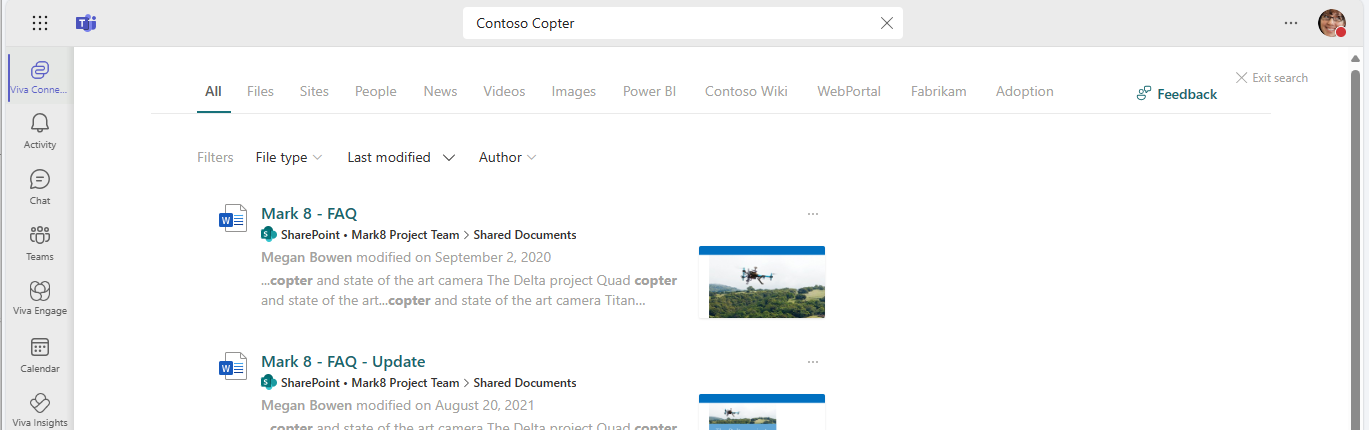
In 2023, we introduced scoped search for the Microsoft Viva Connections app in what is now Microsoft Classic Teams. Now we are rolling out scoped search to New Teams. If you are using Classic Teams, there is no change for your organization. [When this will happen:] Targeted Release: We will begin rolling out late February 2024 and expect to complete by early March 2024. Standard Release: We will begin rolling out early March 2024 and expect to complete by late March 2024. GCC: We will begin rolling out mid-April 2024 and expect to complete by late April 2024. GCC High: We will begin rolling out mid-May 2024 and expect to complete by late May 2024. [How this will affect your organization:] After the rollout, when using Viva Connections in New Teams, the search box text will display Search in Viva Connections (or the custom name your organization uses for Viva Connections). When you start typing in the search box, you will notice that Viva Connections is already selected and highlighted (screenshot 1). When you press Enter, you will go to a workplace search like you may have experienced on your organization’s intranet (screenshot 2). If you’d rather search within Teams, deselect the highlighted element (screenshot 1) and search again. To exit search, select the Viva Connections button in the app bar on the left to access the Viva Connections navigation, switch to another app with the app bar buttons in Teams, or use the back button in your browser in Teams for the web or the < > navigation in Teams for desktop. [What you need to do to prepare:] If your organization is using New Teams, no action is needed to prepare for this rollout. You may want to notify your users about this change and update any relevant documentation as appropriate. |
| Machine Translation |
2023 年には、現在の Microsoft クラシック Teams に Microsoft Viva コネクション アプリのスコープ検索が導入されました。現在、スコープ検索を新しいチームにロールアウトしています。 クラシック Teams を使用している場合、組織に変更はありません。 [これがいつ起こるか:] 対象リリース: 2024 年 2 月下旬にロールアウトを開始し、2024 年 3 月上旬までに完了する予定です。 標準リリース: 2024 年 3 月上旬にロールアウトを開始し、2024 年 3 月下旬までに完了する予定です。 GCC: 2024 年 4 月中旬にロールアウトを開始し、2024 年 4 月下旬までに完了する予定です。 GCC High: 2024 年 5 月中旬にロールアウトを開始し、2024 年 5 月下旬までに完了する予定です。 [これが組織に及ぼす影響:] ロールアウト後、新しいチームでViva コネクションを使用すると、検索ボックスのテキストに Viva コネクションの検索 (または組織が Viva コネクション に使用するカスタム名) が表示されます。検索ボックスに入力を開始すると、Viva コネクションが既に選択され、強調表示されていることがわかります (スクリーンショット 1)。Enter キーを押すと、組織のイントラネットで経験したような職場検索に移動します (スクリーンショット 2)。Teams 内で検索する場合は、強調表示された要素 (スクリーンショット 1) の選択を解除して、もう一度検索します。 検索を終了するには、左側のアプリ バーの [Viva コネクション] ボタンを選択して Viva コネクション ナビゲーションにアクセスするか、Teams のアプリ バー ボタンを使用して別のアプリに切り替えるか、Teams for the webのブラウザーの [戻る] ボタンを使用するか、デスクトップ用 Teams の< >ナビゲーションを使用します。 [準備に必要なこと:] 組織で新しい Teams を使用している場合は、このロールアウトを準備するためのアクションは必要ありません。この変更についてユーザーに通知し、必要に応じて関連ドキュメントを更新することをお勧めします。 |