SHD / MC Checker

MC716664 | Microsoft Teams | Task publishing: Schedule recurring lists and several top requests


MC716664 | Microsoft Teams | Task publishing: Schedule recurring lists and several top requests

Classification stayInformed
Last Updated 02/16/2024 23:50:33
Start Time 02/16/2024 23:48:41
End Time 08/31/2024 07:00:00
Message Content

The task publishing experience allows frontline organizations to distribute tasks across employees spread across geographically dispersed locations and then monitor how that work is going. Task publishing is available in Microsoft Teams as part of the Tasks by Planner and To Do app, which will soon be renamed to Planner.

We’re releasing several new task publishing features based on top customer requests and feedback: 

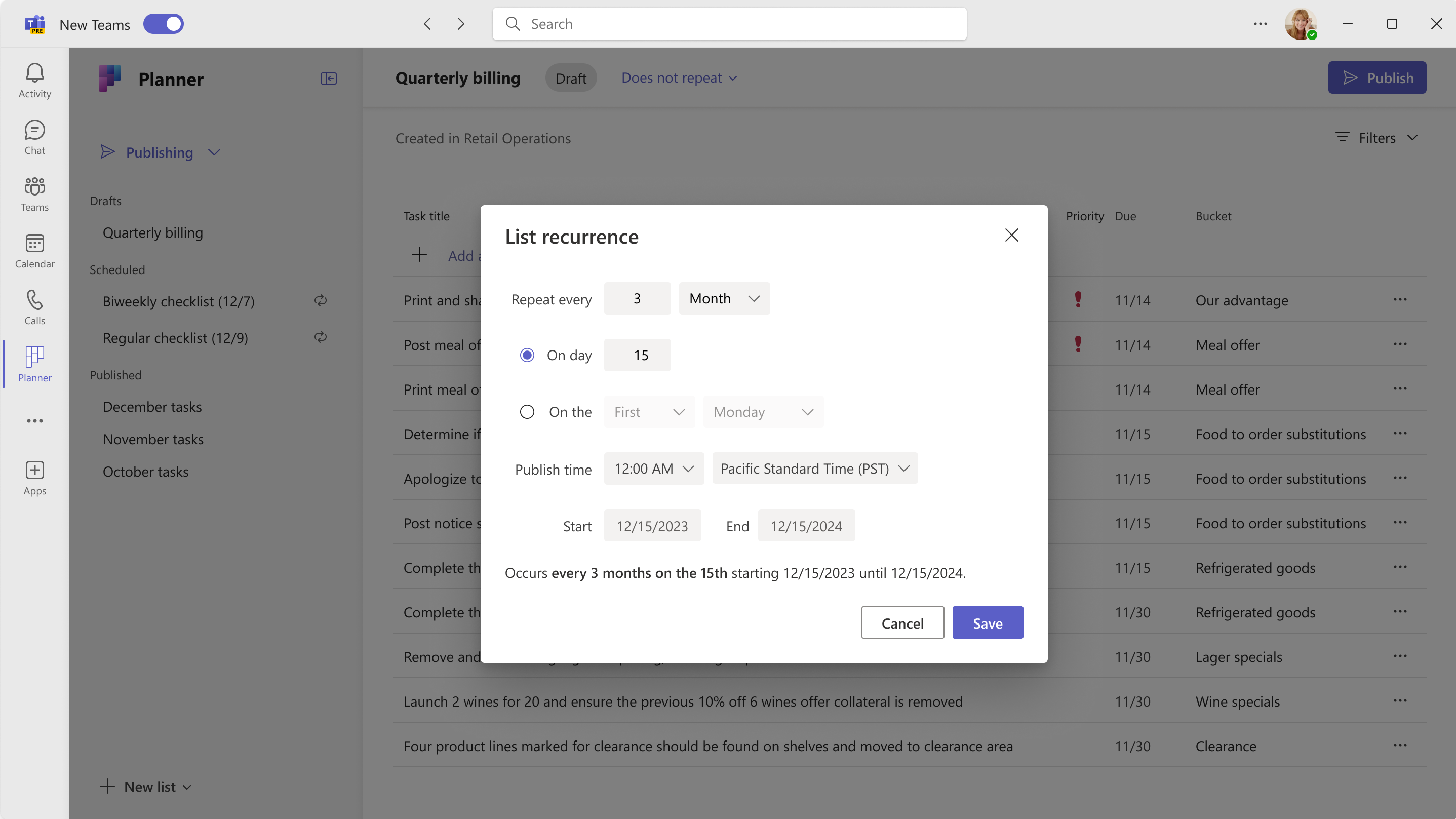
  1. Recurring task lists. You’ll be able to set recurrence on a draft task list, which will allow you to choose the cadence (such as every month on the 15th of the month). You can then publish the list and task publishing will automatically send future tasks. We know this will be a time saver for distributing repeat tasks across frontline locations. Common applications are weekly/monthly site inspections and compliance walks or daily opening and closing tasks.
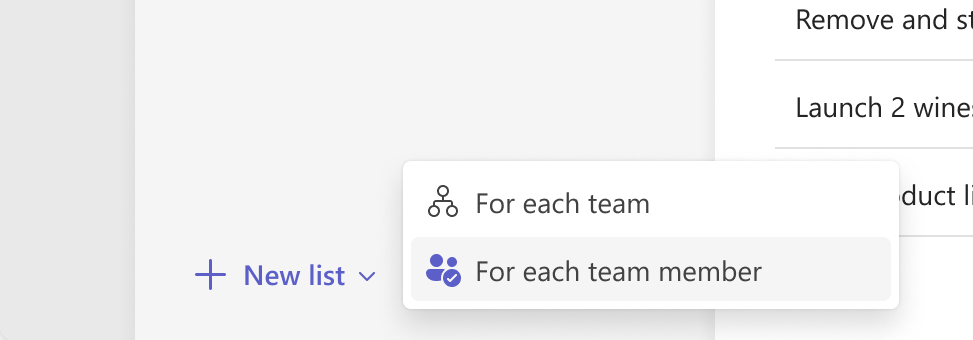
  2. Training and policy task lists. You’ll be able to create a task list for each member of a recipient team. When you publish the list and choose the recipient teams, a copy of the tasks in the list will be created for and assigned to each member of the recipient teams. This is a great option for training tasks or tasks where employees must acknowledge a new policy.
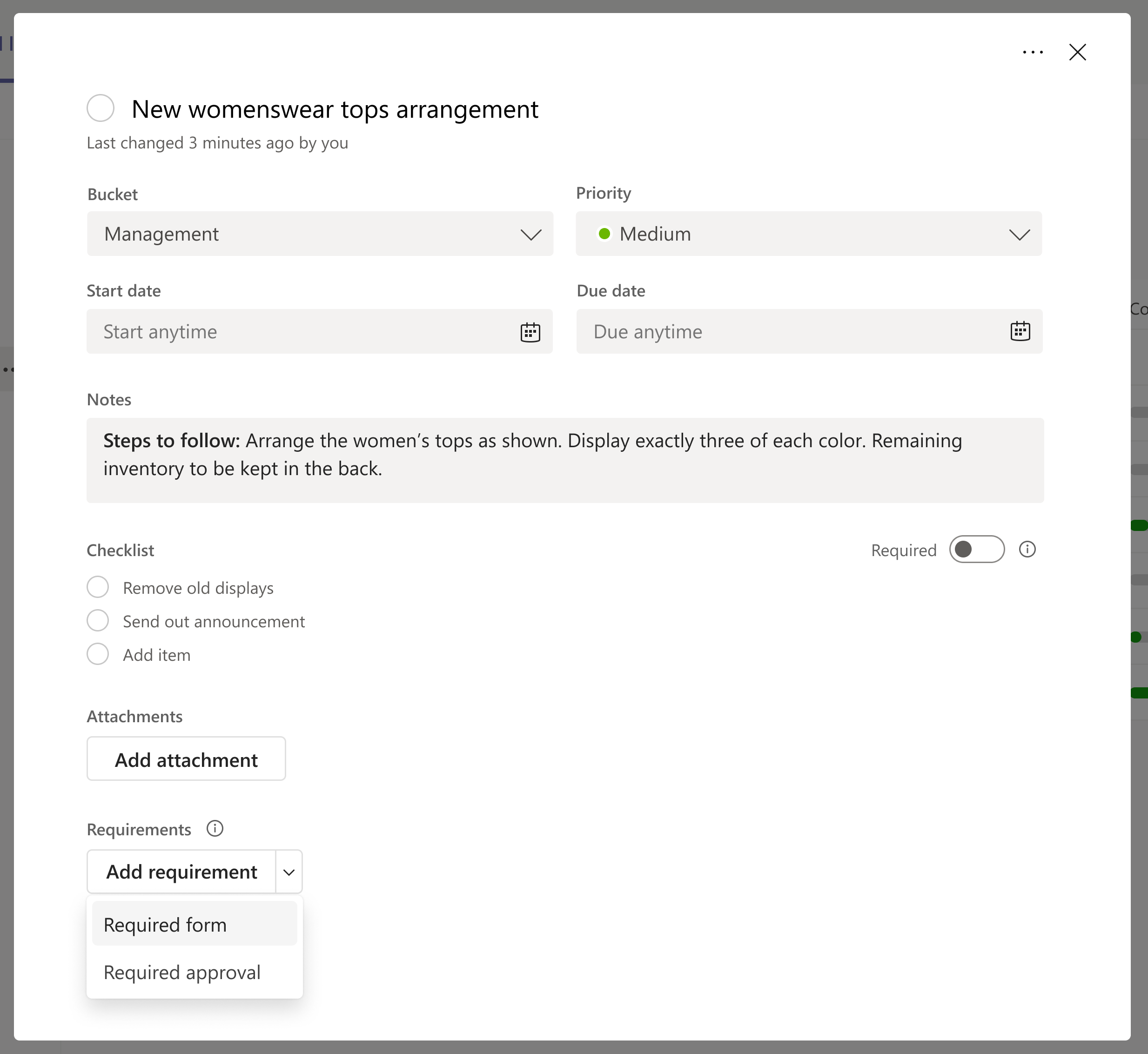
  3. Form completion requirement. You’ll be able to add a form completion requirement to a task, which allows you to create a Microsoft Forms survey that must be completed by a member of each recipient team before that team can complete the task. You can use any Forms question types, including a question that requires a file upload for employees to show their work. You’ll be able to centrally review the form submissions across the locations.
  4. Approval completion requirement. Similarly, you’ll be able to add an approval completion requirement to a task, which means that the task cannot be approved until an approval of the completed work is requested and granted. The approval can be requested directly from the task details by the user completing the task. 

These features will be enabled as part of the rollout of the new Planner experience (more info at https://aka.ms/thenewplanner).

This message is associated with Microsoft 365 Roadmap ID 135562.

[When this will happen:]

Targeted Release: We will begin rolling out mid-March and expect to complete by late March 2024.

Standard Release: We will begin rolling out late March 2024 and expect to complete by early April 2024.

[How this will affect your organization:]

If you are using the task publishing feature, you will see new options when creating task lists and tasks.

  • For recurrence options when working with a draft list, you can select Does not recur next to the list title to change the recurrence setting (Screenshot 1 below).
  • You’ll see the option to create a task list for each team member when you click the New list button (Screenshot 2 below).
  • You’ll see the option to add a form completion requirement or approval completion requirement to a task after you’ve created a task in the draft task list. Select the task to open it and add a new completion requirement at the bottom of the task details dialog box (Screenshot 3 below). 

Screenshot 1: Task list recurrence options:

user controls

Screenshot 2: Create a task list will show two types:

user controls

Screenshot 3: Add a form completion requirement or approval completion requirement:

user controls

[What you need to do to prepare:]

No additional action is needed to prepare for this rollout. You may want to notify your users about this change and update any relevant documentation as appropriate.

Machine Translation

タスク 発行エクスペリエンス により、現場担当者は地理的に分散した場所に分散した従業員にタスクを分散し、その作業の進行状況を監視できます。タスクの発行は、Microsoft Teams で Planner によるタスクと To Do アプリの一部として利用できます (まもなく Planner に名前が変更されます)。

お客様からの上位のご要望やフィードバックに基づいて、いくつかの新しいタスク公開機能をリリースします。 

  1. 定期的なタスク リスト。下書きのタスク リストに繰り返しを設定して、頻度 (毎月 15 日など) を選択できるようになります。その後、リストを公開すると、タスクの公開によって将来のタスクが自動的に送信されます。これにより、現場に繰り返しタスクを分散させるための時間の節約になることがわかっています。一般的な用途は、毎週/毎月の現場検査とコンプライアンスウォーク、または毎日の開閉作業です。
  2. トレーニングとポリシーのタスク リスト。 受信者チームの各メンバーのタスク リストを作成できます。リストを公開して受信者チームを選択すると、リスト内のタスクのコピーが作成され、受信者チームの各メンバーに割り当てられます。これは、トレーニング タスクや、従業員が新しいポリシーを確認する必要があるタスクに最適なオプションです。
  3. フォームの記入要件。 タスクにフォーム入力要件を追加すると、各受信者チームのメンバーがタスクを完了する前に完了する必要がある Microsoft Forms アンケートを作成できます。 従業員が作業内容を表示するためにファイルのアップロードを必要とする質問など、任意のフォームの質問タイプを使用できます。 場所全体でフォームの送信を一元的に確認できます。
  4. 承認完了要件。 同様に、タスクに承認完了要件を追加することもできますが、これは、完了した作業の承認が要求され、付与されるまでタスクを承認できないことを意味します。承認は、タスクを完了したユーザーがタスクの詳細から直接要求できます。 

これらの機能は、新しい Planner エクスペリエンスのロールアウトの一環として有効になります (詳細については、https://aka.ms/thenewplanner を参照してください )。

このメッセージは、Microsoft 365 ロードマップ ID 135562に関連付けられ ています

[これがいつ起こるか:]

対象リリース: 3 月中旬にロールアウトを開始し、2024 年 3 月下旬までに完了する予定です。

標準リリース: 2024 年 3 月下旬にロールアウトを開始し、2024 年 4 月上旬までに完了する予定です。

[これが組織に及ぼす影響:]

タスクの公開機能を使用している場合は、タスク リストとタスクの作成時に新しいオプションが表示されます。

  • 下書きリストを操作する際の繰り返しオプションについては、リスト のタイトルの横にある 繰り返し しない を選択して、繰り返しの設定を変更することができます (下のスクリーンショット 1)。
  • [ 新しいリスト ] ボタンをクリックすると、各チーム メンバーのタスク リストを作成するオプションが表示されます (下のスクリーンショット 2)。
  • 下書きタスク リストでタスクを作成した後、フォーム入力要件または承認完了要件をタスクに追加するオプションが表示されます。タスクを選択して開き、タスクの詳細ダイアログボックスの下部に新しい完了要件を追加します (下のスクリーンショット 3)。 

スクリーンショット 1: タスク リストの繰り返しオプション:

user controls

スクリーンショット 2: タスク リストの作成には、次の 2 つのタイプが表示されます。

user controls

スクリーンショット 3: フォーム入力要件または承認完了要件を追加します。

user controls

[準備に必要なこと:]

このロールアウトを準備するために追加のアクションは必要ありません。この変更についてユーザーに通知し、必要に応じて関連ドキュメントを更新することをお勧めします。