| MC716665 | Microsoft Exchange admin center: new troubleshooting option |
|---|
| Classification | stayInformed |
|---|---|
| Last Updated | 02/16/2024 23:51:27 |
| Start Time | 02/16/2024 23:50:51 |
| End Time | 08/05/2024 07:00:00 |
| Message Content |
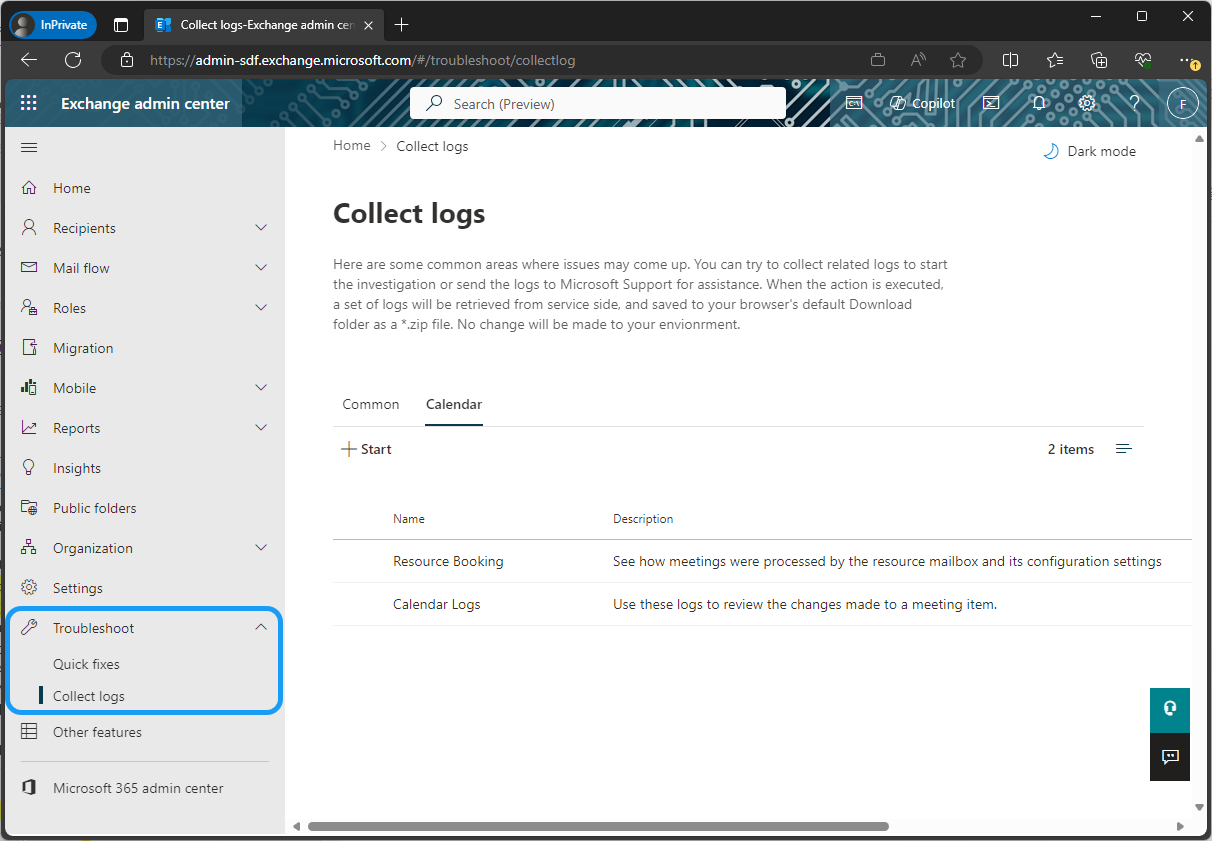
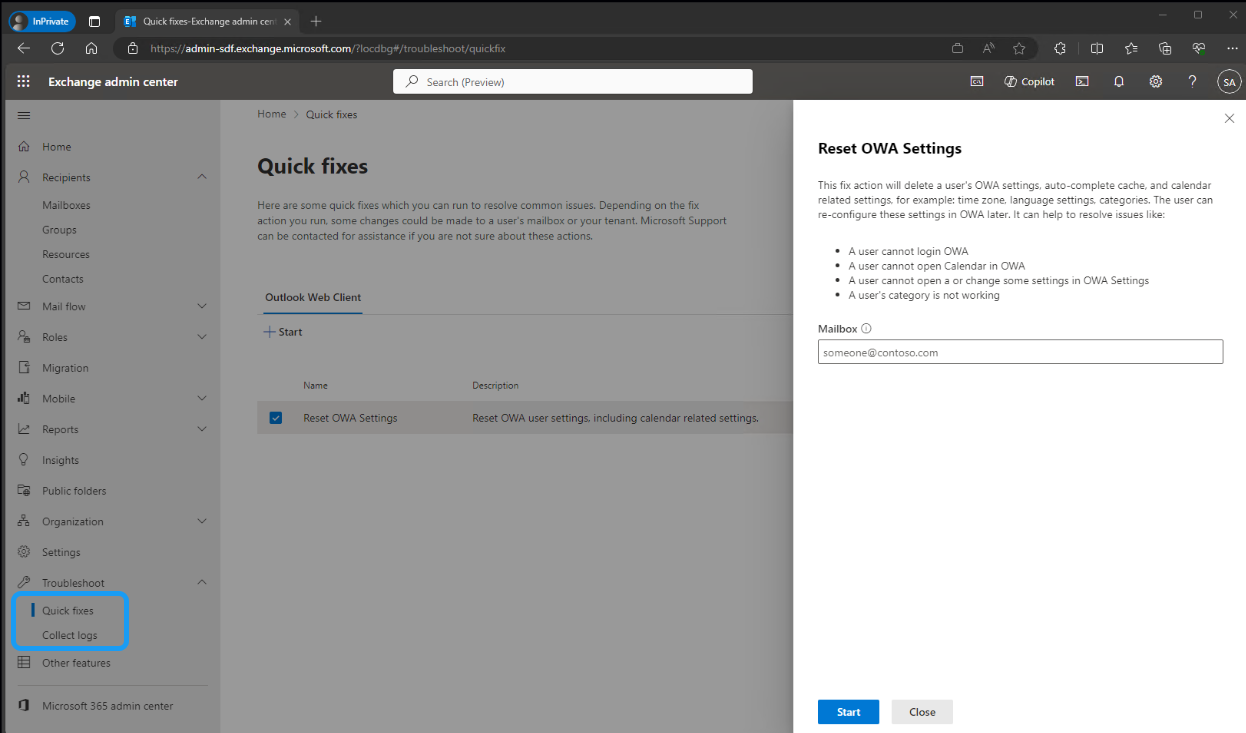
The Microsoft Exchange admin center (EAC) is launching new troubleshooting workflows to help customers resolve common issues more efficiently. [When this will happen:] Standard Release: We will begin rolling out mid-February 2024 and expect to complete by late June 2024. [How will this affect your organization:] Admins will be able to access the new Troubleshoot option on the left navigation of the Microsoft Exchange admin center. When common issues arise, admins can run the Quick fixes workflow or Collect logs workflow to investigate. These workflows gather logs and data to provide relevant information, making troubleshooting easier. All logs and data are stored on the admin’s local machine for easy access. The Quick fixes option includes workflows to resolve known issues. Each workflow provides detailed information about the actions it performs and the specific issue it addresses. In this initial release, admins will be able to quickly reset Outlook on the web (OWA) settings for users, helping to resolve various login and calendar-related issues. The Collect logs workflows can be used to diagnose issues with resource mailboxes functioning in unexpected ways or meetings updating incorrectly for a mailbox. Each workflow executes multiple cmdlets and provides aggregated information, which is then downloaded to the admin’s local machine as logs. These logs can be used to diagnose issues independently or provide additional information before contacting Support.
[What you need to do to prepare:]
No action is needed to prepare for this change. You may want to notify your users about this change and update any relevant documentation as appropriate. |
| Machine Translation |
Microsoft Exchange 管理センター (EAC) は、お客様が一般的な問題をより効率的に解決できるように、新しいトラブルシューティング ワークフローを開始しています。 [これがいつ起こるか:] 標準リリース: 2024 年 2 月中旬にロールアウトを開始し、2024 年 6 月下旬までに完了する予定です。 [これは組織にどのような影響を与えますか:] 管理者は、Microsoft Exchange 管理センターの左側のナビゲーションにある新しい [トラブルシューティング ] オプションにアクセスできます。一般的な問題が発生した場合、管理者は クイック修正 ワークフローまたは ログの収集ワークフロー を実行して調査できます。これらのワークフローは、ログとデータを収集して関連情報を提供し、トラブルシューティングを容易にします。すべてのログとデータは、簡単にアクセスできるように管理者のローカルマシンに保存されます。 [クイック修正] オプションには、既知の問題を解決するためのワークフローが含まれています。各ワークフローは、実行するアクションと対処する特定の問題に関する詳細情報を提供します。 この初期リリースでは、管理者はユーザーのOutlook on the web(OWA)設定をすばやくリセットでき、ログインや予定表に関連するさまざまな問題の解決に役立ちます。 ログの収集ワークフローを使用して、リソース メールボックスが予期しない方法で機能したり、メールボックスの会議が正しく更新されなかったりする問題を診断できます。各ワークフローは複数のコマンドレットを実行し、集計された情報を提供し、ログとして管理者のローカル コンピューターにダウンロードします。これらのログを使用して、問題を個別に診断したり、サポートに連絡する前に追加情報を提供したりできます。
[準備に必要なこと:]
この変更に備えるためのアクションは必要ありません。この変更についてユーザーに通知し、必要に応じて関連ドキュメントを更新することをお勧めします。 |