| MC707663 | (Updated) Microsoft Teams: Chat/Channel Copilot will Preserve Side Pane Preferences |
|---|
| Classification | stayInformed |
|---|---|
| Last Updated | 02/21/2024 21:16:37 |
| Start Time | 01/17/2024 00:41:46 |
| End Time | 04/29/2024 07:00:00 |
| Message Content |
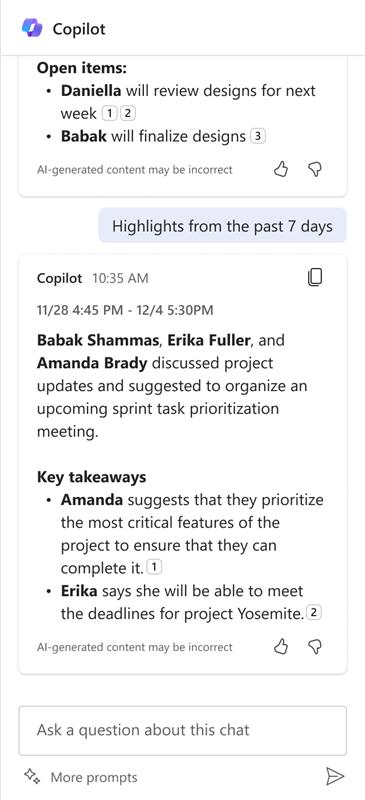
Updated February 21, 2024: We have updated the rollout timeline below. Thank you for your patience. We are excited to announce that Microsoft Copilot in Microsoft Teams chat and channels will soon preserve your side pane preferences for a specific chat thread while the Microsoft Teams app is running. This means that if you open Copilot in one group chat, it will remain open when you return to that chat thread. This feature will be available on desktop and web. [When this will happen:] Worldwide: We will roll out this feature to commercial tenants in early March 2024 (previously early-February) and expect it to be completed by mid-March 2024 (previously mid-February). [How this will affect your organization:] Prior to this feature, when you opened Chat Copilot or Channel Copilot and navigated away and then came back, Copilot would be closed. As a result of the release of this feature, when you open Chat Copilot and Channel Copilot and navigate away and come back, Copilot will remain open. To close Copilot, deselect the Copilot icon.
[What you need to do to prepare:] There is no action needed to prepare for this change. You may want to notify your users about this change and update any relevant documentation as appropriate. |
| Machine Translation |
2024 年 2 月 21 日更新: 以下のロールアウト タイムラインを更新しました。何卒ご理解のほどよろしくお願いいたします。 Microsoft Teams チャットとチャネルの Microsoft Copilot では、Microsoft Teams アプリの実行中に、特定のチャット スレッドのサイド ウィンドウの設定がまもなく保持されるようになることをお知らせします。つまり、1 つのグループチャットで Copilot を開くと、そのチャットスレッドに戻ったときに開いたままになります。この機能は、デスクトップとウェブで利用できます。 [これがいつ起こるか:] 全世界: この機能は 2024 年 3 月上旬 (以前は 2 月上旬) に商業テナントにロールアウトされ、2024 年 3 月中旬 (以前は 2 月中旬) までに完了する予定です。 [これが組織に及ぼす影響:] この機能が登場する前は、Chat Copilot または Channel Copilot を開いてから移動してから戻ってくると、Copilot は閉じられていました。この機能のリリースにより、Chat Copilot と Channel Copilot を開き、別の場所に移動して戻ってきても、Copilot は開いたままになります。Copilot を閉じるには、Copilot アイコンの選択を解除します。
[準備に必要なこと:] この変更に備えるために必要なアクションはありません。この変更についてユーザーに通知し、必要に応じて関連ドキュメントを更新することをお勧めします。 |