| Message Content |
Updated February 25, 2024: We have updated the content below with additional resources.
We will be releasing audience targeting support on Resources component and inline expansion of dashboard component on Viva Connections page. These features are expected to be available to customers by mid-February 2024.
To prepare for this upcoming release, we recommend setting up revamped Resources section ahead of time as per the instructions shared in our previous update.
As part of this update, the Resources section will be updated, and it will be pulling data from a different source other than global navigation. To prepare for this upcoming release, we suggest Connections admins to follow the steps outlined below.:
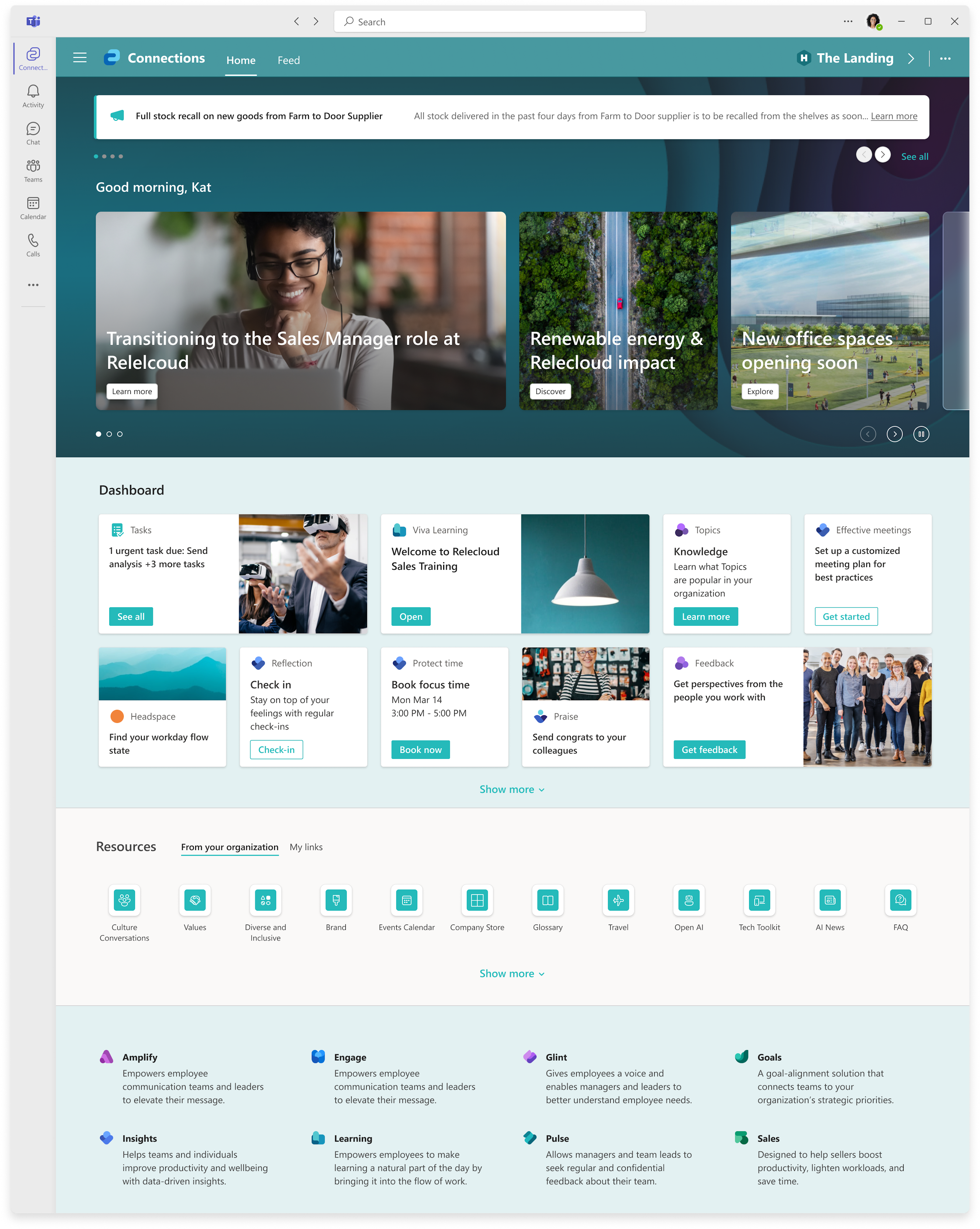
The refreshed Viva Connections landing experience offers a more intuitive layout and introduces several requested new features including branding capabilities, sending announcements, a revamped Resources section, and support for different card sizes. This experience will also bring the Feed back into the viewport on your Connections page.
Here are the updates that we expect our new layout will offer:
- Announcements – Important time sensitive information surfaced on desktop, mobile and tablet.
- Hero section – This new section focuses on org news and brings the Connections Feed into the viewport.
- Dashboard layout –The Dashboard section is evolving to be more fluid with inline expansion.
- Resources – Introduces a new section for company curated links different from global navigation. The new section allows for more flexibility to have a unique list with visuals like icons.
- Viva Suite links relocated – Viva suite links have been moved to the bottom of the experience and will offer links that the user is licensed for with a corresponding description.
- Full page feed – Full page feed treatment now exists with its own pivot shown at the top of the page.
This message is associated with Microsoft 365 Roadmap ID 176677
[When this will happen:]
Rollout will be broken down into two phases:
- Phase 1 rollout is expected to start in early November 2023 and is expected to be complete by mid-January 2024.
- Phase 2 rollout is expected to start in early February 2024 and is expected to be complete by late March 2024.
[How this will affect your organization:]
- The Feed will now be in the viewport of your Connections page. Your communication team can share important organization news with employees, which would surface in the Hero section on top of the page.
- Users will be notified of new announcements through the Viva Connections app through the Viva Connections app on desktop, mobile and tablet.
- With the updated resources experience, you will be able to manage a list of company links with support to add icons and images, along with URLs, that showcase your company’s brand and vision. In addition, a user managed section for employees to manage their own links is planned to be released in the second phase of this update. The updated resources experience will replace the current global navigation. However, Global navigation will still be accessible by double clicking on Connections app.
[What you need to do to prepare:]
You may want to notify users of these updates and update any relevant training documentation.
To transfer your existing links from your existing global navigation to the new resources section on the new Viva Connections desktop experience, you will need to follow these steps:
- Access the provisioned SharePoint list link below with your home site URL: ({SiteUrl}/Lists/CompanyList006e2221e1df45c0875383a98de5ecf1/AllItems.aspx) before the November 2023 launch and add your company links to it.
- In the list, there will be two required fields that you will need to fill out to add a link to your instance: Title and Link URL.
- Review and add the links to the list to make it available in your Connections instance when we go live. Once the two fields are completed, a link will be stored in the list. The maximum number of links that can be stored is 48 links.
Here are the instructions to find the site URL needed for setting up Resources:
- To find your site URL, go to the Microsoft Admin Center and on the menu pane, select Setup
- Once selected, navigate to Featured Collections and select Microsoft Viva
- From there, navigate and select Viva Connections
- Under the Setup and Management tab, select Create and Manage Viva Connections Experiences
- Select the tenant(s) that you want to edit and once selected, you’ll see a section that says URL (which will be the URL to your Connections instance).

(Microsoft Admin Center for Viva Connections highlighting where admins can find site URL.)
Resources:
|
| Machine Translation |
2024 年 2 月 25 日更新: 以下のコンテンツを更新し、追加のリソースを追加しました。
リソース コンポーネントの対象ユーザーのターゲット設定のサポートと、Viva コネクション ページのダッシュボード コンポーネントのインライン展開をリリースします。これらの機能は、2024 年 2 月中旬までにお客様に提供される予定です。
この今後のリリースに備えるために、前回のアップデートで共有した手順に従って、刷新されたリソースセクションを事前に設定することをお勧めします。
この更新の一環として、[リソース] セクションが更新され、グローバル ナビゲーション以外の別のソースからデータが取得されます。この今後のリリースに備えるために、Connections 管理者は以下に概説する手順に従うことをお勧めします。
更新されたViva コネクション ランディング エクスペリエンスは、より直感的なレイアウトを提供し、ブランド化機能、アナウンスの送信、改良された リソース セクション、さまざまなカード サイズのサポートなど、要求のあったいくつかの新機能を導入します。このエクスペリエンスでは、フィードが [接続 ] ページのビューポートにも戻されます。
新しいレイアウトで提供される予定のアップデートは次のとおりです。
- お知らせ – デスクトップ、モバイル、タブレットで重要な情報が表示されました。
- ヒーローセクション – この新しいセクションは、組織のニュースに焦点を当て、 接続フィード をビューポートに取り込みます。
- ダッシュボードのレイアウト – ダッシュボード セクションは、インライン展開により、より流動的になるように進化しています。
- リソース – グローバル ナビゲーションとは異なる、会社がキュレーションしたリンク用の新しいセクションが導入されました。新しいセクションでは、アイコンなどのビジュアルで一意のリストをより柔軟に作成できます。
- Viva スイート リンクの再配置 – Viva スイート リンクはエクスペリエンスの下部に移動され、ユーザーがライセンスされているリンクと対応する説明が提供されます。
- 全ページフィード – ページ上部に独自のピボットが表示されるフルページフィード処理ができるようになりました。
このメッセージは、Microsoft 365 ロードマップ ID 176677に関連付けられています
[これがいつ起こるか:]
ロールアウトは 2 つのフェーズに分かれています。
- フェーズ 1 のロールアウトは 2023 年 11 月上旬に開始され、2024 年 1 月中旬までに完了する予定です。
- フェーズ 2 のロールアウトは 2024 年 2 月上旬に開始され、2024 年 3 月下旬までに完了する予定です。
[これが組織に及ぼす影響:]
- これで、フィードが [接続] ページのビューポートに表示されます。コミュニケーション チームは、組織の重要なニュースを従業員と共有でき、ページ上部の [ヒーロー] セクションに表示されます。
- ユーザーには、デスクトップ、モバイル、タブレットの Viva コネクション アプリを通じて、Viva コネクション アプリを通じて新しいお知らせが通知されます。
- 更新されたリソース エクスペリエンスでは、会社のブランドとビジョンを示すアイコンと画像、および URL を追加するためのサポートを使用して、会社のリンクの一覧を管理できるようになります。また、このアップデートの第2フェーズでは、従業員が自分のリンクを管理するためのユーザー管理セクションをリリースする予定です。更新されたリソース エクスペリエンスは、現在のグローバル ナビゲーションに置き換わります。ただし、グローバル・ナビゲーションには、Connections アプリケーションをダブルクリックすることでアクセスできます。
[準備に必要なこと:]
これらの更新をユーザーに通知し、関連するトレーニング ドキュメントを更新することができます。
既存のグローバル ナビゲーションから新しいViva コネクション デスクトップ エクスペリエンスの新しいリソース セクションに既存のリンクを転送するには、次の手順に従う必要があります。
- 2023 年 11 月のリリース前に、ホーム サイトの URL ({SiteUrl}/Lists/CompanyList006e2221e1df45c0875383a98de5ecf1/AllItems.aspx) を使用して、以下のプロビジョニングされた SharePoint リスト リンクにアクセスし、会社のリンクを追加します。
- リストには、インスタンスへのリンクを追加するために入力する必要がある 2 つの必須フィールドがあります: タイトルとリンク URL。
- リンクを確認してリストに追加し、ライブ開始時に Connections インスタンスで使用できるようにします。2つのフィールドに入力すると、リンクがリストに保存されます。保存できるリンクの最大数は 48 リンクです。
リソースの設定に必要なサイトURLを見つける手順は次のとおりです。
- サイトの URL を見つけるには、Microsoft 管理センターに移動し、メニュー ウィンドウで [セットアップ] を選択します
- 選択したら、[おすすめのコレクション] に移動し、[Microsoft Viva] を選択します
- そこから、Viva コネクションに移動して選択します
- [セットアップと管理] タブで、[Viva コネクション エクスペリエンスの作成と管理] を選択します
- 編集するテナントを選択し、選択すると、URL (Connections インスタンスの URL) というセクションが表示されます。
(管理者がサイト URL を見つけることができる場所を強調表示するViva コネクションの Microsoft 管理センター)。
リソース:
|