| MC711662 | (Updated) Domain Impersonation Protection in Automatic State |
|---|
| Classification | planForChange |
|---|---|
| Last Updated | 03/15/2024 21:14:30 |
| Start Time | 02/01/2024 04:17:43 |
| End Time | 03/29/2024 07:00:00 |
| Message Content |
Updated March 15, 2024: Due to technical issues, we have to roll back the changes and remove the UX and cmdlets. We will update you with a new MCpost when the feature is ready again. Meanwhile, we recommend using impersonation protection capabilities to safeguard your users from any impersonation attack.
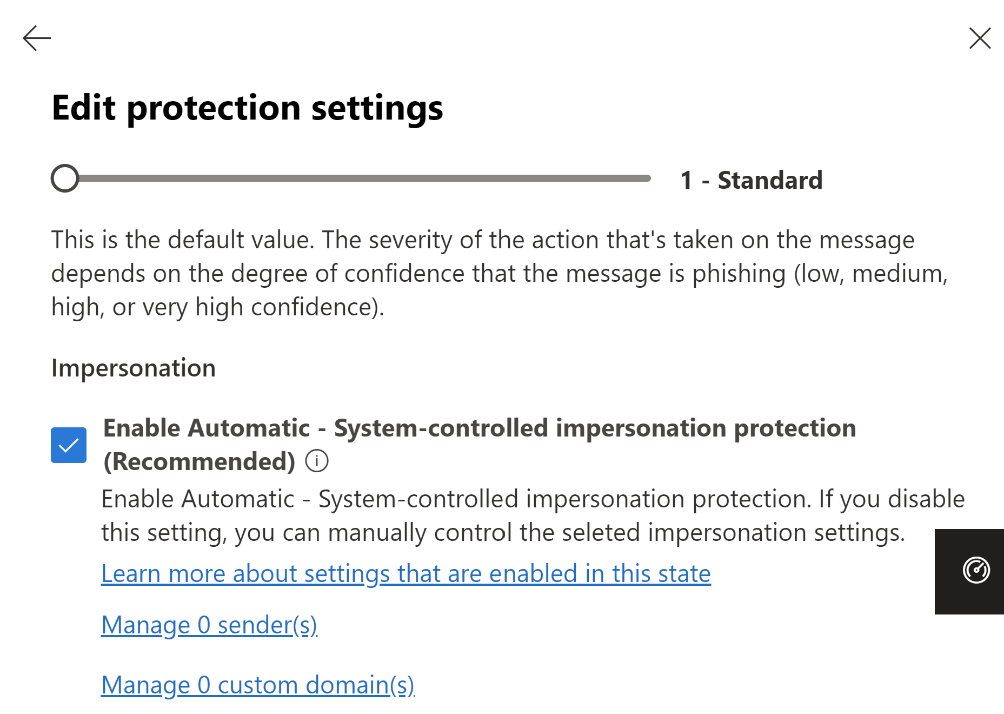
To enhance protection against Domain impersonation using Microsoft Defender for Office 365, the system will enable Domain impersonation protection by default. Additionally, existing customers who unintentionally kept Domain impersonation protection OFF in their tenant environment will start receiving the benefits of this protection for their company/organization’s owned domains.
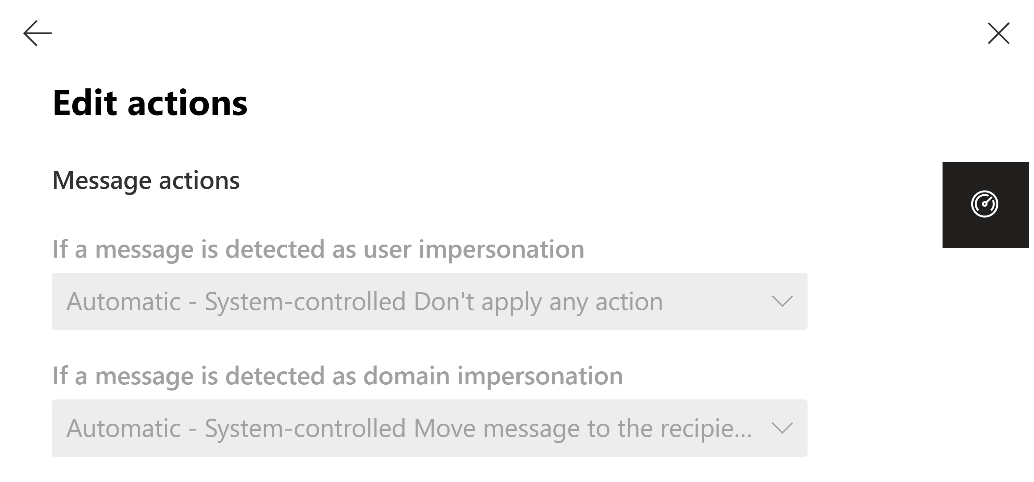
[When this will happen:] We will communicate via Message center when we are ready to proceed. [How this will affect your organization:] The upcoming change will provide security administrators the capability to manage Domain impersonation protection automatically enabled by default within AntiPhish Default and Custom Policies. This state will only be enabled by default for tenants who have the Domain impersonation setting turned OFF. (Specifically, when AntiPhish policy -> Impersonation settings -> Custom Domains; EnableOrganizationDomainsProtection:False within PowerShell). Additionally, there will also be an option for admins to choose not to enable these protections by default. They can set ImpersonationProtectionState: Manual in order to opt-out of Automatic state of domain impersonation protection. When the policy is effective (approx. 30 days after the opt-out period), users will see that domain impersonated emails are handled according to the policy settings chosen by MDO controlled settings as per Automatic state of the protection set by Security admins. (Or by settings configured by the Security admins per Manual state). The configured policies will determine the actions taken for such emails, ensuring that appropriate measures are in place to mitigate the risks associated with Domain impersonation attacks. This provides end users with increased confidence and assurance that impersonated emails will be managed effectively based on the guidelines established by their organization’s security administrators. Note: This change is only applicable to accepted domains and not applicable to custom domains (i.e. targeted domains) and it does not apply to Preset policies. The following settings will be enabled in Automatic state for Organization Domain Impersonation protection:
[What you need to do to prepare:]
During rollout, only the user experience and cmdlets related to the Domain impersonation protection change will be made available to customers. However, no immediate actions will be taken on domain impersonated messages based on these changes. Customers have the option to opt out of Automatic state of protection controlled by Microsoft and adjust their settings manually according to their preferences before the effective date. From that date onwards, the chosen setting will be honored, and the Domain impersonation protection will take action accordingly on the messages detected as such. (For example, send to junk or quarantine). With the upcoming automatic state rollout for Domain impersonation protection, other forms of impersonation protection will be turned OFF, as per the previous policy setting. If you want to activate impersonation protection for all other types of impersonations, you will need to disable the automatic state and manually enable protection settings for each of them. We are actively planning to introduce automatic state functionality for other impersonation protections in the future such as custom domain and user impersonation protection, mailbox intelligence-based impersonation protection. For more detailed information about Domain impersonation protection and its configuration in MDO, you can refer to the following public documentation: Anti-phishing policies and Impersonation insight. |
| Machine Translation |
2024 年 3 月 15 日更新: 技g的な}のため、涓颔愆`ルバックし、UX とコマンドレットを削除する必要があります。C能の浃ご蔚凇⑿陇筏MCpostでお知らせします。そのg、巫氨WoC能を使用して、巫肮膜楗姗`ザ`を保oすることをお幛幛筏蓼埂
Microsoft Defender for Office 365を使用してドメイン巫挨する保oを化するために、システムは既定でドメイン巫氨Woを有郡摔筏蓼埂¥丹椁恕匹圣螗拳h境で意恧护氦衰丧幞ぅ巫氨Woをオフにした既存のお客は、会社/Mが所有するドメインにしてこの保oのメリットを享受し始めます。
[これがいつ起こるか:] A行する浃扦郡椤幞氓哗`ジセンタ`を介してBjします。 [これがMに及ぼす影:] 今後の涓摔瑜辍互濂辚匹9芾碚撙稀AntiPhish、デフォルトポリシ`、およびカスタムポリシ`内でデフォルトで自拥膜擞郡摔胜毳丧幞ぅ巫氨Woを管理できるようになります。この状Bは、ドメイン巫霸O定がオフになっているテナントにしてのみ既定で有郡摔胜辘蓼埂 (具体的には、フィッシング策ポリシ` -> 巫霸O定 -> カスタム ドメイン;EnableOrganizationDomainsProtection:False です。 さらに、管理者がこれらの保oをデフォルトで有郡摔筏胜い长趣蜻xkするオプションもあります。ImpersonationProtectionState: Manual をO定して、ドメイン巫氨Woの自幼Bをオプトアウトできます。 ポリシ`が有郡摔胜毪 (オプトアウト期gのs 30 日後)、ユ`ザ`は、ドメイン巫哎岍`ルが、セキュリティ管理者によってO定された保oの自幼Bにって、MDO 制御O定によってxkされたポリシ`O定にってI理されることがわかります。(または、手幼Bごとにセキュリティ管理者によって成されたO定によって)。O定されたポリシ`は、このような子メ`ルにしてg行されるアクションをQ定し、ドメイン巫肮膜碎vBするリスクをXpするためのm切な策がvじられるようにします。これにより、エンドユ`ザ`は、なりすましメ`ルがMのセキュリティ管理者によって_立されたガイドラインに基づいて抗膜斯芾恧丹欷毪趣いψ孕扭缺T^を得ることができます。 手: この涓铣姓Jgみドメインにのみm用され、カスタム ドメイン (つまり、象ドメイン) にはm用されず、プリセット ポリシ`にはm用されません。Mドメインの巫氨Woの自幼Bでは、次のO定が有郡摔胜辘蓼埂
[浃吮匾胜长:]
ロ`ルアウト中は、ドメイン巫氨Woの涓碎vBするユ`ザ` エクスペリエンスとコマンドレットのみがお客に提供されます。ただし、これらの涓嘶扭い啤丧幞ぅ巫挨丹欷骏幞氓哗`ジにして直ちにアクションがg行されることはありません。 お客は、Microsoft によって制御される保oの自幼Bをオプトアウトし、k咳栅瑜昵挨撕盲撙じてO定を手婴钦{整することができます。その日付以降、xkしたO定がm用され、ドメイン巫氨Woは、そのように食訾丹欷骏幞氓哗`ジにしてそれにじてアクションをg行します。(たとえば、迷惑メ`ルや室撙怂托)。 ドメイン巫氨Woの今後の自幼Bロ`ルアウトでは、以前のポリシ`O定にって、他の形式の巫氨Woがオフになります。他のすべてのNの巫挨して巫氨Woをアクティブ化する龊悉稀⒆幼Bをo郡摔贰饯欷兢欷伪WoO定を手婴怯郡摔工氡匾辘蓼埂 将来的には、カスタム ドメインとユ`ザ`の巫氨Wo、メ`ルボックス インテリジェンス ベ`スの巫氨Woなど、他の巫氨Woに自幼BC能を毪工毪长趣蚍eO的に画しています。 ドメイン巫氨Woと MDO での成のについては、パブリック ドキュメント「フィッシング策ポリシ`」と「 巫挨畏治銮」を参照してください。 |