| MC715429 | (Updated) Data Loss Prevention – Enriched Data Loss Prevention (DLP) alert email notifications for DLP admins |
|---|
| Classification | stayInformed |
|---|---|
| Last Updated | 03/15/2024 21:54:56 |
| Start Time | 02/13/2024 01:30:45 |
| End Time | 06/03/2024 07:00:00 |
| Message Content |
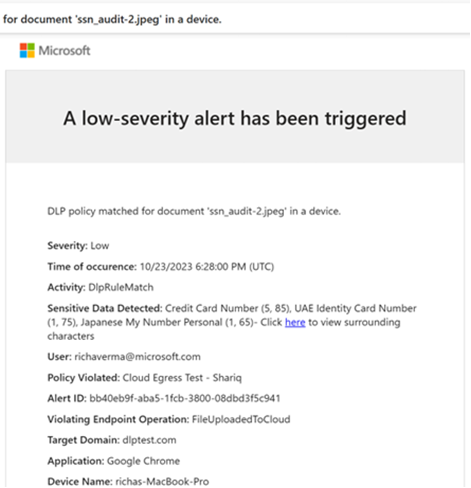
Updated March 15, 2024: We have updated the rollout timeline below. Thank you for your patience. There is now increased information in the alert email notification sent to the Data Loss Prevention (DLP) admins upon a DLP policy match. Previously a DLP alert email only included the user activity and the type of sensitive information matched in the alert. Now, DLP admins will get additional context such as alert ID, policy details, device details, and more. This will help admins quickly assess the priority of an alert and determine the next steps before navigating to the Microsoft Purview DLP alerts page or Microsoft 365 Defender DLP alerts page.
This message is associated with Microsoft 365 Roadmap ID 369645
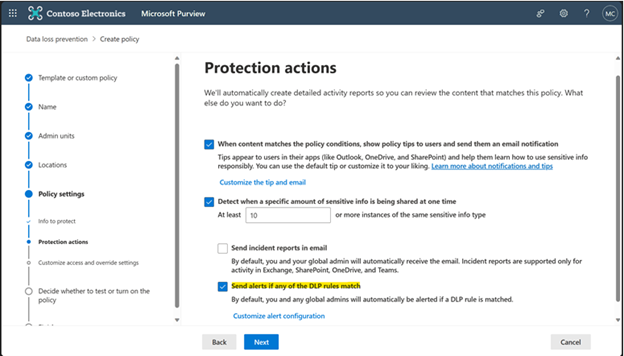
[When this will happen:] Public Preview: Available now. General Availability: Rollout will begin in mid-April 2024 (previously mid-March) and is expected to complete by late April 2024 (previously late March). [How this will affect your organization:] This feature will be available as part of the DLP alerts experience if you follow these steps: 1. Ensure the DLP policy has alert notifications turned ON.
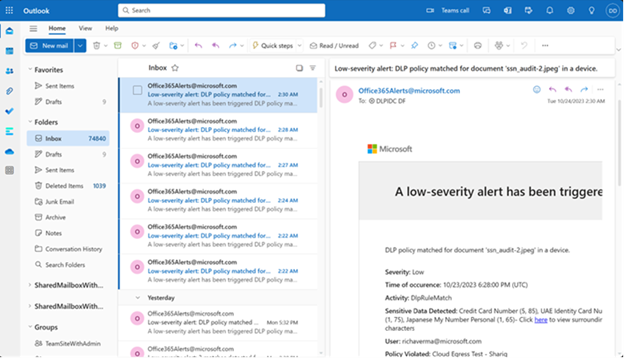
2. When DLP policy rule matches occur, the admin will receive alert email notifications in their inbox.
3. The enriched alert email notifications have additional context for alert triage. If further investigation is needed, the admin can navigate to the DLP alert page in the Microsoft 365 Defender portal (E5 customers) or Purview portal (E3 customers) directly from the email. Below is an example of an endpoint alert email notification.
[What you need to do to prepare:]
This feature will be available as part of the DLP alerts experience if the steps above are followed. |
| Machine Translation |
2024 年 3 月 15 日更新: 以下のロールアウト タイムラインを更新しました。何卒ご理解のほどよろしくお願いいたします。 DLP ポリシーが一致したときにデータ損失防止 (DLP) 管理者に送信されるアラート メール通知の情報が増えました。以前は、DLP アラート メールには、アラートで一致したユーザー アクティビティと機密情報の種類のみが含まれていました。これで、DLP 管理者は、アラート ID、ポリシーの詳細、デバイスの詳細などの追加のコンテキストを取得できます。これにより、管理者はアラートの優先度をすばやく評価し、Microsoft Purview DLP アラート ページまたはMicrosoft 365 Defender DLP アラート ページに移動する前に次の手順を決定できます。
このメッセージは、Microsoft 365 ロードマップ ID 369645に関連付けられています
[これがいつ起こるか:] パブリック プレビュー: 現在利用可能です。 一般提供: ロールアウトは 2024 年 4 月中旬 (以前は 3 月中旬) に開始され、2024 年 4 月下旬 (以前は 3 月下旬) までに完了する予定です。 [これが組織に及ぼす影響:] この機能は、次の手順に従うと、DLP アラート エクスペリエンスの一部として使用できます。 1. DLP ポリシーでアラート通知がオンになっていることを確認します。
2. DLP ポリシー ルールの一致が発生すると、管理者は受信トレイでアラート メール通知を受け取ります。
3. エンリッチされたアラートの電子メール通知には、アラートのトリアージのための追加のコンテキストがあります。さらに調査が必要な場合、管理者はメールから直接Microsoft 365 Defender ポータル (E5 のお客様) または Purview ポータル (E3 のお客様) の DLP アラート ページに移動できます。以下は、エンドポイント アラートの電子メール通知の例です。
[準備に必要なこと:]
この機能は、上記の手順に従った場合、DLP アラート エクスペリエンスの一部として使用できます。 |