| MC718553 | (Updated) Microsoft Teams: Change background while recording on phone |
|---|
| Classification | stayInformed |
|---|---|
| Last Updated | 03/15/2024 22:23:20 |
| Start Time | 02/23/2024 00:36:04 |
| End Time | 06/03/2024 07:00:00 |
| Message Content |
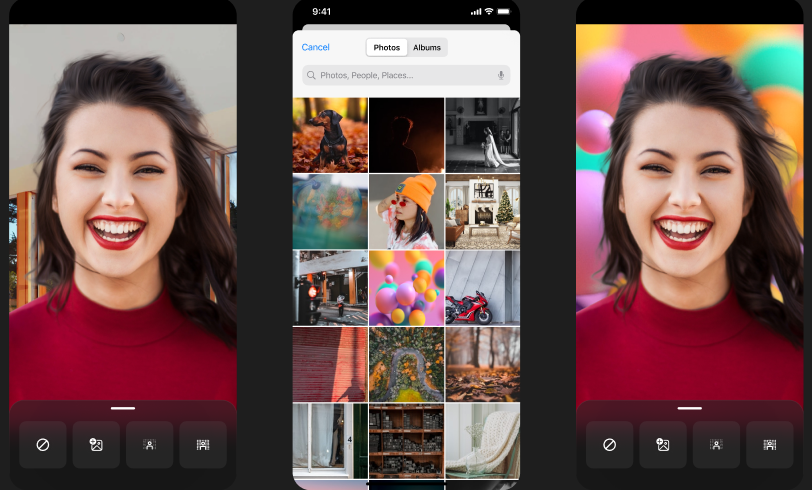
Updated March 15, 2024: We have updated the rollout timeline below. Thank you for your patience. Users can now record themselves anywhere and share it with coworkers in the Microsoft Teams chat or channel without worrying about the background. Users can now change their background to any image they want or make the background blurry while recording using their Microsoft Teams camera on iOS devices.
This message is associated with Microsoft 365 Roadmap ID 380852
[When this will happen:] General Availability (Worldwide, GCC, GCC High and DoD): We will begin rolling out late March 2024 (previously early March) and expect to complete by late April 2024 (previously late March). [How this will affect your organization:] Users will get an option to change their background to any image they want or make the background blurry while recording using their Microsoft Teams camera on an iOS device. To use this feature:
[What you need to do to prepare:]
No action is needed to prepare for this change. You may want to notify your users about this change and update any relevant documentation as appropriate. |
| Machine Translation |
2024 年 3 月 15 日更新: 以下のロールアウト タイムラインを更新しました。何卒ご理解のほどよろしくお願いいたします。 ユーザーは、バックグラウンドを気にすることなく、どこにいても自分自身を記録して、Microsoft Teams チャットまたはチャネルで同僚と共有できるようになりました。ユーザーは、iOSデバイスでMicrosoft Teamsカメラを使用して記録中に、背景を任意の画像に変更したり、背景をぼかしたりできるようになりました。
このメッセージは、Microsoft 365 ロードマップ ID 380852に関連付けられています
[これがいつ起こるか:] 一般提供 (全世界、GCC、GCC High、DoD): 2024 年 3 月下旬 (以前は 3 月上旬) にロールアウトを開始し、2024 年 4 月下旬 (以前は 3 月下旬) までに完了する予定です。 [これが組織に及ぼす影響:] ユーザーは、iOSデバイスでMicrosoft Teamsカメラを使用して記録中に背景を必要な画像に変更したり、背景をぼかしたりするオプションを取得します。この機能を使用するには、次の手順を実行します。
[準備に必要なこと:]
この変更に備えるためのアクションは必要ありません。この変更についてユーザーに通知し、必要に応じて関連ドキュメントを更新することをお勧めします。 |