| MC759451 | Microsoft Viva Insights delegate access for leaders |
|---|
| Classification | stayInformed |
|---|---|
| Last Updated | 03/27/2024 22:51:51 |
| Start Time | 03/27/2024 22:51:37 |
| End Time | 06/24/2024 07:00:00 |
| Message Content |
With Microsoft Viva insights, new delegate access allows leaders to empower other individuals to view insights about their organization. Those with delegated access will be able to easily navigate to the leader’s view of organizational insights. This message is associated with Microsoft 365 Roadmap ID 164209 [When this will happen:] Public Preview: We will begin rolling out early April 2024 and expect to complete by late April 2024. General Availability (Worldwide): We will begin rolling out mid-April 2024 and expect to complete by mid-May 2024. [How this will affect your organization:]
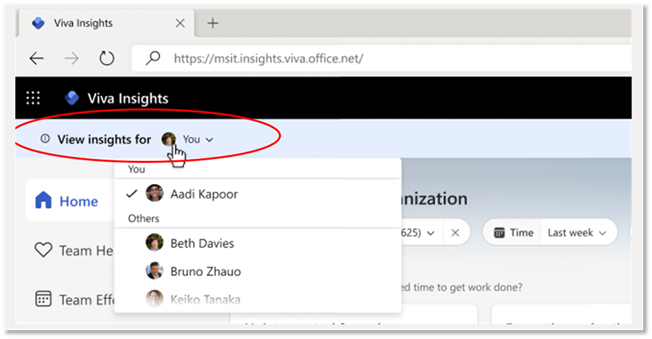
Leaders can now delegate access to their organization insights to other people in their company. This will allow designated delegates, such as the leader’s Chief of Staff or direct reports, to view organization insights and use them to make data-driven decisions. Designated delegates have the same access to organization insights as the leader but cannot see the leader’s personal insights. Assigned delegates will now have a ‘View insights for’ banner at the top of the Viva Insights app to toggle between their own profile and the leader’s profile (see image below).
Leaders are defined as users who have been assigned the group manager role in Viva Insights and have a span of control of at least 9 licensed users. Here are a few things to note about this new capability:
This feature is optional and requires action from leaders to delegate access to others. For more details, visit Organization insights in Viva Insights. [What you need to do to prepare:] No action is needed to enable this feature. Leaders can use this capability at their discretion. Inform your Viva Insights users that have been assigned the group manager role about this new capability and update any relevant training materials. |
| Machine Translation |
Microsoft Viva インサイトを使用すると、新しい代理人アクセスにより、リーダーは他の個人が自分の組織に関する分析情報を表示できるようになります。委任されたアクセス権を持つユーザーは、組織の分析情報のリーダーのビューに簡単に移動できます。 このメッセージは、Microsoft 365 ロードマップ ID 164209に関連付けられています [これがいつ起こるか:] パブリック プレビュー: 2024 年 4 月上旬にロールアウトを開始し、2024 年 4 月下旬までに完了する予定です。 一般提供 (全世界): 2024 年 4 月中旬にロールアウトを開始し、2024 年 5 月中旬までに完了する予定です。 [これが組織に及ぼす影響:]
リーダーは、組織の分析情報へのアクセスを社内の他のユーザーに委任できるようになりました。これにより、リーダーの参謀長や直属の部下など、指定された代理人が組織の分析情報を表示し、それらを使用してデータ主導の意思決定を行うことができます。指定された代理人は、リーダーと同じ組織のインサイトにアクセスできますが、リーダーの個人的なインサイトを表示することはできません。 割り当てられた代理人には、Viva インサイト アプリの上部に [分析情報の表示] バナーが表示され、自分のプロファイルとリーダーのプロファイルが切り替わります (下の画像を参照)。
リーダーは、Viva インサイトでグループ マネージャー ロールが割り当てられ、少なくとも 9 人のライセンス ユーザーの制御範囲を持つユーザーとして定義されます。 この新機能について、注意すべき点がいくつかあります。
この機能はオプションであり、他のユーザーにアクセス権を委任するには、リーダーからのアクションが必要です。詳細については、「 Viva インサイトの組織の分析情報」を参照してください。 [準備に必要なこと:] この機能を有効にするためのアクションは必要ありません。リーダーは、自分の裁量でこの機能を使用できます。グループ マネージャー ロールが割り当てられているViva インサイト ユーザーに、この新機能について通知し、関連するトレーニング資料を更新します。 |