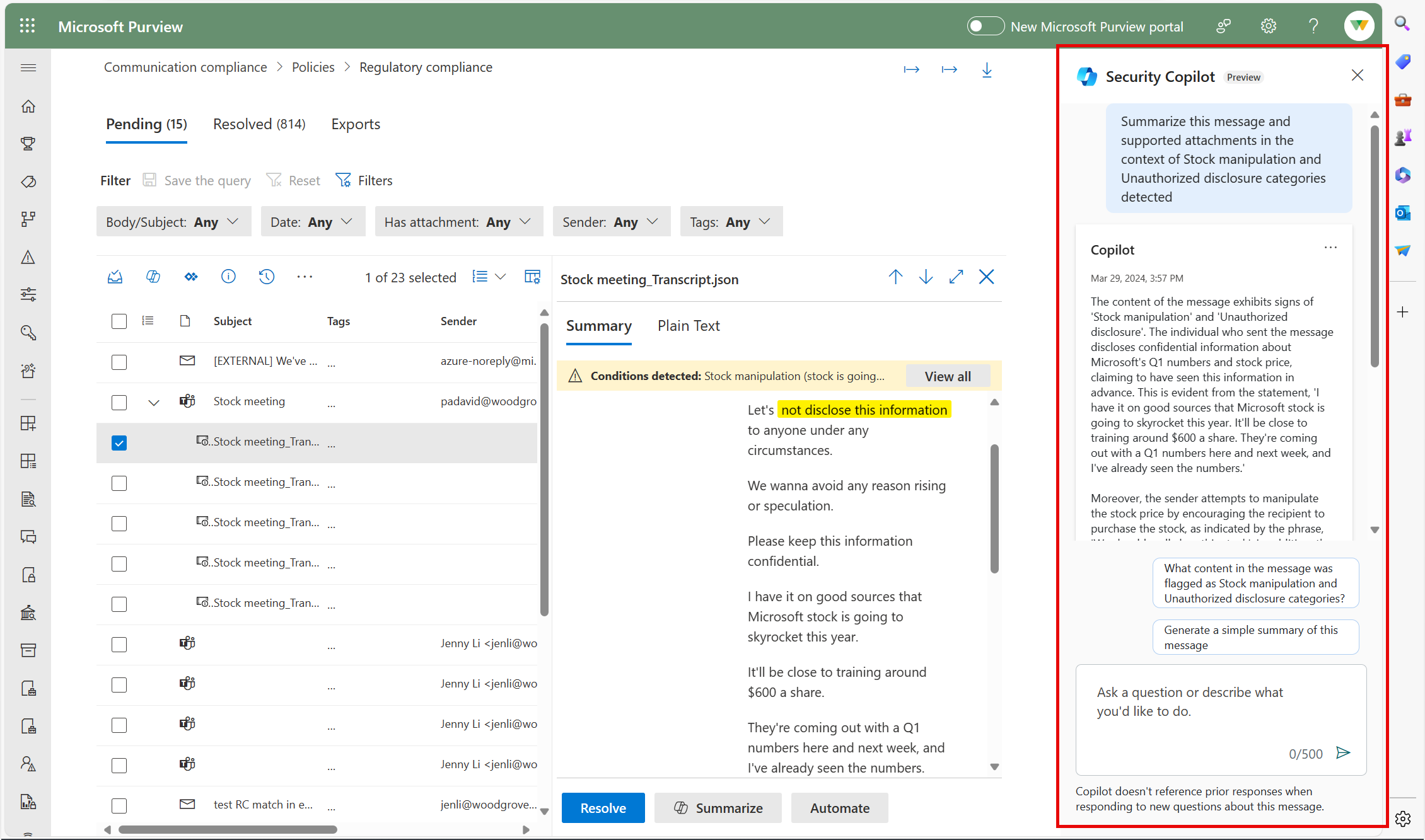
| MC764458 | Microsoft Purview | Communication Compliance: Contextual Summaries with Copilot for Security |
|---|
| Classification | stayInformed |
|---|---|
| Last Updated | 04/01/2024 23:39:51 |
| Start Time | 04/01/2024 23:39:17 |
| End Time | 08/07/2024 07:00:00 |
| Message Content |
Coming soon to public preview, Microsoft Purview capabilities in Microsoft Copilot for Security introduces the ability to generate contextual summaries of a Communication Compliance policy match in the context of the conditions that flag the message. This message is associated with Microsoft 365 Roadmap ID 388752. [When this will happen:] Public Preview: We will begin rolling out early April 2024 and expect to complete by late April 2024. General Availability (Worldwide): We will begin rolling out early June 2024 and expect to complete by late June 2024. [How this will affect your organization:] Microsoft Purview capabilities in Copilot for Security introduces the ability to generate contextual summaries of individual Communication Compliance policy matches in the context of the conditions that flag the message as potentially risky. Investigators can more quickly identify potentially risky content and understand the meaning of the content with just one click. Users can ask additional open prompt questions for deeper insight into the message content.
[What you need to do to prepare:] Microsoft Purview Communication Compliance provides the tools to help organizations detect business conduct and regulatory compliance violations (e.g. SEC or FINRA), such as sensitive or confidential information, harassing or threatening language, and sharing of adult content. Built with privacy by design, usernames are pseudonymized by default, role-based access controls are built in, investigators are opted in by an admin, and audit logs are in place to help ensure user-level privacy. You must have a Copilot for Security license configured for your tenant and give proper permissions to users who will leverage the Contextual Summary feature. Permissions needed to access Copilot for Security:
Learn more |
| Machine Translation |
近日公開予定の Microsoft Copilot for Security の Microsoft Purview 機能では、メッセージにフラグを設定する条件のコンテキストで、コミュニケーション コンプライアンス ポリシーの一致のコンテキスト概要を生成する機能が導入されています。 このメッセージは、Microsoft 365 ロードマップ ID 388752に関連付けられ ています。 [これがいつ起こるか:] パブリック プレビュー: 2024 年 4 月上旬にロールアウトを開始し、2024 年 4 月下旬までに完了する予定です。 一般提供 (全世界): 2024 年 6 月上旬にロールアウトを開始し、2024 年 6 月下旬までに完了する予定です。 [これが組織に及ぼす影響:] Copilot for Security の Microsoft Purview 機能では、メッセージに潜在的に危険であるとフラグを立てる条件のコンテキストで、個々のコミュニケーション コンプライアンス ポリシーの一致のコンテキストの概要を生成する機能が導入されています。調査担当者は、潜在的に危険なコンテンツをより迅速に特定し、ワンクリックでコンテンツの意味を理解できます。ユーザーは、メッセージの内容をより深く理解するために、追加のオープンプロンプトの質問をすることができます。
[準備に必要なこと:] Microsoft Purview コミュニケーション コンプライアンスは、機密情報、嫌がらせや脅迫的な言葉、アダルト コンテンツの共有など、組織がビジネス行動や規制コンプライアンス違反 (SEC や FINRA など) を検出するのに役立つツールを提供します。プライバシー・バイ・デザインで構築されており、ユーザー名はデフォルトで仮名化され、ロールベースのアクセス制御が組み込まれ、調査担当者は管理者によってオプトインされ、監査ログはユーザーレベルのプライバシーを確保するのに役立ちます。 テナント用に Copilot for Security ライセンスが構成され、コンテキスト サマリー機能を利用するユーザーに適切なアクセス許可を付与する必要があります。 Copilot for Security にアクセスするために必要な権限:
詳細情報 |