| MC718750 | (Updated) Microsoft Teams: Simplified sign in for iOS and Android devices |
|---|
| Classification | stayInformed |
|---|---|
| Last Updated | 04/18/2024 22:54:14 |
| Start Time | 02/23/2024 22:55:43 |
| End Time | 05/31/2024 07:00:00 |
| Message Content |
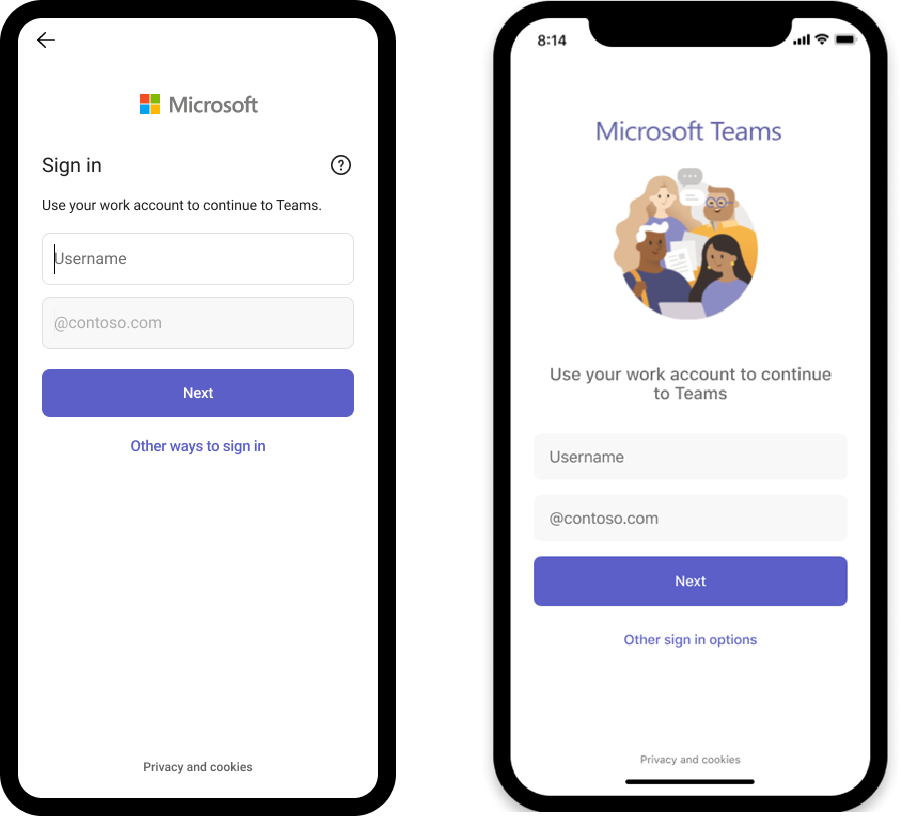
Updated April 18, 2024: We have updated the content below with additional details. Thank you for your patience. Note: If your organization does not support mobile devices, you can ignore this message. Microsoft Teams admins will now have the capability to make sign in faster for iOS and Android device users by prefilling domain names using app configuration policies. This change will especially benefit frontline workers who frequently sign in and out of a shared device. This message is associated with Microsoft 365 Roadmap ID 383134. [When this will happen:] Worldwide: We will begin rolling out late March 2024 and expect to complete by mid-April 2024 (previously late March). [How this will affect your organization:] After you set the app configuration policies in Intune or any other mobile device management (MDM) provider, users will be able to sign in by entering the first part of their user principal name (UPN) without the domain name. For example, if the username is 123456@contoso.com or adelev@contoso.com, users can sign with 123456 or adelev, respectively, and their password. If the first part of your UPN is numeric only, then admins can further simplify sign in by defaulting to numeric keypads on iOS and Android. You will be able to set these app configuration policies: “domain_name”: A string value providing the domain of the tenant to appended. Use a semicolon delimited value to add multiple domains. “enable_numeric_emp_id_keypad”: A Boolean value used to indicate that the employee ID is all numeric and the number keypad should be enabled for easy entry. If the value isn’t set, the alphanumeric keyboard opens. If desired, users can select Other ways to sign in to enter the full email or sign in with another method such as a phone number. Android on the left, iOS on the right:
Admins can make sign in faster on Microsoft Teams app on iOS and Android by prefilling domain names using app configuration policies. This change will especially benefit frontline workers who frequently sign in and out of a shared device. [What you need to do to prepare:]
There will be no impact on your organization if the application configurations are not set. However, to use the feature for your organization you will be required to set the app configuration policies. You may want to notify your users about this change and update any relevant documentation as appropriate. Learn more: How different technologies affect Microsoft Teams sign-on, including restricting sign-on, and sign-in behaviors. – Microsoft Teams | Microsoft Learn (will be updated before rollout begins)
|
| Machine Translation |
2024 年 4 月 18 日更新: 以下の内容を更新し、詳細を追加しました。何卒ご理解のほどよろしくお願いいたします。 注: 組織がモバイル デバイスをサポートしていない場合は、このメッセージを無視できます。 Microsoft Teams 管理者は、アプリ構成ポリシーを使用してドメイン名を事前入力することで、iOS および Android デバイス ユーザーのサインインを高速化できるようになりました。この変更は、共有デバイスに頻繁にサインインおよびサインアウトする現場担当者に特にメリットがあります。 このメッセージは、Microsoft 365 ロードマップ ID 383134に関連付けられ ています。 [これがいつ起こるか:] 全世界: 2024 年 3 月下旬にロールアウトを開始し、2024 年 4 月中旬 (以前は 3 月下旬) までに完了する予定です。 [これが組織に及ぼす影響:] Intuneまたはその他のモバイル デバイス管理 (MDM) プロバイダーでアプリ構成ポリシーを設定した後、ユーザーはドメイン名なしでユーザー プリンシパル名 (UPN) の最初の部分を入力してサインインできるようになります。たとえば、ユーザー名が 123456@contoso.com または adelev@contoso.com の場合、ユーザーはそれぞれ 123456 または adelev とパスワードを使用して署名できます。 UPN の最初の部分が数値のみの場合、管理者は iOS と Android で既定でテンキーを使用することで、サインインをさらに簡略化できます。 次のアプリ構成ポリシーを設定できます。 “domain_name”: 追加するテナントのドメインを提供する文字列値。セミコロンで区切られた値を使用して、複数のドメインを追加します。 “enable_numeric_emp_id_keypad”: 従業員 ID がすべて数字であり、簡単に入力できるように数字キーパッドを有効にする必要があることを示すために使用されるブール値。値が設定されていない場合は、英数字キーボードが開きます。 必要に応じて、ユーザーは [その他のサインイン方法] を選択して 完全なメール アドレスを入力するか、電話番号などの別の方法でサインインできます。 左がAndroid、右がiOS:
管理者は、アプリ構成ポリシーを使用してドメイン名を事前入力することで、iOS および Android 上の Microsoft Teams アプリでのサインインを高速化できます。この変更は、共有デバイスに頻繁にサインインおよびサインアウトする現場担当者に特に役立ちます。 [準備に必要なこと:]
アプリケーション構成が設定されていない場合、組織への影響はありません。ただし、組織でこの機能を使用するには、アプリ構成ポリシーを設定する必要があります。 この変更についてユーザーに通知し、必要に応じて関連ドキュメントを更新することをお勧めします。 詳細情報: サインオンやサインイン動作の制限など、さまざまなテクノロジが Microsoft Teams サインオンに与える影響。 – Microsoft Teams |Microsoft Learn (ロールアウト開始前に更新されます)
|