| MC789611 | Microsoft Teams: Message reactions in right-click menu |
|---|
| Classification | stayInformed |
|---|---|
| Last Updated | 05/02/2024 04:22:12 |
| Start Time | 05/02/2024 04:21:11 |
| End Time | 07/20/2024 07:00:00 |
| Message Content |
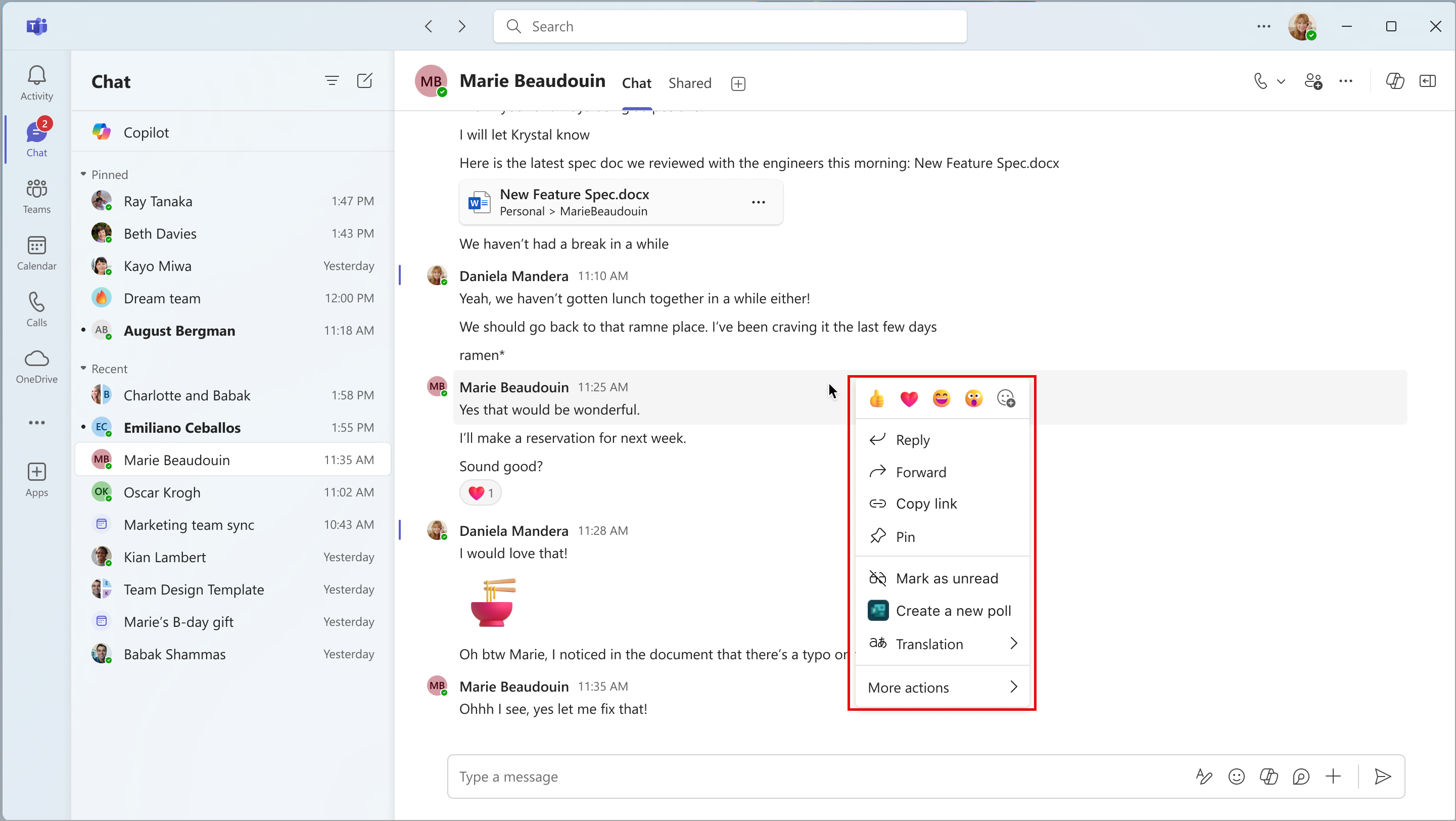
Coming soon: In Microsoft Teams: users will be able to right-click any message and react to it directly from the right-click menu. With this rollout, we are adding reactions to the right-click menu to give users another way to react to messages. This rollout applies to Teams for the web and Teams for desktop T2.1. [When this will happen:] Public Preview: We will begin rolling out late April 2024 and expect to complete by early May 2024. General Availability (Worldwide, GCC, GCC High, and DoD): We will begin rolling out mid-May 2024 and expect to complete by late May 2024. [How this will affect your organization:] After this rollout, all messages where the right-click menu was present before rollout will have the new reactions. Before the rollout, users could hover their cursor over the message to choose a reaction, and this option will continue to be available after rollout. Reactions in the right-click menu:
[What you need to do to prepare:] This rollout will happen automatically by the specified date with no admin action required before the rollout. You may want to notify your users about this change and update any relevant documentation as appropriate. We will update this comm before rollout with revised documentation. |
| Machine Translation |
近日公開予定: Microsoft Teams の場合: ユーザーは任意のメッセージを右クリックして、右クリック メニューから直接応答できるようになります。このロールアウトでは、右クリック メニューにリアクションを追加して、ユーザーがメッセージにリアクションする別の方法を提供します。このロールアウトは、Teams for the web と Teams for desktop T2.1 に適用されます。 [これがいつ起こるか:] パブリック プレビュー: 2024 年 4 月下旬にロールアウトを開始し、2024 年 5 月上旬までに完了する予定です。 一般提供 (全世界、GCC、GCC High、DoD): 2024 年 5 月中旬にロールアウトを開始し、2024 年 5 月下旬までに完了する予定です。 [これが組織に及ぼす影響:] このロールアウト後、ロールアウト前に右クリック メニューが表示されていたすべてのメッセージに新しいリアクションが適用されます。ロールアウト前は、ユーザーはメッセージの上にカーソルを置いてリアクションを選択でき、このオプションはロールアウト後も引き続き使用できます。 右クリックメニューの反応:
[準備に必要なこと:] このロールアウトは、指定された日付までに自動的に行われ、ロールアウト前に管理者のアクションは必要ありません。この変更についてユーザーに通知し、必要に応じて関連ドキュメントを更新することをお勧めします。 ロールアウト前に、このコミュニケーションを更新し、ドキュメントを改訂します。 |