| MC779843 | (Updated) Microsoft Syntex: New autofill columns |
|---|
| Classification | stayInformed |
|---|---|
| Last Updated | 05/24/2024 17:46:47 |
| Start Time | 04/18/2024 00:25:54 |
| End Time | 08/05/2024 07:00:00 |
| Message Content |
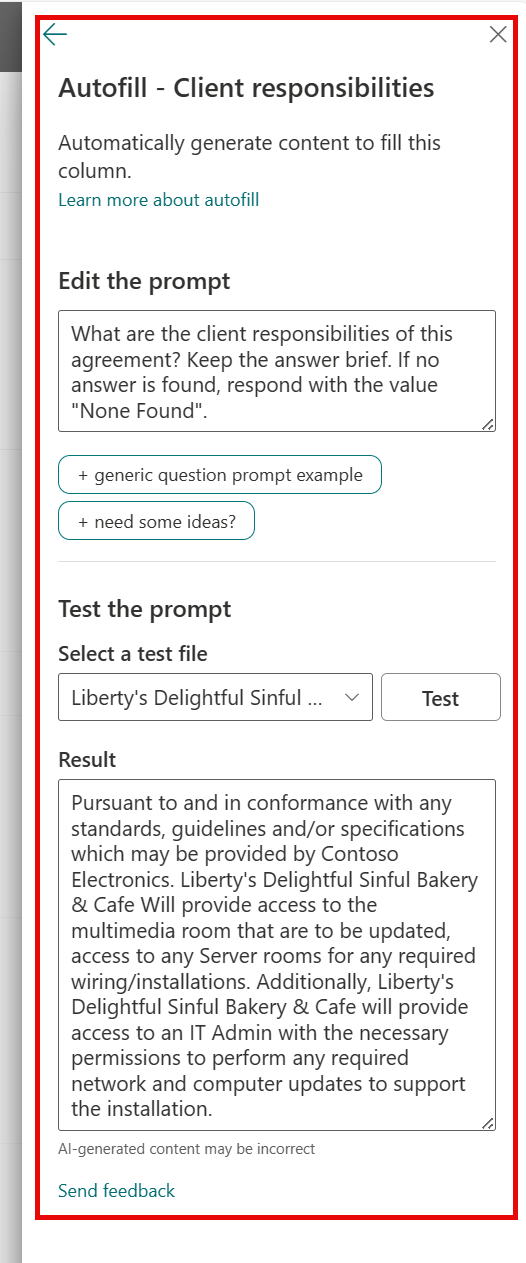
Updated May 24, 2024: We have updated the rollout timeline below. Thank you for your patience. Microsoft Syntex will soon deliver a new Microsoft SharePoint document library enhancement called autofill columns that allows a prompt to be set on a library column that will process the file’s contents and save the response to the associated column. The prompt can be configured to extract information from the file or to generate a response based on the analysis of its contents. This message is associated with Microsoft 365 Roadmap ID 389375. [When this will happen:] General availability (Worldwide): We will begin rolling out early June 2024 (previously mid-May) and expect to complete by late June 2024 (previously early June). [How this will affect your organization:] Users will be able to configure prompts on document library columns to process files created or uploaded to the library. To start using autofill columns, visit the Content processing setup page in the Microsoft 365 admin center and connect your Azure subscription to enable pay-as-you-go billing. Then, configure the sites where you would like to have this setting available. By default, the setting is on for all sites. Once enabled, users will be able to manually configure a prompt on a new or existing column C and test it on a library file before saving the change.
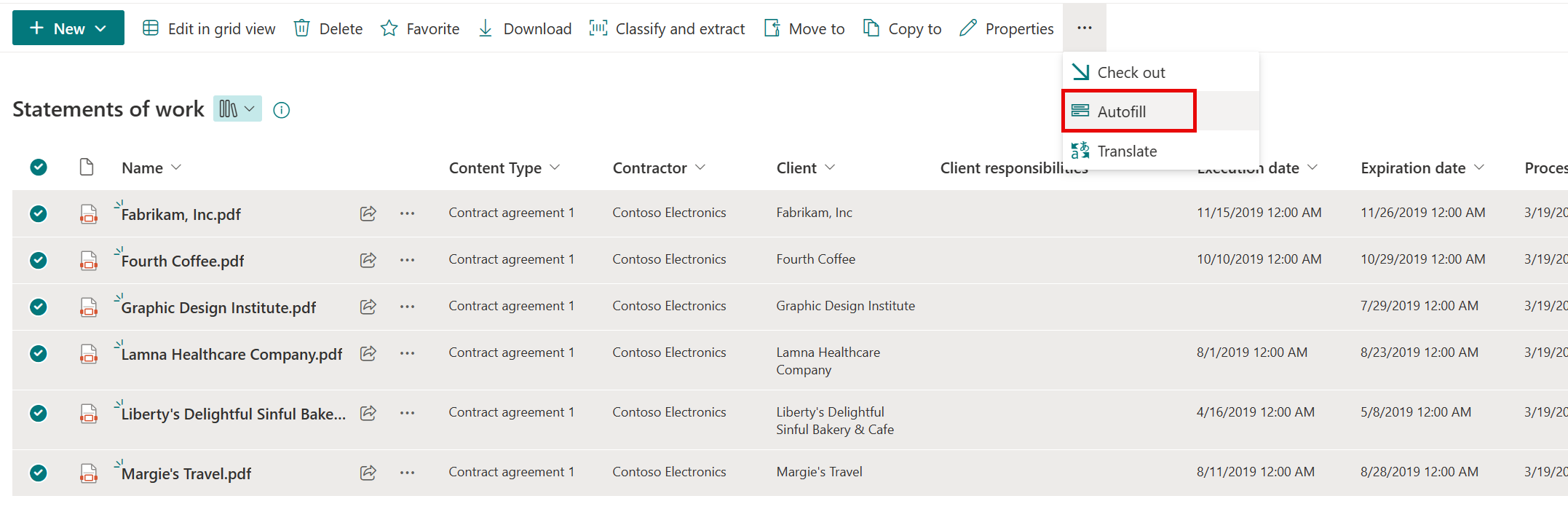
After saving, new uploaded files will be processed. To process existing library files, users can select the desired files and process them with the Autofill command from the three-dot menu:
[What you need to do to prepare:] After the feature has rolled out, you can manage its availability to your users in the Microsoft 365 admin center. This rollout will happen automatically by the specified date with no admin action required before the rollout. You may want to notify your users about this change and update any relevant documentation as appropriate. Learn more Configure Microsoft Syntex for pay-as-you-go billing – Microsoft Syntex | Microsoft Learn Overview of autofill columns Microsoft Syntex – Microsoft Syntex | Microsoft Learn |
| Machine Translation |
2024 年 5 月 24 日更新: 以下のロ`ルアウト タイムラインを更新しました。何卒ご理解のほどよろしくおいいたします。 Microsoft Syntex は、ファイルの内容をI理し、vBする列に答を保存するライブラリ列にプロンプトをO定できる自尤肓α肖群簸肖欷胄陇筏 Microsoft SharePoint ドキュメント ライブラリC能をgもなく提供します。プロンプトは、ファイルから情螭虺槌訾筏郡辍饯文谌荬畏治訾嘶扭い答を生成したりするように成できます。 このメッセ`ジは、Microsoft 365 ロ`ドマップ ID 389375にvB付けられ ています。 [これがいつ起こるか:] 一般提供 (全世界): 2024 年 6 月上旬 (以前は 5 月中旬) にロ`ルアウトを_始し、2024 年 6 月下旬 (以前は 6 月上旬) までに完了する予定です。 [これがMに及ぼす影:] ユ`ザ`は、ドキュメント ライブラリの列でプロンプトを成して、ライブラリに作成またはアップロ`ドされたファイルをI理できます。 自尤肓α肖问褂盲蜷_始するには、Microsoft 365 管理センタ`の [コンテンツI理のセットアップ] ペ`ジにアクセスし、Azure サブスクリプションを接Aして量n金制を有郡摔筏蓼埂4韦恕长卧O定を有郡摔工毳单ぅ趣成します。既定では、このO定はすべてのサイトでオンになっています。 有郡摔工毪取姗`ザ`は新蓼郡霞却妞瘟肖违抓恁螗抓趣蚴婴成し、涓虮4妞工肭挨衰楗ぅ芝楗辚榨ˉぅ毪钎匹攻趣扦蓼埂
保存後、新しくアップロ`ドされたファイルがI理されます。既存のライブラリファイルをI理するには、ユ`ザ`は目的のファイルをxkし、3ドットメニュ`から[ 自尤肓 ]コマンドを使用してI理します。
[浃吮匾胜长:] このC能がロ`ルアウトされたら、Microsoft 365 管理センタ`でユ`ザ`への可用性を管理できます。 このロ`ルアウトは、指定された日付までに自拥膜诵肖铯臁愆`ルアウト前に管理者のアクションは必要ありません。この涓摔膜い匹姗`ザ`に通知し、必要にじてvBドキュメントを更新することをお幛幛筏蓼埂 情 量n金制の Microsoft Syntex を成する – Microsoft Syntex |Microsoft Learn 自尤肓α肖胃乓 Microsoft Syntex – Microsoft Syntex |Microsoft Learn |