| MC692467 | (Updated) Microsoft 365 admin center: Usage reports – Overview page redesign |
|---|
| Classification | stayInformed |
|---|---|
| Last Updated | 10/03/2024 22:13:51 |
| Start Time | 11/22/2023 06:37:17 |
| End Time | 10/10/2024 07:00:00 |
| Message Content |
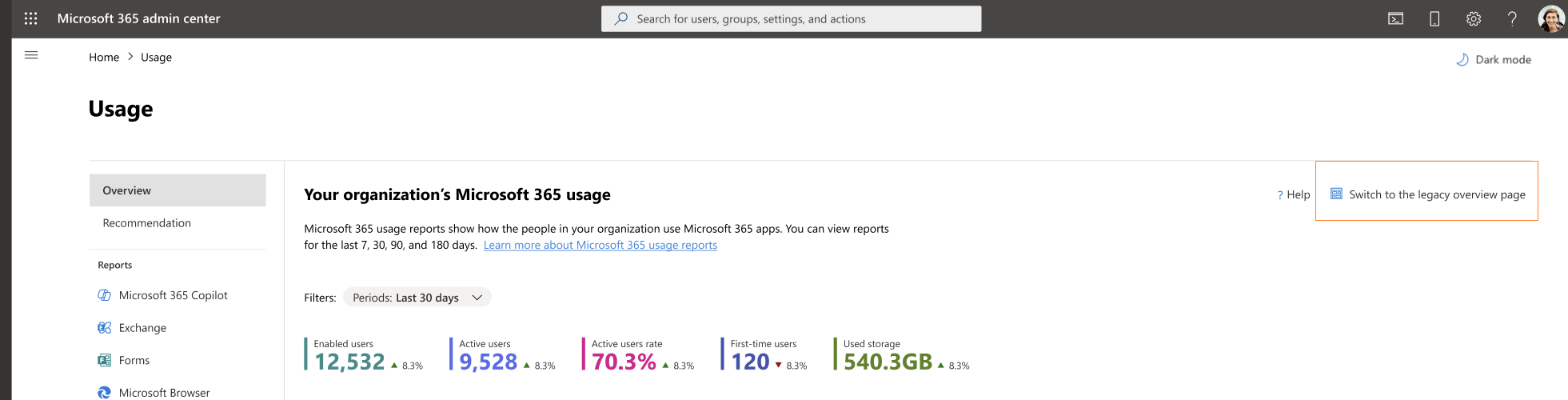
Updated October 3, 2024: Updated note: After further review we have decided not to proceed with this change at this time. We apologize for any inconvenience. We will not be rolling this out to organizations in GCC High or DoD during the timeline outlined below. We will communicate via Message center when we are ready to proceed. Organizations in GCC High and DoD can safely disregard this message. Thank you for your patience. The Microsoft 365 admin center Usage report Overview page has been redesigned to better navigate the most important usage insights in your organization and provide a holistic view of Microsoft 365 apps usage. The redesign includes new engagement metrics such as enabled and active users, user state compositions (e.g. first time, returning users), and key usage metrics for Microsoft 365 apps. This message is associated with Microsoft 365 Roadmap ID 185799 [When this will happen:] Preview: We will begin rolling the report out starting in mid-June 2024 (previously late April) and the rollout is expected to be complete by early July 2024 (previously early May). – We will not be proceeding with this change at this time. General Availability (Worldwide, GCC): We will begin rolling the report out starting in late September 2024 (previously late July) and the rollout is expected to be complete by late October 2024 (previously late August). – We will not be proceeding with this change at this time. [How this will affect your organization:] Admins with the correct permissions will have access to the Overview page redesign and can switch between the Overview page redesign and the legacy Overview page using the Switch button.
[What you need to do to prepare:] To access the new reports, go to Reports -> Usage -> Overview. For more information regarding these reports, please review the following documentation. |
| Machine Translation |
2024年10月3日更新:さらなる検討の結果、現時点ではこの変更を続行しないことを決定しました。ご不便をおかけして申し訳ございません。 以下に概説するタイムラインでは、GCC High または DoD の組織にはこれを展開しません。準備が整いましたら、メッセージセンターでご連絡いたします。GCC High と DoD の組織は、このメッセージを無視しても問題ありません。ご理解いただきありがとうございます。 Microsoft 365 管理センターの使用状況レポートの概要ページが再設計され、組織内の最も重要な使用状況の分析情報をより適切にナビゲートし、Microsoft 365 アプリの使用状況の全体像が提供されるようになりました。再設計には、有効なユーザーとアクティブ ユーザー、ユーザー状態の構成 (初回、リピーターなど)、Microsoft 365 アプリの主要な使用状況メトリックなどの新しいエンゲージメント メトリックが含まれます。 このメッセージは、Microsoft 365 ロードマップ ID 185799に関連付けられています [これがいつ起こるか:] プレビュー: レポートは 2024 年 6 月中旬 (以前は 4 月下旬) からロールアウトを開始し、2024 年 7 月上旬 (以前は 5 月上旬) までに完了する予定です。- 現時点では、この変更は進められません。 一般提供 (全世界、GCC): レポートは 2024 年 9 月下旬 (以前は 7 月下旬) から展開を開始し、2024 年 10 月下旬 (以前は 8 月下旬) までに展開が完了する予定です。- 現時点では、この変更は進められません。 [これがあなたの組織にどのように影響しますか:] 適切な権限を持つ管理者は、概要ページの再設計にアクセスでき、切り替えボタンを使用して概要ページの再設計と従来の概要ページを切り替えることができます。
【準備に必要なこと】 新しいレポートにアクセスするには、[ レポート] – [> 使用状況] > [概要] に移動します。 これらのレポートの詳細については、次の ドキュメントを参照してください。 |