| Message Content |
Updated July 20, 2026: We have updated the content. Thank you for your patience.
[What and Why]
To provide a more consistent and user-controlled experience across Microsoft 365 Copilot, we’re expanding the existing Web content preference to additional Copilot experiences and moving the preference within Settings. Previously, the ability to enable or disable web search was only available to Microsoft 365 Copilot users in the Work tab. With this update, users of both Microsoft 365 Copilot and Microsoft 365 Copilot Chat can control web content grounding across their available Work and Web experiences through a persistent preference that follows them across supported Copilot clients. This supports our Enterprise-ready AI vision by providing a consistent, policy-respecting experience while giving users more control over how Copilot generates responses.
[Rollout Schedule]
- General Availability (Worldwide): Rollout will start in mid-July 2026 and is expected to complete by late July 2026.
[Impact on Your Organization]
Who is affected
- Microsoft 365 Copilot Chat users
- Microsoft 365 Copilot users
- Organizations that allow web search in Microsoft 365 Copilot
- Organizations using Copilot across Work and Web experiences
Platforms/Services
- Microsoft 365 Copilot (web, desktop, mobile)
- Microsoft 365 Copilot Chat (web, desktop, mobile)
What will happen
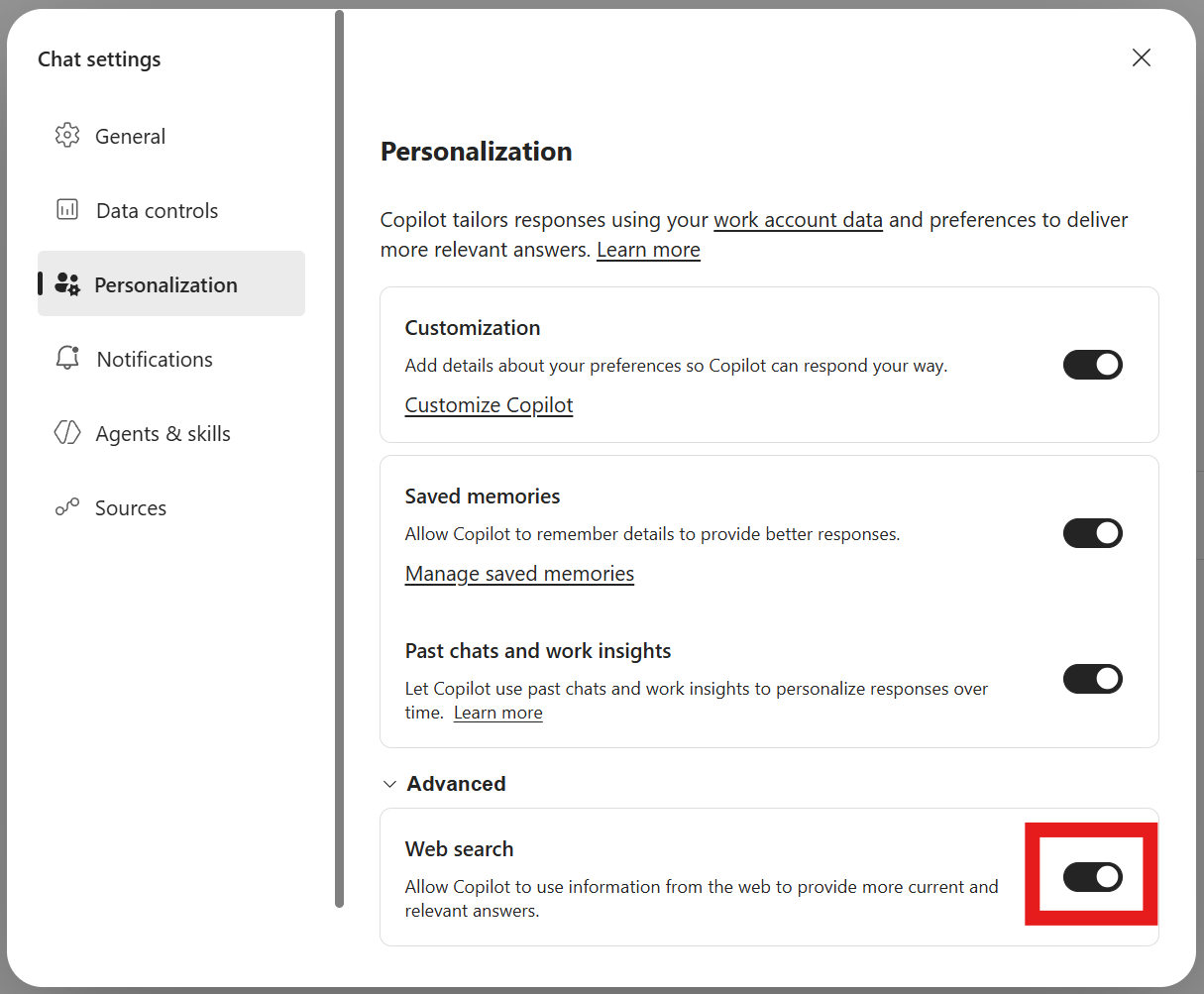
- The existing Web content setting will move to Settings > Personalization > Advanced Settings.
- Users will be able to enable or disable web search from a centralized settings experience.
- This capability is expanding to both Microsoft 365 Copilot and Copilot Chat users across the Work and Web experiences.
- The user’s preference will be stored as a persistent setting and applied across supported Copilot clients and devices.
- The preference will continue to be honored wherever the setting is supported.
- Existing administrator web search policies remain in effect.
- If an administrator disables web search through policy:
- The Web content setting will not be available to users.
- Web content grounding will remain disabled.
- The feature is available by default only where web search is already permitted by tenant policy.
- No changes are required to existing administrative controls.
Screenshot – Personalization settings screen with web search setting highlighted
[Action Required / Recommendations]
No action is required.
We recommend administrators:
- Review existing Copilot web search policies and confirm they align with organizational requirements.
- Notify help desk and support teams that the Web content setting has moved.
- Update any internal documentation or training materials that reference the previous setting location.
- Communicate the expanded availability of the setting to users if your organization provides Copilot adoption guidance.
Learn more: Data, privacy, and security for web search in Microsoft 365 Copilot and Microsoft 365 Copilot Chat | Microsoft Learn
[Compliance Considerations]
| Consideration |
Explanation |
| Does the change store new customer data? |
The user’s Web content preference is stored as a persistent user setting so it can be consistently applied across supported Copilot clients and experiences. |
| Does the change alter how existing customer data is processed, stored, or accessed? |
User preference storage changes from an experience-specific setting to a persistent cross-client preference. This does not change how Microsoft 365 documents, emails, chats, or files are processed. |
| Does the change provide end users any new way of interacting with generative AI? |
Users can now manage web search grounding across both Work and Web experiences, and the capability expands from M365 Copilot Work experiences to M365 Copilot and Copilot Chat across Work and Web. |
| Does the change include an admin control and can it be controlled through Entra ID group membership? |
Existing administrative controls governing web search continue to be enforced. Organizations can continue to manage access through existing policy controls. |
| Does the change allow a user to enable and disable the feature themselves? |
Users can turn Web content on or off through Settings when web search is permitted by organizational policy. |
|
| Machine Translation |
2026年7月20日更新:内容を更新しました。ご辛抱いただきありがとうございます。
【何となぜ】
Microsoft 365 Copilot全体でより一貫性がありユーザーがコントロールできる体験を提供するため、既存の ウェブコンテンツ の優先順位を追加のCopilot体験に拡張し、設定内に設定内に移動しています。以前は、ウェブ検索の有効化・無効化機能はMicrosoft 365 Copilotの「 Work 」タブでのみ利用可能でした。このアップデートにより、 Microsoft 365 Copilot および Microsoft 365 Copilot Chat のユーザーは、サポートされたCopilotクライアント間で持続的な優先順位を通じて、利用可能な 業務 および Web 体験全体でウェブコンテンツのグラウンディングをコントロールできるようになりました。これにより、一貫性のあるポリシー尊重体験を提供し、ユーザーがCopilotの応答生成方法をよりコントロールできるようにすることで、エンタープライズ対応のAIビジョンを支援します。
[展開スケジュール]
- 一般公開(世界): 展開は 2026年7月中旬 に開始され、 2026年7月下旬までに完了する予定です。
[組織への影響]
影響を受ける人物
- Microsoft 365 Copilot Chat ユーザー
- Microsoft 365 Copilot ユーザーの皆さん
- Microsoft 365 Copilotでウェブ検索を許可している組織
- Copilotを職場およびウェブ体験で活用する組織
プラットフォーム/サービス
- Microsoft 365 Copilot(ウェブ、デスクトップ、モバイル)
- Microsoft 365 Copilot Chat(ウェブ、デスクトップ、モバイル)
何が起こるのか
- 既存の ウェブコンテンツ 設定は「パーソナライズ設定」 >「詳細設定」>に移動します。
- ユーザーは集中設定の体験からウェブ検索の有効化・無効化が可能です。
- この機能は、 Microsoft 365 CopilotおよびCopilot Chatの両方のユーザー向けに、職場およびウェブの両面で拡大されています。
- ユーザーの設定は永続的に保存され、サポートされているCopilotクライアントやデバイス間で適用されます。
- この優先順位は、その設定がサポートされている場所で引き続き尊重されます。
- 既存の管理者向けウェブ検索ポリシーは引き続き有効です。
- 管理者がポリシーを通じてウェブ検索を無効にした場合:
- ウェブコンテンツ設定はユーザーに利用できません。
- ウェブコンテンツの接続は無効のままです。
- この機能は、テナントポリシーでウェブ検索が許可されている場合にのみデフォルトで利用可能です。
- 既存の管理管理に変更は必要ありません。
スクリーンショット – ウェブ検索設定がハイライトされたパーソナライズ設定画面
[行動が必要/勧告]
何の対応も必要ありません。
管理者には以下を推奨します:
- 既存のCopilotウェブ検索ポリシーを確認し、組織の要件に適合しているか確認してください。
- ウェブコンテンツ設定が移動したことをヘルプデスクやサポートチームに通知してください。
- 前の設置場所を参照する内部文書や研修資料は必ず更新してください。
- もし組織がCopilot導入のガイダンスを提供している場合は、設定の拡大をユーザーに伝えてください。
詳しくはこちら: Microsoft 365 CopilotおよびMicrosoft 365 Copilot Chatにおけるウェブ検索のデータ、プライバシー、セキュリティ |Microsoft Learn
[コンプライアンスの考慮事項]
| 考慮 |
説明 |
| 変更は新しい顧客データを保存しますか? |
ユーザーのウェブコンテンツの好みは永続的なユーザー設定として保存されるため、サポートされているCopilotクライアントや体験間で一貫して適用できます。 |
| この変更は既存の顧客データの処理、保存、アクセス方法を変えますか? |
ユーザープリファレンスストレージが、体験固有の設定から永続的なクロスクライアントの好みに変更されます。しかし、Microsoft 365のドキュメント、メール、チャット、ファイルの処理方法は変わりません。 |
| この変更はエンドユーザーに生成AIと関わる新たな方法をもたらすのでしょうか? |
ユーザーは現在、WorkとWebの両方の体験でウェブ検索のグラウンディングを管理でき、機能はM365 Copilot Workの体験から、仕事とWebのM365 CopilotおよびCopilot Chatへと拡大しています。 |
| 変更には管理者権限も含まれますか?またEntra IDのグループメンバーシップを通じて制御できますか? |
ウェブ検索を規制する既存の管理管理は引き続き施行されています。組織は既存のポリシー管理を通じてアクセス管理を継続できます。 |
| この変更により、ユーザーは自分でその機能を有効・無効にできるのでしょうか? |
ユーザーは組織の方針でウェブ検索が許可されている場合、設定からウェブコンテンツのオン・オフが可能です。 |
|