SHD / MC Checker

MC1434580 | Use OneDrive stored user defined custom skills in PowerPoint Copilot (web)


MC1434580 | Use OneDrive stored user defined custom skills in PowerPoint Copilot (web)

Classification stayInformed
Last Updated 07/20/2026 22:22:38
Start Time 07/20/2026 22:22:25
End Time 08/31/2026 07:00:00
Message Content

[What and Why:]

PowerPoint Copilot on the web is introducing support for personal, user-defined custom skills stored in OneDrive. Users can upload skill folders containing a SKILL.md file to a designated OneDrive location, and those skills will automatically appear in the Copilot Skills menu within PowerPoint for the web. A new Manage Skills experience will also allow users to enable or disable individual skills directly from the Copilot pane. This enhancement supports personal productivity by enabling users to tailor Copilot to their specific workflows and presentation needs while maintaining control over which skills are available during Copilot interactions.

[Rollout Schedule:]

  • General Availability (Worldwide): Rollout begins in late July 2026 and is expected to complete by late July 2026.

[Impact on Your Organization:]

Who is affected:

  • Users licensed to use Microsoft Copilot in PowerPoint for the web.
  • Users who create or use personal custom skills.
  • Microsoft 365 administrators supporting Copilot deployments.

Platforms/Services:

  • PowerPoint for the web
  • Microsoft 365 Copilot
  • OneDrive

What will happen:

  • Users can upload skill folders containing a required SKILL.md file to a designated OneDrive location.
  • Uploaded skills are personal and visible only to the user who uploads them.
  • Eligible skills automatically appear in the Skills menu within PowerPoint Copilot on the web.
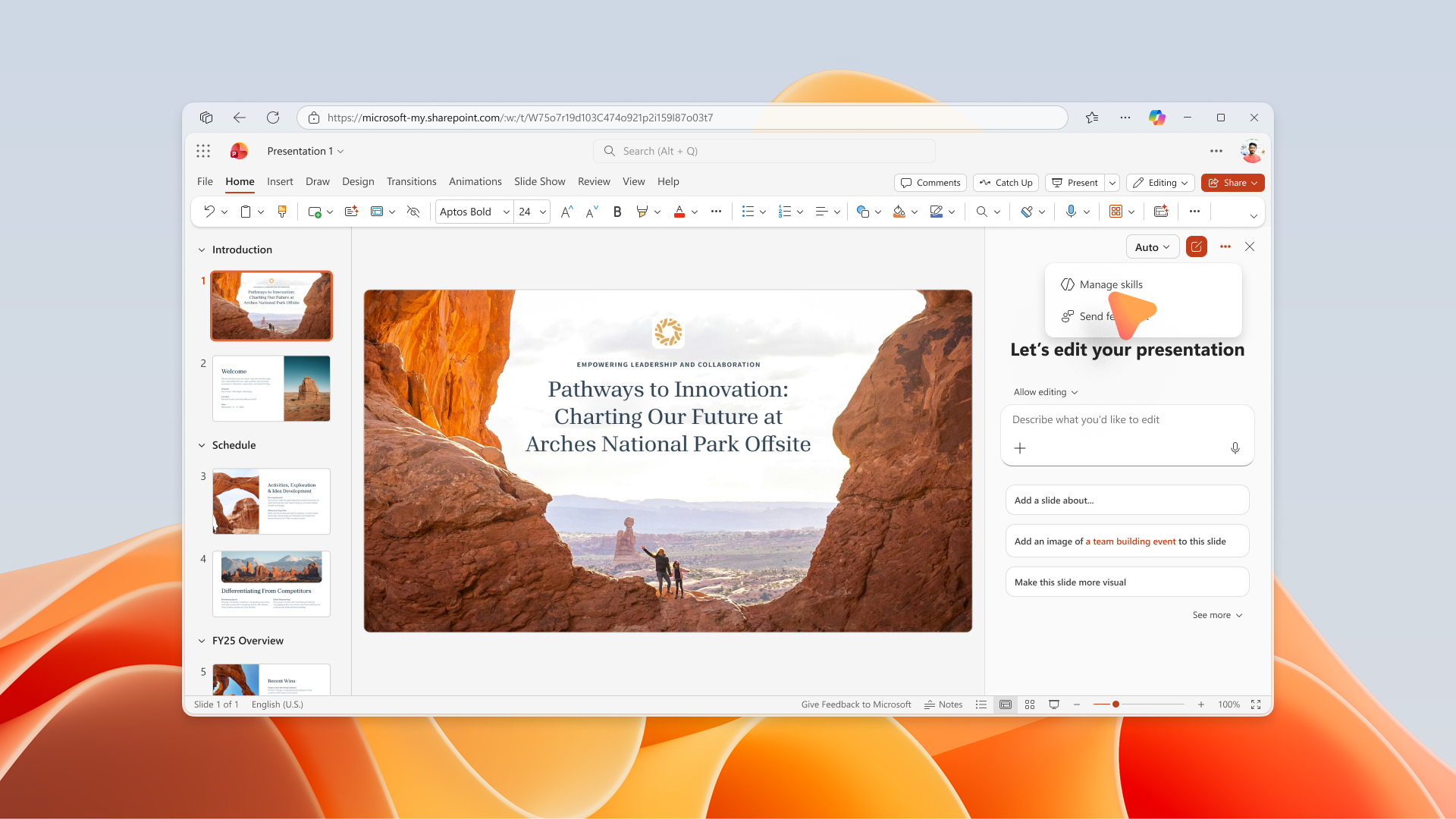
  • Users will have access to a new Manage Skills experience from the three-dot menu in the Copilot pane.
  • Screenshot 1: Users can open Manage skills from the three-dot menu in the PowerPoint Copilot on the web pane:

    user settings

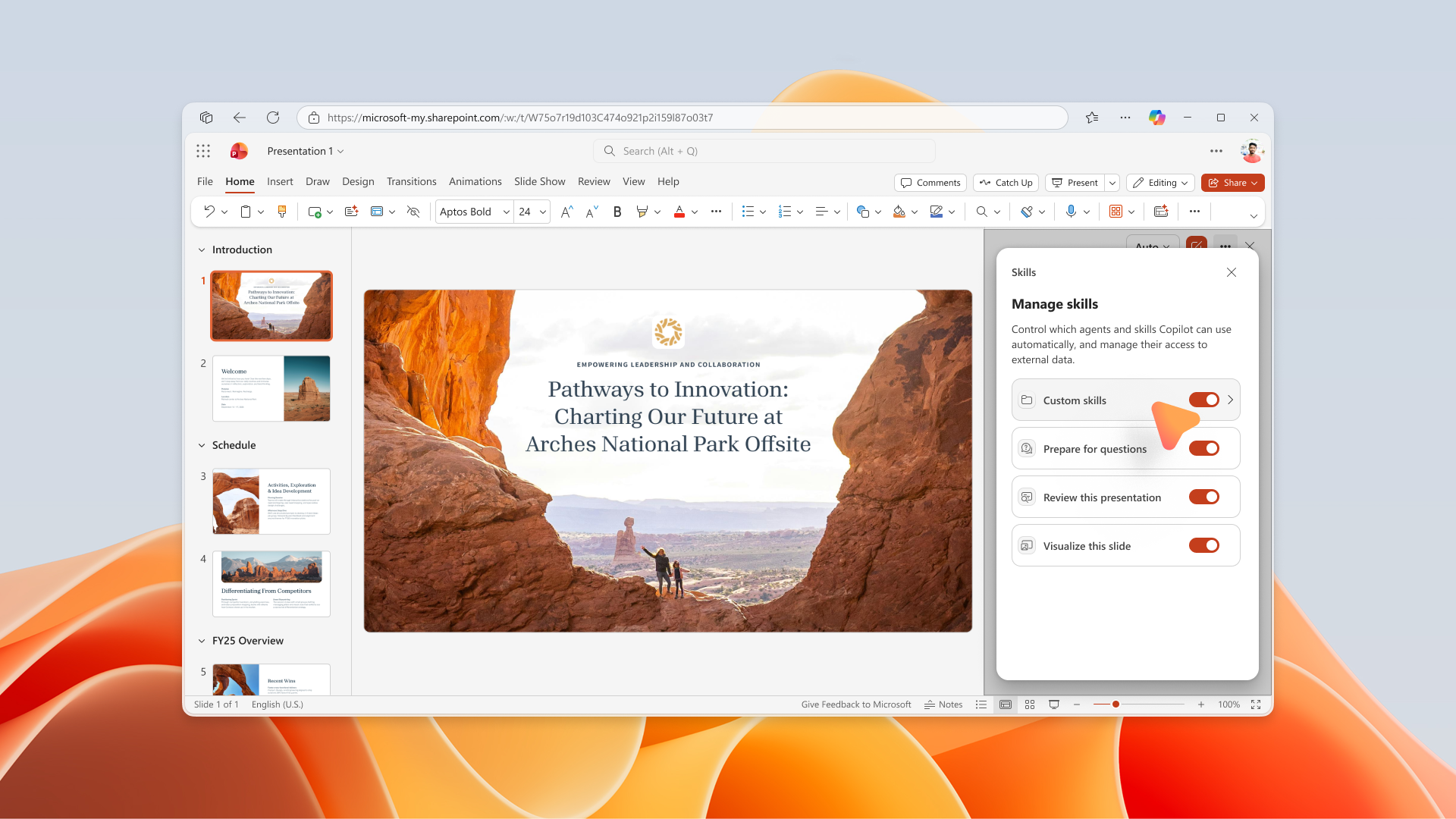
  • Users can independently enable or disable individual skills.
  • Screenshot 2: Users can enable or disable individual skills from the Manage skills experience in PowerPoint Copilot on the web:

    user settings

  • Skill availability within Copilot will reflect the user’s selected settings.
  • No additional administrator deployment actions are required for the feature to appear.
  • The feature is available by default to eligible users when rollout reaches the tenant.

[Action Required/Recommendations:]

No immediate administrator action is required.

We recommend that you:

  • Review any internal governance processes related to user-created Copilot skills.
  • Prepare sample skills in the required format with a valid SKILL.md file for testing.
  • Identify pilot users who can validate the experience after rollout.
  • Update internal Copilot adoption and training materials to include guidance on custom skills.
  • Inform helpdesk and support teams about the new Skills and Manage Skills experiences.
  • Monitor user feedback following rollout to understand adoption and governance needs.

[Compliance considerations:]

Compliance Area Explanation
Stores new customer data Custom skill folders and SKILL.md files are stored in the user’s OneDrive location.
Changes data processing or access Copilot can leverage user-created skill definitions stored in OneDrive as part of the user interaction experience.
Introduces AI/ML capabilities User-defined custom skills extend how Copilot responds and interacts with content.
New generative AI interaction Users can customize Copilot behavior through personal skills and selectively enable or disable skills.
Admin or user controls Users can manage skill availability through the Manage Skills experience.
Machine Translation

[何となぜ:]

PowerPoint Copilot on the webは、OneDriveに保存された個人のユーザー定義カスタムスキルのサポートを導入します。ユーザーは SKILL.md ファイルを含むスキルフォルダを指定されたOneDriveの場所にアップロードでき、それらのスキルはウェブPowerPoint内のCopilotスキルメニューに自動的に表示されます。新しい 「スキル管理 」体験では、コパイロットのパネルから個別のスキルを直接有効または無効にすることも可能です。この強化により、ユーザーは自分のワークフローやプレゼンテーションニーズに合わせてCopilotをカスタマイズでき、Copilotとのやり取り中に利用可能なスキルをコントロールできるようになり、個人の生産性を向上させます。

[展開スケジュール:]

  • 一般公開(世界展開):展開は 2026年7月下旬 に始まり、 2026年7月下旬までに完了する予定です。

[組織への影響:]

影響を受ける人物:

  • Microsoft Copilotをウェブ版PowerPointで使用するためのライセンスを取得したユーザー。
  • 個人のカスタムスキルを作成または使用するユーザー。
  • Microsoft 365管理者がCopilotの展開をサポートします。

プラットフォーム/サービス:

  • ウェブ用PowerPoint
  • Microsoft 365 Copilot
  • OneDrive

今後の展開:

  • ユーザーは必要な SKILL.md ファイルを含むスキルフォルダを指定されたOneDriveの場所にアップロードできます。
  • アップロードされたスキルは個人的で、アップロードしたユーザーだけが閲覧可能です。
  • 対象となるスキルは、ウェブ上のPowerPoint Copilot内の スキル メニューに自動的に表示されます。
  • ユーザーはCopilotペインの三点メニューから新しい 「スキル管理 」体験にアクセスできます。
  • スクリーンショット1: ユーザーはウェブペインのPowerPoint Copilotの三点メニューからスキル管理を開けます:

    user settings

  • ユーザーは個別のスキルを独立して有効または無効にすることができます。
  • スクリーンショット2: ユーザーはウェブ上のPowerPoint Copilotでスキル管理体験の個別スキルを有効または無効にできます:

    user settings

  • Copilot内のスキルの利用可能性は、ユーザーが選択した設定を反映します。
  • 機能が現れるのに追加の管理者展開アクションは必要ありません。
  • この機能は、ロールアウトがテナントに届くと 、対象ユーザーにデフォルトで利用 可能です。

[必要な行動/推奨事項:]

即時の管理者の対応は必要ありません。

以下をお勧めします:

  • ユーザー作成のCopilotスキルに関連する内部ガバナンスプロセスも見直してください。
  • テスト用の有効な SKILL.md ファイルを備えた必要な形式のサンプルスキルを準備してください。
  • 展開後に体験を検証できるパイロットユーザーを特定しましょう。
  • 社内Copilotの採用およびトレーニング資料を更新し、カスタムスキルに関するガイダンスを含めること。
  • ヘルプデスクやサポートチームに新しい スキル マネジメントスキル の体験について知らせてください。
  • 導入後のユーザーフィードバックを監視し、導入やガバナンスのニーズを理解しましょう。

[コンプライアンス上の考慮事項:]

コンプライアンス分野 説明
新しい顧客データを保存 カスタムスキルフォルダや SKILL.md ファイルはユーザーのOneDriveの場所に保存されます。
データ処理やアクセスの変更 CopilotはOneDriveに保存されたユーザー作成のスキル定義をユーザーインタラクション体験の一部として活用できます。
AI/ML機能の導入 ユーザー定義のカスタムスキルは、Copilotがコンテンツに応答し、やり取りする方法を拡張します。
新しい生成AIインタラクション ユーザーは個人スキルでコパイロットの行動をカスタマイズでき、スキルを選択的に有効または無効にできます。
管理者またはユーザー制御 ユーザーはスキル管理体験を通じてスキルの利用可能性を管理できます。