SHD / MC Checker

MC1437668 | Microsoft Outlook for iOS and Android: Insert signature images from OneDrive


MC1437668 | Microsoft Outlook for iOS and Android: Insert signature images from OneDrive

Classification stayInformed
Last Updated 07/23/2026 22:37:48
Start Time 07/23/2026 22:37:34
End Time 10/30/2026 07:00:00
Message Content

[What and why]

Microsoft is enhancing the signature editing experience in Outlook for iOS and Android by allowing users to insert images into email signatures directly from OneDrive, in addition to selecting images from their device photo library. This improvement makes it easier for users to access and use signature images stored in OneDrive while maintaining existing organizational data-sharing policies.

[Rollout schedule]

General Availability (Worldwide, GCC, GCC High, and DoD): Beginning in late August 2026 and expected to complete by late September 2026

[Impact on your organization]

Who is affected

  • Users of Outlook for iOS and Android who create or edit email signatures

Platforms and services

  • Outlook for iOS
  • Outlook for Android

What will happen

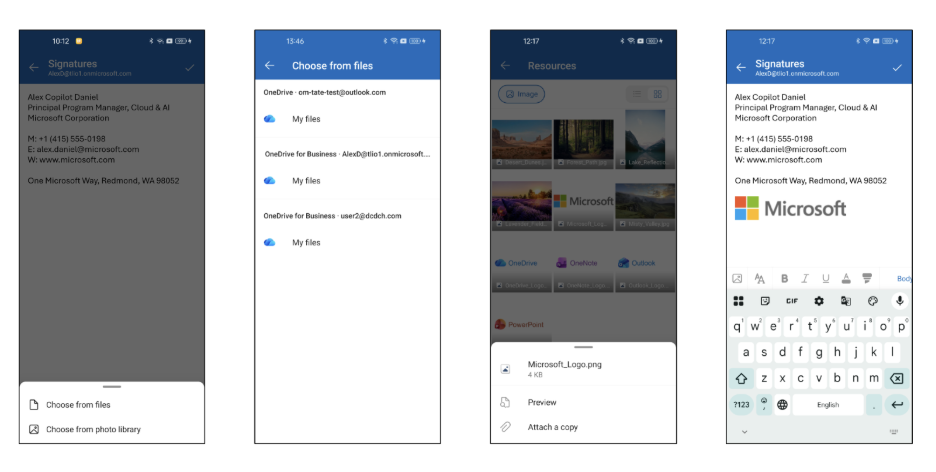
  • Users will see a new option when inserting an image into an email signature: 

  • Selecting Insert image in the signature editor will present:
    • Choose from files to browse and select image files that are stored in OneDrive.
    • Choose from photo library to select an image from the device, which remains the existing behavior.
  • This change is only visible in Outlook for iOS and Android when editing email signatures. Users can select images stored in OneDrive, but there are no changes to the OneDrive application experience.
  • Available OneDrive accounts are determined by your organization’s existing cross-account data-sharing policies.
  • The file picker displays only image files.
  • Users can switch between grid and list views while browsing images.
  • Selected images are downloaded and embedded into the signature, consistent with the current behavior for locally stored images.
  • Existing signatures are not modified.
  • The feature is enabled by default and does not require administrator configuration.

[Action required and recommendations]

No action is required. The update is enabled automatically.

We recommend that you:

  • Inform helpdesk and support staff about the updated signature image selection experience.
  • Update internal training materials or screenshots if they reference the signature editor workflow.

[Compliance considerations]

No compliance considerations identified. Review as appropriate for your organization.

Machine Translation

[何となぜ]

Microsoftは、Outlookのシグネチャ編集体験をiOS およびAndroid向けに 向上させており、ユーザーがOneDriveから直接メール署名に画像を挿入できるようにし、デバイスの写真ライブラリから画像を選択することも可能にしています。この改善により、ユーザーは既存の組織データ共有ポリシーを維持しつつ、OneDriveに保存された署名画像にアクセスし、より簡単に利用できるようになりました。

[展開スケジュール]

一般稼働(世界、GCC、GCC High、DoD):2026年8月下旬から始まり、2026年9月下旬までに完了予定です

[組織への影響]

影響を受ける人物

  • OutlookのiOS版およびAndroid版ユーザーで、メール署名を作成または編集する方々

ホームとサービス

  • Outlook for iOS
  • Outlook for Android

何が起こるのか

  • ユーザーはメール署名に画像を挿入すると、新しいオプションが表示されます: 

  • 署名エディタ「画像を挿入」を選択すると、以下が表示されます:
    • OneDriveに保存されている画像ファイルから閲覧ファイルを選択し てください。
    • 写真ライブラリから画像 を選択してデバイスから画像を選択し、これは現状のままです。
  • この変更はOutlookのiOSおよびAndroid版メール署名編集時にのみ確認されます。ユーザーはOneDriveに保存された画像を選択できますが、OneDriveのアプリケーション体験に変更はありません。
  • 利用可能なOneDriveアカウントは、組織の既存のクロスアカウントデータ共有ポリシーによって決まります。
  • ファイルピッカーは画像ファイルのみを表示します。
  • ユーザーは画像閲覧中にグリッドビューとリストビューを切り替えることができます。
  • 選ばれた画像はダウンロードされ、現在のローカル保存画像の動作と一致して署名に埋め込まれます。
  • 既存の署名は変更されません。
  • この機能は デフォルトで有効 化されており、 管理者の設定は不要です。

[行動が必要と提言]

何の操作も必要ありません。更新は自動的に有効化されます。

以下をお勧めします:

  • ヘルプデスクやサポートスタッフに、最新の署名画像選択体験について知らせてください。
  • 社内の研修資料やスクリーンショットが署名エディタのワークフローを参照している場合は更新してください。

[コンプライアンスの考慮事項]

コンプライアンス上の考慮事項は特定されていません。組織に応じた適切なレビューを行ってください。