SHD / MC Checker

MC1443511 | Microsoft Teams: Manage auto attendant shared voicemails in the Queues app


MC1443511 | Microsoft Teams: Manage auto attendant shared voicemails in the Queues app

Classification planForChange
Last Updated 07/31/2026 00:23:37
Start Time 07/31/2026 00:23:25
End Time 09/28/2026 07:00:00
Message Content

[What and why]

We’re introducing the ability to view and manage auto attendant shared voicemails directly in the Microsoft Teams Queues app. Previously, organizations typically managed auto attendant voicemails through shared mailboxes or other workflows. This update provides a centralized experience for teams to review, triage, and respond to customer voicemail messages more efficiently.

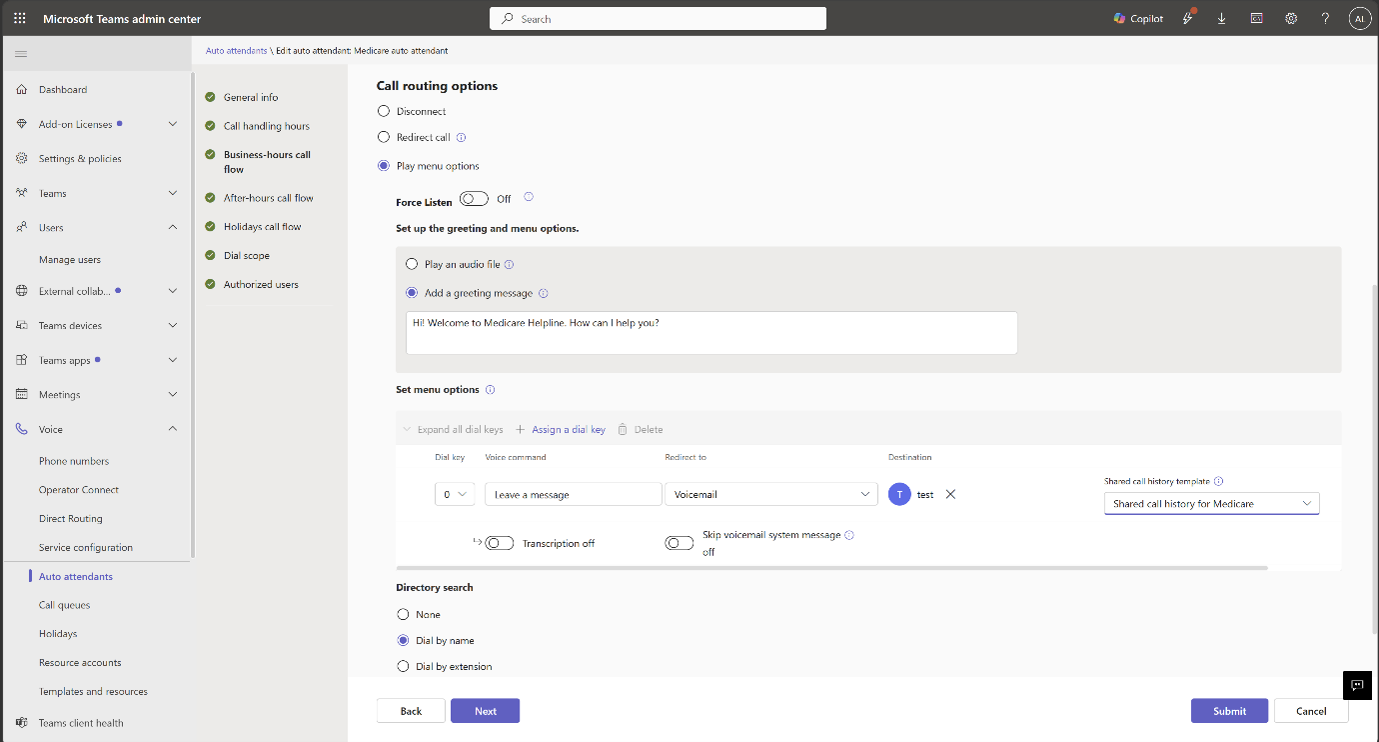
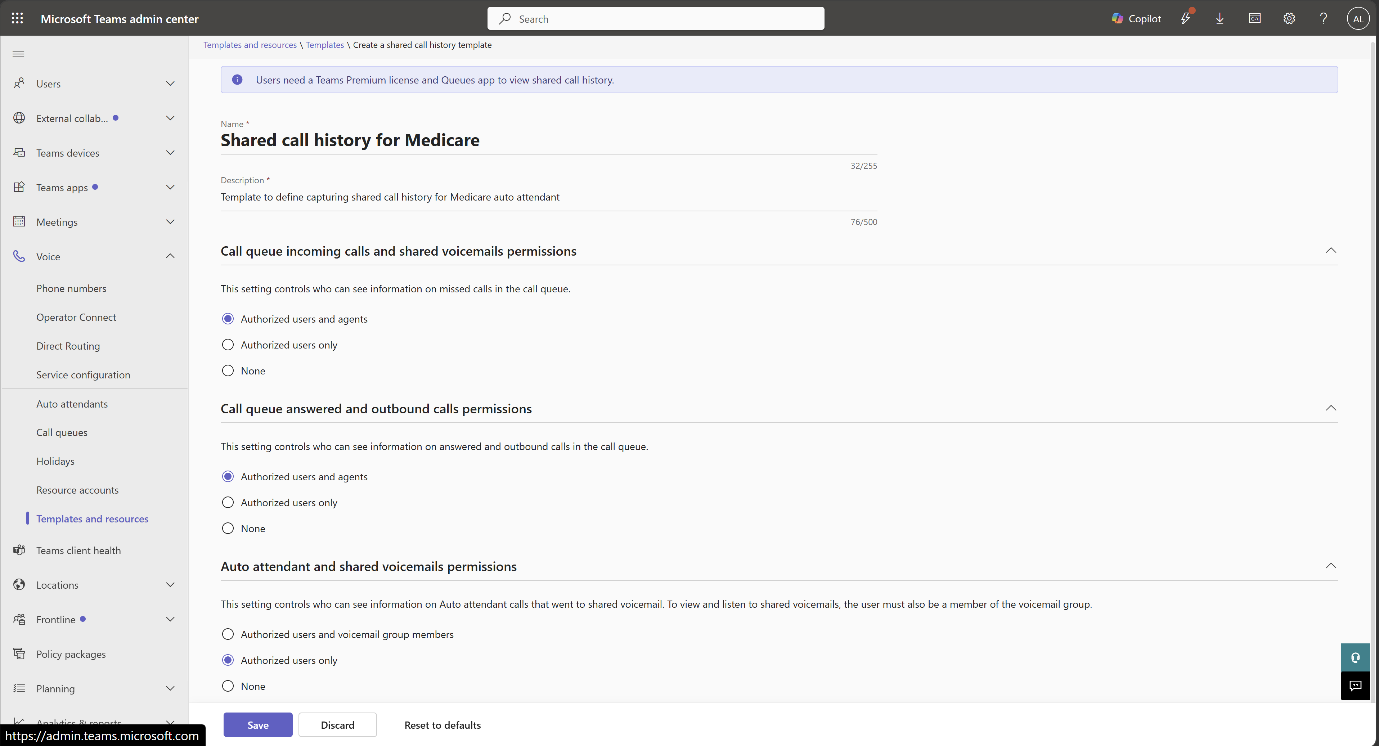
Administrators can control access to auto attendant voicemail history through permissions configured in the Teams admin center.

This message is associated with Microsoft 365 Roadmap ID 567457.

[Rollout schedule]

  • Targeted Release: Beginning in mid-August 2026
  • General Availability (Worldwide): Beginning in late August 2026

[Impact on your organization]

Who is affected

  • Users licensed for Teams Premium who manage call queues or auto attendants
  • Teams administrators responsible for configuring auto attendant permissions
  • Organizations that use Microsoft Teams auto attendants with voicemail enabled

Platforms and services

  • Microsoft Teams
  • Teams Queues app
  • Teams admin center

What will happen

After rollout:

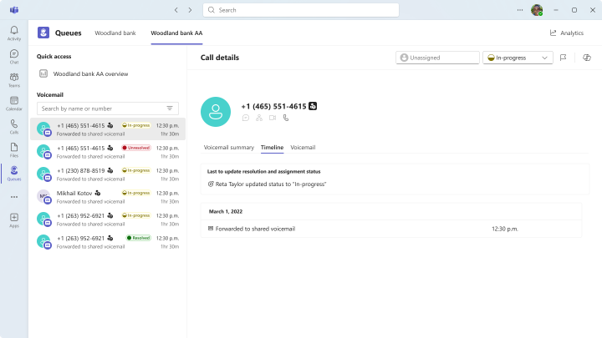
  • Eligible users will see a new Auto Attendants tab in the Queues app.
  •  Users can view voicemail history for auto attendants they are authorized to access:

  • Users can play voicemail messages and review transcripts when transcription is enabled.
  • Users can track voicemail handling using the following statuses:
    • Unresolved
    • In Progress
    • Resolved
  • Users can filter voicemail messages by status.
  • Users can mark voicemail messages as urgent to help prioritize follow-up activities.

Administrators can control access using one of the following permission models:

  • Authorized users only: Only users explicitly assigned by an administrator can access voicemail history.
  • Authorized users plus Microsoft 365 group members: Authorized users and members of the associated Microsoft 365 group can access voicemail history.

The feature is available only to eligible users who have the required Teams Premium licensing.

[Action required and recommendations]

Action may be required.

Review your current auto attendant voicemail management processes and determine which users require access to shared voicemail management in the Queues app.

We recommend that administrators:

  • Review and configure auto attendant voicemail permissions in the Teams admin center.
  • Verify that intended users have the appropriate Teams Premium licenses.
  • Update internal support documentation and operational procedures.
  • Notify affected users about the new voicemail management experience before rollout.

Learn more

[Compliance considerations]

Question Answer
Does this change alter how existing customer data is accessed? Yes. Shared Auto Attendant voicemail data that previously was not available in the Queues app can now be viewed and managed directly within the Queues app by users who have been granted the appropriate permissions.
Does this change include an admin control? Yes. Administrators control access to shared Auto Attendant voicemails through permission settings configured in the Teams admin center. Administrators can assign either Authorized Users only or Authorized Users plus Microsoft 365 group members.
Can the feature be controlled through Microsoft 365 group membership? Yes. Administrators can grant access through membership in the Microsoft 365 group associated with the voicemail, in addition to explicitly authorized users.
Does this change alter how customer data is processed or presented? Yes. Auto Attendant voicemails and any associated transcripts are surfaced in a new management experience within the Queues app, where users can view, filter, prioritize, and manage voicemail status.
Machine Translation

[何となぜ]

Microsoft Teams Queuesアプリで自動応答電話の共有ボイスメールを直接閲覧・管理する機能を導入します。以前は、組織は通常、共有メールボックスやその他のワークフローを通じて自動応答電話を管理していました。このアップデートにより、Teamsが顧客の留守番電話メッセージをより効率的に確認、トリアージ、応答できる集中管理の体験が提供されました。

管理者はTeams管理センターで設定した権限を通じて、自動応答電話の履歴へのアクセスを制御できます。

このメッセージはMicrosoft 365 Roadmap ID 567457に関連付けられています。

[展開スケジュール]

  • リリース予定: 2026年8月中旬から開始
  • 一般公開開始(世界展開): 2026年8月下旬から開始

[組織への影響]

影響を受ける人物

  • Teams Premiumのライセンスを取得し、通話キューや自動応答を管理しているユーザー
  • Teams管理者が自動応答権限の設定を担当します
  • ボイスメールを有効にしたMicrosoft Teams自動応答を利用する組織

ホームとサービス

  • Microsoft Teams
  • Teams Queuesアプリ
  • Teams管理センター

何が起こるのか

展開後:

  • 対象ユーザーはキューアプリに新しい自動応答タブが表示されます。
  •  ユーザーはアクセス許可を受けた自動応答機のボイスメール履歴を確認できます:

  • 文字起こしが有効であれば、ユーザーはボイスメールメッセージを再生したり、文字起こしを確認したりできます。
  • ユーザーは以下のステータスを使ってボイスメールの処理を追跡できます:
    • 未解決
    • 進行中
    • 解決済み
  • ユーザーはステータスでボイスメールメッセージをフィルタリングできます。
  • ユーザーはボイスメールメッセージを緊急としてマークし、フォローアップの優先順位をつけることができます。

管理者は以下のいずれかの権限モデルを使ってアクセスを制御できます:

  • 認可ユーザーのみ:管理者によって明示的に割り当てられたユーザーのみがボイスメール履歴にアクセスできます。
  • 認可ユーザーおよびMicrosoft 365グループメンバー:認可ユーザーおよび関連するMicrosoft 365グループのメンバーはボイスメール履歴にアクセスできます。

この機能は、必要なTeams Premiumライセンスを持つ適格ユーザーのみが利用可能です。

[行動が必要と提言]

行動が必要になるかもしれません。

現在の自動応答電話のボイスメール管理プロセスを確認し、キューアプリで共有ボイスメール管理へのアクセスが必要なユーザーを特定しましょう。

私たちは管理者に以下のことを推奨します:

  • Teams管理センターで自動応答のボイスメール権限を確認し、設定してください。
  • 意図するユーザーが適切なTeams Premiumライセンスを持っているか確認してください。
  • 内部サポートのドキュメントや運用手順を更新しましょう。
  • 導入前に影響を受けるユーザーに新しいボイスメール管理体験を通知してください。

詳しくはこちら

[コンプライアンスの考慮事項]

質問 回答
この変更は既存の顧客データへのアクセス方法を変えますか? はい。Queuesアプリでは利用できなかった共有自動応答電話の音声メッセージデータが、適切な権限を持つユーザーがQueuesアプリ内で直接閲覧・管理できるようになりました。
この変更には管理者の管理も含まれますか? はい。管理者はTeams管理センターで設定された権限設定を通じて共有自動応答電話のボイスメールへのアクセスを制御できます。管理者は「Authorized Users Only」または「Authorized Users plus Microsoft 365」グループメンバーを割り当てることができます。
この機能はMicrosoft 365のグループメンバーシップを通じて制御できますか? はい。管理者は、ボイスメールに関連付けられたMicrosoft 365グループのメンバーシップを通じて、明示的に許可されたユーザーに加えてアクセス権を付与できます。
この変更は顧客データの処理や提示の仕方を変えますか? はい。自動応答のボイスメールおよび関連するトランスクリプトは、キューアプリ内の新しい管理体験で表示され、ユーザーはボイスメールの状況を閲覧、フィルタリング、優先順位付け、管理できます。