| MC1447682 | Microsoft Teams: Enhanced live captions settings and right-side panel view |
|---|
| Classification | planForChange |
|---|---|
| Last Updated | 08/05/2026 00:26:26 |
| Start Time | 08/05/2026 00:26:22 |
| End Time | 10/21/2026 07:00:00 |
| Message Content |
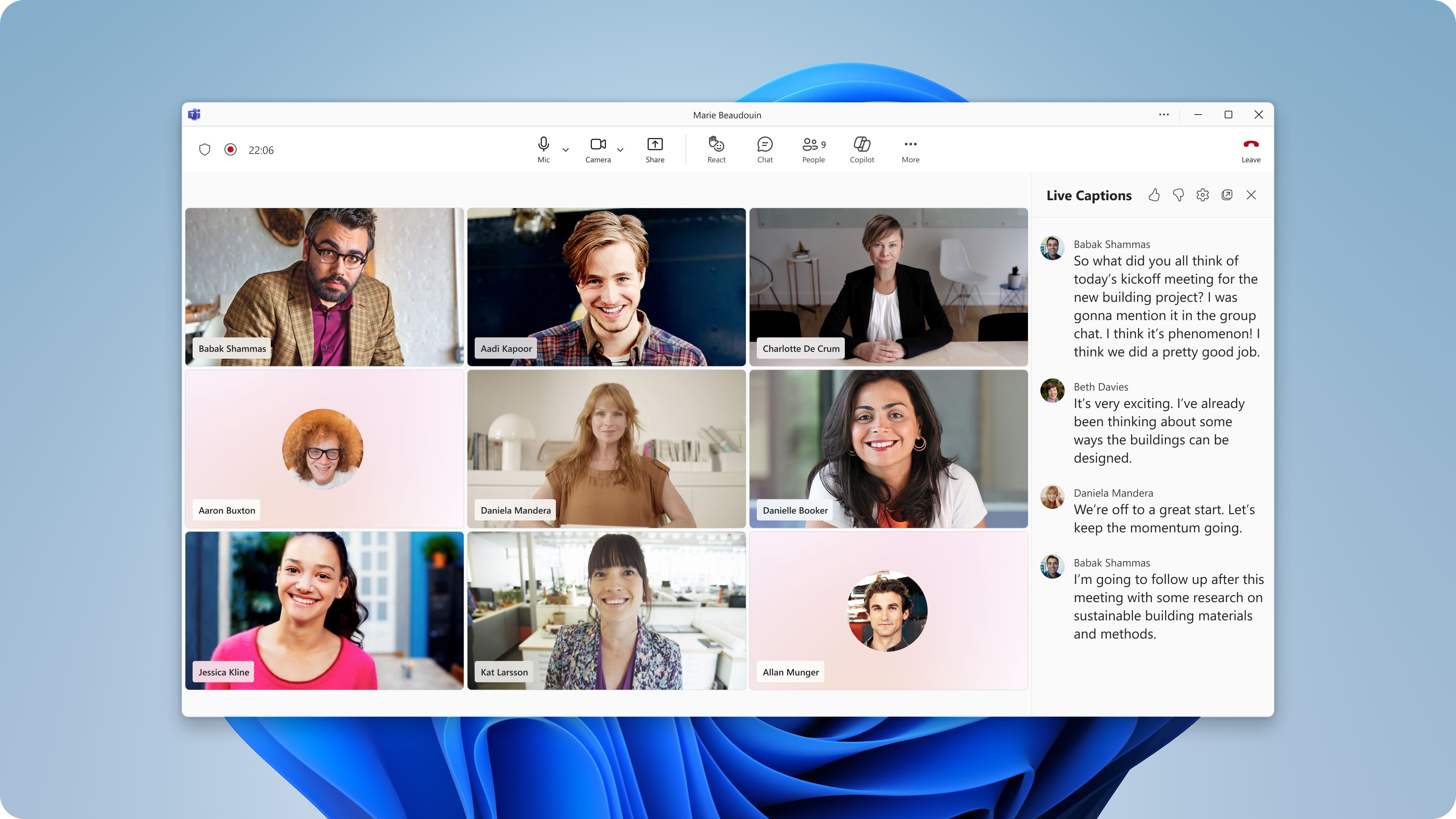
[What and why] We’re improving the live captions experience in Microsoft Teams to give users more flexibility when viewing captions and to simplify caption configuration during meetings. This update introduces a new right-side panel layout for live captions and consolidates caption settings into a single menu. This message is associated with Microsoft 365 Roadmap ID 567462. [Rollout schedule]
[Impact on your organization] Who is affected
Platforms and services
What will happen After rollout, users will be able to:
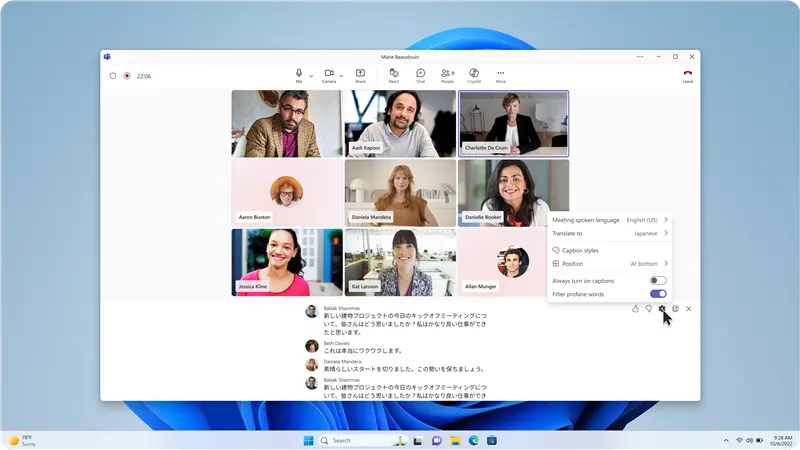
The consolidated settings menu will include:
The right-side panel provides an additional way to keep captions visible without overlapping meeting video or shared content. The synchronized translation language setting reduces the need for users to configure Interpreter and translated captions separately. The option to automatically turn on live captions is a user-level preference. When enabled, live captions will start automatically for that user in future meetings, subject to the meeting policies and feature availability configured by their organization. This update does not change existing administrator controls or policies for live captions, translated captions, or Interpreter. Users will only be able to access features permitted by their organization’s licensing, service availability, and Teams policy configuration. [Action required and recommendations] No administrative action is required. We recommend that administrators:
The feature will be enabled automatically as rollout reaches your organization. Learn more [Compliance considerations] No compliance considerations identified. Review as appropriate for your organization. |
| Machine Translation |
[何となぜ] Microsoft Teamsのライブキャプション体験を改善し、ユーザーがキャプションを閲覧する際の柔軟性を高め、会議中のキャプション設定を簡素化しています。このアップデートでは、ライブキャプション用の右側パネルレイアウトが新たに導入され、キャプション設定が一つのメニューに統合されます。 このメッセージはMicrosoft 365ロードマップID 567462に関連付けられています。 [展開スケジュール]
[組織への影響] 影響を受ける人物
ホームとサービス
何が起こるのか 展開後、ユーザーは以下を行えます:
統合された設定メニューには以下が含まれます:
右側パネルは、会議の映像や共有コンテンツが重複することなく字幕を表示し続ける追加の方法を提供します。 同期翻訳言語設定により、ユーザーがインタープリターと翻訳字幕を別々に設定する必要が減ります。 ライブキャプションを自動でオンにするオプションはユーザーレベルの好みです。有効化すると、そのユーザーの今後の会議で自動的にライブキャプションが開始されますが、これは組織が設定した会議ポリシーや機能の利用可能性に応じて行われます。 このアップデートは、ライブキャプション、翻訳字幕、またはインタープリターに関する既存の管理者のコントロールやポリシーを変更しません。ユーザーは、組織のライセンス、サービスの利用可能性、Teamsのポリシー設定によって許可された機能のみにアクセスできます。 [行動が必要と提言] 行政上の措置は必要ありません。 私たちは管理者に以下のことを推奨します:
この機能は、展開が組織に届くにつれて 自動的に有効 になります。 詳しくはこちら [コンプライアンスの考慮事項] コンプライアンス上の考慮事項は特定されていません。組織に応じた適切なレビューを行ってください。 |