| MC1422063 | (Updated) OneDrive for Business: Improved Windows Desktop sync error messages for max path length |
|---|
| Classification | stayInformed |
|---|---|
| Last Updated | 08/17/2026 21:49:52 |
| Start Time | 07/09/2026 21:51:47 |
| End Time | 11/23/2026 07:00:00 |
| Message Content |
Updated August 17, 2026: We have updated the timeline. Thank you for your patience. [What and why] We are improving the OneDrive sync experience on Windows desktop to provide clearer, more actionable guidance when file and folder paths exceed the supported 520-character limit. The updated experience will show exactly how many characters a path exceeds the limit and will provide a guided flow to rename or move affected items so they can sync successfully. This improvement addresses a common OneDrive sync issue by reducing user confusion, minimizing workflow disruption, and helping users resolve errors faster. This update is associated with Microsoft 365 Roadmap ID 557563. [Rollout schedule] General Availability (Worldwide): Beginning by mid-September 2026 (previously mid-August) and expected to complete by mid-October 2026 (previously mid-September) [Impact on your organization] Who is affected
Platforms and services
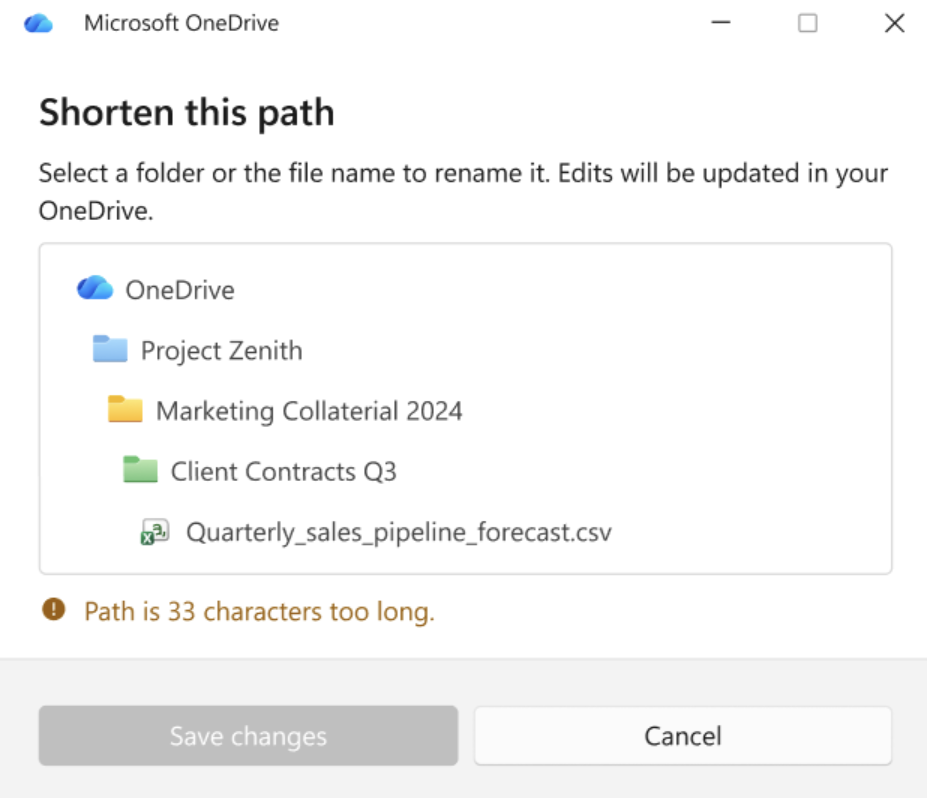
What will happen Max path errors are one of the most commonly reported issues by OneDrive sync users. Currently, when a file or folder path exceeds the 520-character sync limit, the error message only states how many characters the path exceeds the limit and asks users to shorten it. In addition, File Explorer limitations may prevent users from renaming paths over 260 characters, and the sync client may stop syncing until the issue is resolved. As part of this improved error experience, when users encounter max path errors, the sync client will continue running and users will be guided through a custom rename and move experience. With this update:
The rename experience will:
Screenshot – Custom rename dialog The move experience will:
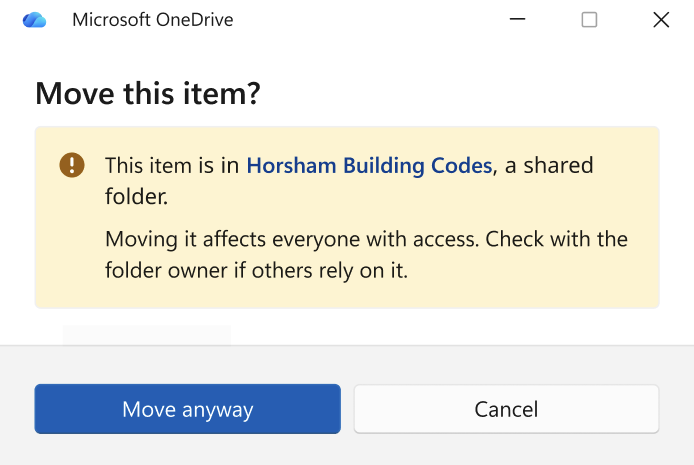
Screenshot – Example warning dialog for overlimit items in shortcuts
These enhancements are designed to reduce troubleshooting time and improve the overall sync experience. [Action required and recommendations] No admin action is required. This update will be automatically available through the OneDrive sync client. You may want to:
Learn more
[Compliance considerations] No compliance considerations identified. This update does not change how customer data is stored, processed, or accessed. |
| Machine Translation |
2026年8月17日更新:タイムラインを更新しました。ご辛抱いただきありがとうございました。 [何となぜ] WindowsデスクトップでのOneDrive同期体験を改善し、ファイルやフォルダのパスがサポートされた520文字の制限を超えた場合、より明確で実用的なガイダンスを提供します。更新された体験では、パスが制限を超える文字数を正確に表示し、影響を受けるアイテムの名前変更や移動を促すガイド付きフローを提供します。 この改善により、ユーザーの混乱を減らし、ワークフローの混乱を最小限に抑え、エラーの解決を迅速にすることで、OneDriveの一般的な同期問題を解決します。 このアップデートはMicrosoft 365 Roadmap ID 557563に関連しています。 [展開スケジュール] 一般公開(世界展開): 2026年9月中旬 (以前 は8月 中旬)から 2026年10月中旬 (以前 は9月中旬)までに完了予定です [組織への影響] 影響を受ける人物
ホームとサービス
何が起こるのか 最大パスエラーは、OneDrive同期ユーザーから最もよく報告される問題の一つです。現在、ファイルやフォルダのパスが520文字の同期制限を超えると、エラーメッセージはパスが制限を超えた文字数のみを示し、ユーザーに短縮を求めるように求めます。さらに、ファイルエクスプローラーの制限により、260文字を超えるパスのリネームができなくなる可能性があり、同期クライアントは問題が解決するまで同期を停止することがあります。 この改善されたエラー体験の一環として、ユーザーが最大パスエラーに遭遇しても同期クライアントは動作を続け、カスタムリネームや移動体験を案内されます。 このアップデートで:
リネーム体験は以下の通りです:
スクリーンショット – カスタムリネームダイアログ 引越し体験は以下の通りです:
スクリーンショット – ショートカット内の超過制限アイテムの警告ダイアログの例
これらの強化はトラブルシューティングの時間を短縮し、全体の同期体験を向上させることを目的としています。 [行動が必要と提言] 管理者の操作は不要です。このアップデートはOneDrive同期クライアントを通じて自動的に利用可能です。 以下のようなことをおすすめします:
詳しくはこちら [コンプライアンスの考慮事項] コンプライアンス上の考慮事項は確認されていません。このアップデートは顧客データの保存、処理、アクセス方法を変更しません。 |