| Message Content |
[What and why]
Microsoft 365 People connectors now support ingesting Executive Assistant information from external HR and people systems into Microsoft 365. Organizations can use supported connectors, including SAP SuccessFactors, Workday, and custom People connectors, to bring Executive Assistant data into Microsoft 365 while keeping the source system as the authoritative record.
After Assistant data is ingested, it becomes available across Microsoft 365 experiences such as profile cards, organizational views, Org Explorer and Microsoft 365 Copilot, helping users more easily identify and connect with the appropriate point of contact.
[Rollout schedule]
- General Availability (Worldwide): Available now
[Impact on your organization]
Who is affected
- Microsoft 365 administrators who manage People connectors or organizational profile data
- Users whose Assistant information is ingested into Microsoft 365
Platforms and services
- Microsoft 365 profile cards
- Org Explorer
- Outlook on the web
- New Outlook
- SharePoint
- Microsoft Teams
- Microsoft 365 Copilot experiences
What will happen
After Executive Assistant data is ingested into Microsoft 365:
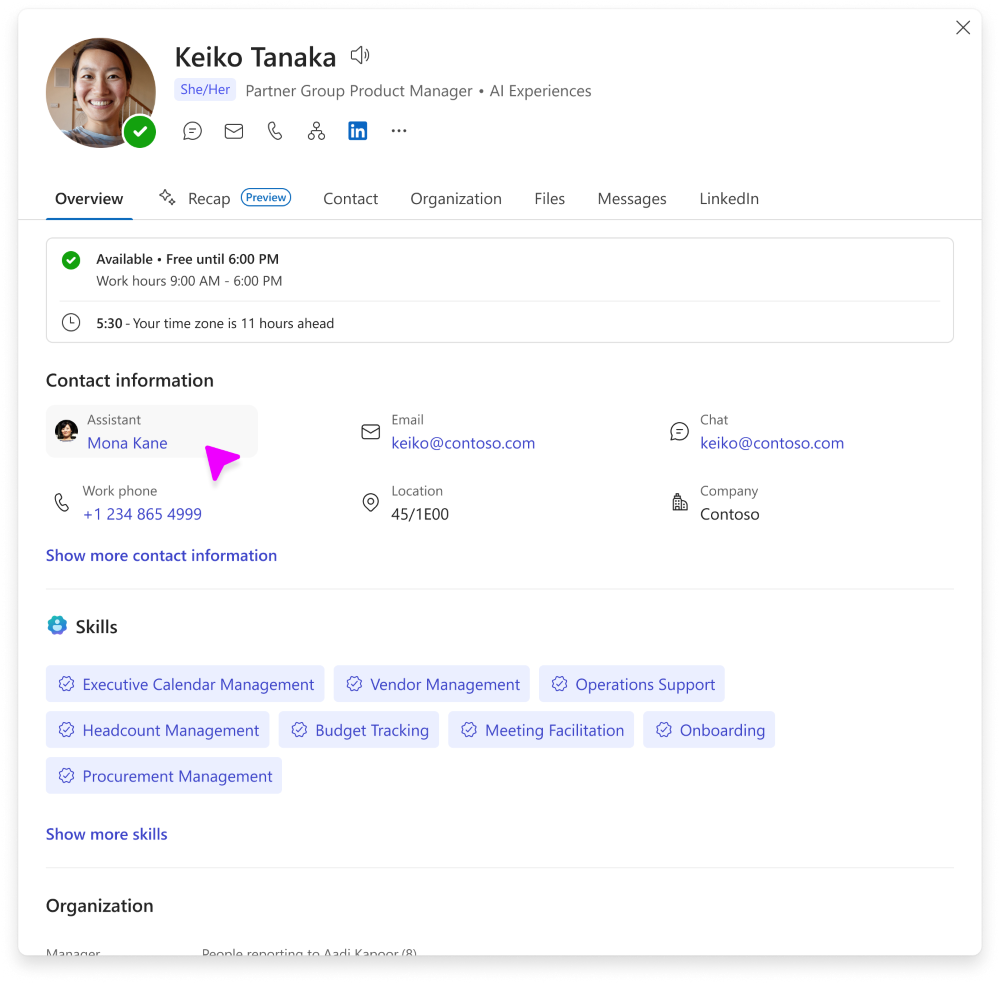
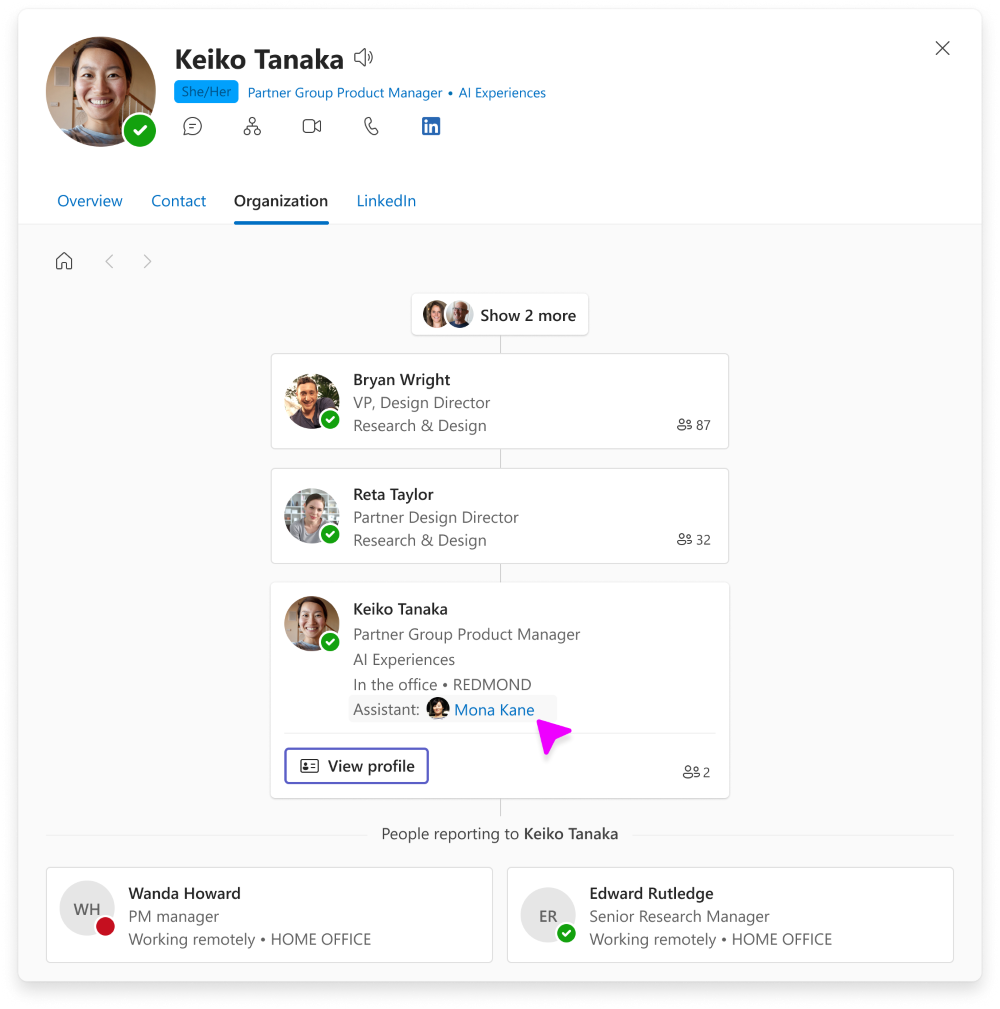
- Assistant information can appear in Microsoft 365 profile experiences, including profile cards in Outlook on the web, new Outlook, Teams, SharePoint, and Microsoft 365 Copilot, as well as Org Explorer.
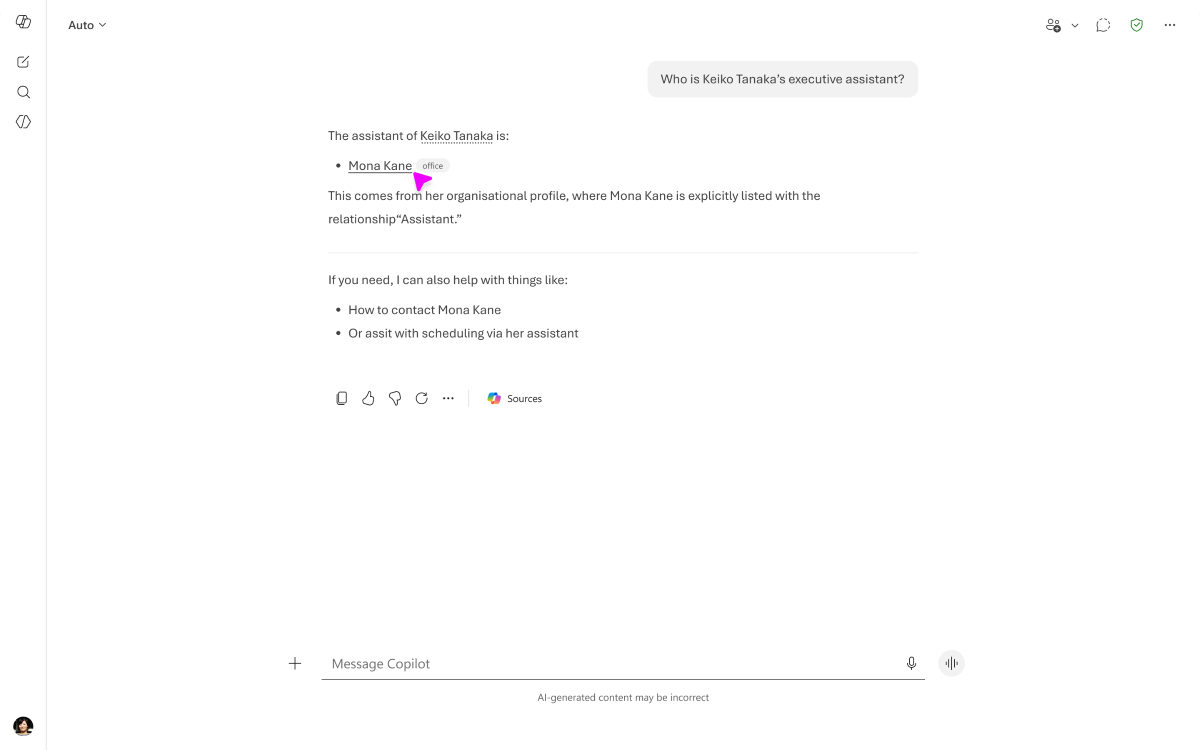
- Microsoft 365 Copilot can use the ingested Assistant information as part of people-related grounding and responses.
- Microsoft 365 Copilot can reason over all Assistant values associated with a user.
- If multiple sources provide Assistant information, source precedence settings determine which value is displayed in Microsoft 365 profile experiences.
- If both user-entered and connector-ingested Assistant values exist, the first value from the highest-priority connected-ingested source is used for display.
- Assistant information is informational profile data and does not grant permissions, modify reporting structures, or create delegated access.
Screenshot 1 – View of Assistant in Contacts tab:
Screenshot 2 – View of Assistant in Copilot:
Screenshot 3 – View of Assistant in Organization tab:
[Action required and recommendations]
No action is required to maintain your current environment.
If your organization wants Assistant information to be available in Microsoft 365 experiences, administrators can ingest the data using supported People data ingestion methods, including:
- SAP SuccessFactors
- Workday
- Custom People connectors
Organizations that use multiple profile data sources should review profile source precedence settings to determine which source is authoritative for overlapping profile attributes.
Learn more
[Compliance considerations]
| Question |
Answer |
| Does this change store new customer or organizational data in Microsoft 365? |
Yes. Executive Assistant information from third-party systems can be ingested into Microsoft 365 profiles through People connectors and Organizational Data in Microsoft 365. The ingested data is stored as part of the Microsoft 365 user profile and is available across Microsoft 365 experiences. |
| Does this change alter how customer or organizational data is processed, stored, or accessed? |
Yes. Assistant information that originates in external HR or people systems can be ingested along with other profile data sources, and surfaced in Microsoft 365 profile experiences based on configured source precedence rules. |
| Does this change introduce or significantly modify AI capabilities that interact with customer data? |
Yes. Microsoft 365 Copilot can use ingested Assistant information to provide grounding for assistant-related prompts and responses, helping users identify and coordinate with the appropriate point of contact. |
| Does this change provide end users with a new way to interact with generative AI? |
Yes. Users can ask assistant-related questions in Microsoft 365 Copilot, and Copilot can use the ingested Assistant information when generating responses. |
| Does this change modify how users access, export, delete, or correct personal data? |
Yes. Assistant information displayed in Microsoft 365 experiences originates from connected data sources. Updates must be made in the source system and then synchronized through the connector. Users can export profile data, and administrators can manage deletion and correction processes through the connected source and Microsoft 365 data management capabilities. |
| Does this change add an integration with third-party software or services? |
Yes. The feature supports ingesting Assistant information from external systems through Microsoft-built and custom People connectors, including supported HR systems and custom people data sources. |
| Does this change include an admin control? |
Yes. Administrators control whether Assistant information is ingested by configuring People connectors and can manage source precedence to determine which Assistant value is displayed when multiple sources provide the same attribute. |
|
| Machine Translation |
[何となぜ]
Microsoft 365 Peopleコネクタは、外部の人事および人事システムからエグゼクティブアシスタント情報をMicrosoft 365に取り 込むことをサポートしています。組織はSAP SuccessFactors、Workday、カスタムPeopleコネクタなど対応コネクターを使用して、エグゼクティブアシスタントデータをMicrosoft 365に取り込みつつ、ソースシステムを権威ある記録として保持できます。
アシスタントのデータが取り込まれた後は、プロファイルカード、組織ビュー、Org Explorer、Microsoft 365 CopilotなどのMicrosoft 365の体験全体で利用可能になり、ユーザーが適切な連絡先をより簡単に特定し、接続できるようにします。
[展開スケジュール]
[組織への影響]
影響を受ける人物
- People connectorsや組織プロファイルデータを管理するMicrosoft 365管理者
- アシスタント情報がMicrosoft 365に取り込まれているユーザー
ホームとサービス
- Microsoft 365 プロファイルカード
- オルグ・エクスプローラー
- ウェブ上の展望
- 新たな展望
- SharePoint
- Microsoft Teams
- Microsoft 365 Copilotの体験
何が起こるのか
Executive AssistantのデータをMicrosoft 365に取り込んだ後:
- アシスタント情報はMicrosoft 365のプロフィール体験に表示され、Outlookのウェブ版、新しいOutlook、Teams、SharePoint、Microsoft 365 Copilot、さらにはOrg Explorerのプロフィールカードも含まれます。
- Microsoft 365 Copilotは、取り込んだアシスタント情報を人に関する接地や応答の一部として利用できます。
- Microsoft 365 Copilotは、ユーザーに関連付けられたすべてのアシスタント値を解析できます。
- 複数のソースからアシスタント情報が提供されている場合、 ソースの優先順位設定によって Microsoft 365プロファイル体験に表示される値が決まります。
- ユーザー入力済みとコネクターで取り込んだアシスタント値の両方が存在する場合、最も優先度の高い接続取り込みソースの最初の値が表示に使用されます。
- アシスタント情報は情報プロファイルデータであり、権限付与、報告構造の変更、委任されたアクセスの作成を行いません。
スクリーンショット1 – 連絡先タブのアシスタントの表示:
スクリーンショット2 – Copilotのアシスタントのビュー:
スクリーンショット3 – 組織タブのアシスタントのビュー:
[行動が必要と提言]
現在の環境を維持するために何の行動も必要ありません。
御社の組織がMicrosoft 365の体験でアシスタント情報を利用できるようにしたい場合、管理者はサポートされたPeopleのデータ取り込み方法を使ってデータを取り込むことができます。以下のような方法があります:
- SAPの成功要因
- ワークデイ
- カスタムPeopleコネクター
複数のプロファイルデータソースを使用する組織は、プロファイルソースの優先順位設定を確認し、どのソースが重複するプロファイル属性に対して権威があるかを判断すべきです。
詳しくはこちら
[コンプライアンスの考慮事項]
| 質問 |
回答 |
| この変更はMicrosoft 365に新しい顧客データや組織データを保存するのでしょうか? |
はい。サードパーティシステムからのエグゼクティブアシスタント情報は、Microsoft 365のPeopleコネクタや組織データを通じてMicrosoft 365のプロファイルに取り込むことができます。取り込んだデータはMicrosoft 365のユーザープロファイルの一部として保存され、Microsoft 365の体験全体で利用可能です。 |
| この変更は顧客や組織のデータの処理、保存、アクセス方法を変えますか? |
はい。外部の人事システムや人事システムから得られたアシスタント情報は、他のプロファイルデータソースと一緒に取り込み、設定されたソース優先ルールに基づいてMicrosoft 365のプロファイル体験に表示できます。 |
| この変更は顧客データとやり取りするAI機能を導入または大幅に修正するのでしょうか? |
はい。Microsoft 365 Copilotは、取り込んだアシスタント情報を使ってアシスタント関連のプロンプトや応答のグラウンディングを提供し、ユーザーが適切な連絡先を特定し調整するのに役立ちます。 |
| この変更はエンドユーザーに生成AIと新たな関わり方をもたらすのでしょうか? |
はい。ユーザーはMicrosoft 365 Copilotでアシスタント関連の質問をすることができ、Copilotは取り込んだアシスタント情報を利用して回答を生成できます。 |
| この変更はユーザーの個人データへのアクセス、エクスポート、削除、修正方法に変化をもたらしますか? |
はい。Microsoft 365の体験に表示されるアシスタント情報は、接続されたデータソースから発信されます。更新はソースシステム内で行い、コネクタを通じて同期する必要があります。ユーザーはプロファイルデータをエクスポートでき、管理者は接続されたソースとMicrosoft 365のデータ管理機能を通じて削除や訂正のプロセスを管理できます。 |
| この変更はサードパーティのソフトウェアやサービスとの統合を追加するのでしょうか? |
はい。この機能は、Microsoftが構築したカスタムPeopleコネクタを通じて外部システムからアシスタント情報を取り込むことをサポートし、対応するHRシステムやカスタムの人事データソースも含まれます。 |
| この変更には管理者の管理も含まれますか? |
はい。管理者はPeopleコネクタを設定してアシスタント情報を取り込むかどうかを制御し、複数のソースが同じ属性を提供する場合にどのアシスタント値を表示するかをソース優先順位管理できます。 |
|